 Understanding Detailed Currency Restatement
This chapter provides an overview of detailed currency restatement and discusses how to:
Work with journal entries for detailed currency restatement.
Processing detailed currency restatement transactions.
Post detailed currency restatement transactions.
Understanding Detailed Currency Restatement
Detailed currency restatement enables you to maintain a second set of books in an alternate (stable) currency in the F0911 table. You set up detailed currency restatement for a company in the Company Names & Numbers program (P0010). Detailed currency restatement is typically used for one of these reasons:
A company operating in a highly inflationary currency needs to maintain a second set of books in an alternate (stable) currency for financial analysis and reporting.
A company needs to report final results at the transaction level in both the local currency and the currency of the parent company.
A company needs to maintain dual reporting for certain classes of general ledger accounts, such as fixed assets, inventory, and equity accounts, to meet accounting standards.
Typically, the Detailed Currency Restatement program (R11411) uses amounts in the domestic currency ledger (AA) and restates them in an alternate currency ledger (XA). However, if amounts in the foreign currency ledger (CA) are in the same currency as the XA ledger, the program instead copies the CA ledger amounts to the XA ledger; it does not restate the AA amounts.
The Detailed Currency Restatement program creates a corresponding transaction in the alternate currency in the XA ledger for every transaction in the domestic currency that is within the range or ranges of accounts specified in the AAIs. Although uncommon, some clients also use ledger types YA (domestic origin) and ZA (foreign origin) for detailed currency restatement.
Detailed currency restatement is integrated into the JD Edwards EnterpriseOne General Accounting, JD Edwards EnterpriseOne Accounts Receivable, JD Edwards EnterpriseOne Accounts Payable, and Oracle's JD Edwards EnterpriseOne Fixed Assets systems. This restatement method includes special functionality for voids, reversals, and gain and loss calculations and enables you to maintain a second set of transactions in a stable currency for reporting purposes.
Note. Before you restate base currency amounts in another currency, determine whether you really need those amounts restated at a detail level. Restating amounts at the detail level has sizing implications. For example, if you enter approximately 2,000 records on a monthly basis, you will have 4,000 records after you run detailed currency restatement. This increase can have a considerable impact on system disk resources.
Example: Detailed Currency Restatement and Ledgers Used
In this example, a Colombian company restates amounts from Colombian pesos (COP) to U.S. dollars (USD) so that they can produce financial statements in USD, a stable currency. The currency code USD is assigned to the alternate currency ledger (XA). The company also uses the YA and ZA ledgers.
The Detailed Currency Restatement program updates amounts in the XA, YA, and ZA ledgers based on the original entry, as described in this table:
|
Original Entry |
Alternate Ledger Updated |
|
Domestic transaction in COP |
For this entry, the transaction currency is the same as the company currency. The system:
|
|
Foreign transaction in USD |
For this entry, the transaction currency equals the XA ledger currency. The system copies the CA ledger amount (USD) to both the XA and ZA ledgers (USD). |
|
Foreign transaction in CAD |
For this entry, the transaction currency is a currency other than the XA ledger currency. The system:
|
 Understanding Detailed Currency Restatement Gains and Losses on Domestic Transactions
Depending on whether a receipt or payment is a domestic or foreign transaction, the system uses different calculations to create restatement gain and loss records when you post the receipt or payment.
For domestic transactions, the system calculates the gain or loss amount between the AA (domestic) and XA (alternate) currencies and creates gain and loss records with a document type of RG (receipt gain or loss) or PG (payment gain or loss). This amount is due to exchange rate fluctuations between the invoice and receipt dates or the voucher and payment dates and is written to the XA ledger.
The post program creates records for the domestic currency receipt or payment amount in the AA ledger and the alternate currency gain or loss amount in the XA ledger.
The Detailed Currency Restatement program creates a record for the alternate currency receipt or payment amount in the XA ledger.
Example: Detailed Currency Restatement Gain/Loss on a Domestic Transaction
In this example, a Colombian company (COP) enters a domestic currency voucher and payment. The company uses detailed currency restatement and restates amounts in the U.S. dollar (USD). The ledgers and currencies are:
AA = COP
XA = USD
The example shows how the system calculates a gain/loss amount for the alternate ledger (XA), based on this information:
|
Date |
Description |
AA Ledger (COP) |
Exchange Rate (divisor) |
XA Ledger (USD) |
|
June 1 |
Voucher |
85,000 |
850 |
100.00 |
|
June 30 |
Payment |
85,000 |
860 |
98.84 |
The gain/loss amount in the XA ledger is –1.16.
These t-accounts show how the system distributes AA and XA ledger amounts for the voucher and payment:
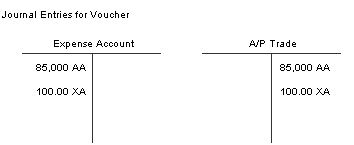
T-account journal entries for a voucher
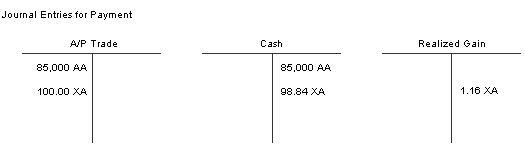
T-account journal entries for a payment
Understanding Detailed Currency Restatement Gains and Losses on Foreign Transactions
Depending on whether a receipt or payment is a domestic or foreign transaction, the system uses different calculations to create restatement gain and loss records when you post the receipt or payment.
For foreign currency transactions, the system does not calculate the gain or loss amount directly between the CA (foreign) and XA (alternate) currencies. Instead, it performs these calculations:
The post program calculates the gain or loss amount between the CA and AA currencies. This amount is due to exchange rate fluctuations between the invoice and receipt dates or the voucher and payment dates and is written to the AA ledger. The post report shows the gain/loss entries in the XA ledger, as well as the entries in the AA ledger.
The post program calculates the gain or loss amount between the AA and XA currencies. This amount is due to exchange rate fluctuations between the invoice and receipt dates or the voucher and payment dates and is written to the XA ledger. The post report shows the gain/loss entries in the XA ledger, as well as the entries in the AA and CA ledger.
Note. The net amount derived from the two previous calculations is the equivalent of what the gain or loss would be if the system calculated the gain or loss amount directly between the CA and XA currencies.
Example: Detailed Currency Restatement Gains/Losses on a Foreign Transaction
In this example, a Colombian company (COP) enters a foreign currency voucher and payment in Chilean pesos (CLP). The company uses detailed currency restatement and restates amounts in the U.S. dollar (USD). The ledgers and currencies are:
AA = COP
CA = CLP
XA = USD
A gain/loss is calculated between the CA ledger (CLP) and AA ledger (COP) and then between the AA ledger and XA ledger (USD). No gain/loss is calculated directly between the CA and XA ledgers. Instead, the gain/loss amount is based on the net difference between the CA to AA ledger and the AA to XA ledger calculations.
The system calculates gain/loss amounts for the XA ledger based on this information:
|
Date |
Description |
CA Ledger (CLP) |
Exchange Rate (multiplier) |
AA Ledger (COP) |
Exchange Rate (divisor) |
XA Ledger (USD) |
|
June 1 June 30 |
Voucher Payment |
100,000 100,000 |
0.75 0.76 |
75,000 76,000 |
750 800 |
100.00 93.75 |
The gain/loss amount in the XA ledger is + 5.00. To derive this net amount, the system performs these steps, in sequential order:
Calculates a gain/loss amount of –1.25 between the CA and AA ledgers.
–1,000 COP/ 800 = –1.25
The gain/loss amount is recorded in the AA ledger and is based on the difference between the voucher and payment amounts (–1,000) in the AA ledger. The difference is then converted using the COP to USD exchange rate (800) effective on the payment date.
Calculates a gain/loss amount of + 6.25 between the AA and XA ledgers.
100.00 − 93.75 = + 6.25
The gain/loss amount is recorded in the XA ledger and is based on the difference between the voucher amount converted using the exchange rate on the voucher date (100.00) and the voucher amount converted using the exchange rate on the payment date (93.75).
Working With Journal Entries for Detailed Currency Restatement
This section discusses how to:
Override exchange rates and prevent XA ledger records from being created.
Review and approve detailed currency restatement transactions.
Forms Used to Work with Detailed Currency Restatement
|
Form Name |
FormID |
Navigation |
Usage |
|
Work With Journal Entries |
W0911I |
Journal Entry, Reports, & Inquiries (G0911), Journal Entry |
Review a batch of journal entries. |
|
Journal Entry |
W0911A |
On the Work With Journal Entries form, select a journal entry. |
Review and revise the journal entries for a batch. |
|
Detail Restatement Exch. Rate |
W0911L |
On the Journal Entry form, select Historical Rate from the Form menu. |
Override the exchange rate for a detailed currency restatement entry. If a journal entry has been posted, the fields on the Detail Restatement Exch. Rate form are disabled and you cannot change them. |
|
Batch Approval |
W0011C |
Financial Restatement (G1122), Detailed Currency Review On the Work With Batches form, select the batch that you want to approve and then select Batch Approval from the Row menu. On the Batch Approval form, select the option for Approved – Batch is ready to post. |
Approve a batch of detailed currency restatement entries. |
Overriding Exchange Rates and Preventing XA Records from Being Created
Access the Detail Restatement Exch. Rate form.
|
Historical Exchange Rate |
To override the exchange rate between the AA and XA currency codes in the F0015 table, enter an exchange rate in this field. |
|
Do Not Create XA Ledger |
To prevent an alternate currency record from being created in the XA ledger by the Detailed Currency Restatement program, select this check box and leave the Historical Exchange Rate field blank. |
Reviewing and Approving Detailed Currency Restatement Transactions
Access the Work With Batches form.
After you run the Detailed Currency Restatement program (R11411), verify the accuracy of the detailed currency transactions and, if applicable, approve the transactions before posting them to the general ledger. Transactions created by the Detailed Currency Restatement program have the same batch number as that of the original AA transactions. The batch type is XX.
You can also review the alternate currency ledger (XA), along with the original actual amounts ledger (AA), on the Work with Account Ledger Inquiry form.
Processing Detailed Currency Restatement
This section provides an overview of the Detailed Currency Restatement program (R11411) and discusses how to:
Set data selection and sequence for Detailed Currency Restatement.
Set processing options for Detailed Currency Restatement (R11411).
Run the Detailed Currency Restatement program from the menu.
Run the Detailed Currency Restatement program from the post program.
Understanding the Detailed Currency Restatement Program
You run the Detailed Currency Restatement program (R11411) to apply current exchange rates to transactions when restating amounts from one currency to another. Based on a processing option, this program creates a second restated ledger of transactions for the alternate currency ledger (XA) only, or for the XA, YA (domestic origin), and ZA (foreign origin) ledgers.
The Detailed Currency Restatement program uses exchange rates to convert domestic currency amounts in the AA (actual amount) ledger to alternate currency amounts in the XA ledger in the F0911 table. The exception to this is when amounts in the foreign currency ledger (CA) are in the same currency as the XA ledger. In this case, the program copies the CA ledger amounts to the XA ledger; it does not restate the AA amounts.
Before you run the Detailed Currency Restatement program, verify that the exchange rates are updated and that the effective date corresponds to the date that you will restate. If the system does not find a rate with the date that you are restating, it uses the last effective date. If you set up currencies to use the no inverse or triangulation method of exchange rate calculation, the Detailed Currency Restatement program uses that method when restating amounts. It uses the most recent effective exchange rate in combination with the override conversion method, which is designated on the Revise Currency Exchange Rates form.
A company must be set up for detailed currency restatement in the F0010 table for transactions to be restated. If the program finds an error for a company, it generates an error report before any processing takes place and does not update the XA ledger for that company. If the program finds errors within a batch, the message Batch Completed With Some Errors. See Work Center for Details appears on the error report. You must resolve the problem and run the program again. If no errors exist, the message No Errors. Batch Will Post appears on the error report.
Transactions Processed by Detailed Currency Restatement
Based on data selection, the Detailed Currency Restatement program selects only those companies that are set up for detailed currency restatement in the F0010 table for processing and ignores all other companies. This has a positive impact on performance and helps improve processing time.
The Detailed Currency Restatement program processes all posted transactions in the actual amount (AA) ledger of the F0911 table that meet this criteria:
The company on the transaction is set up for detailed currency restatement. The Detailed Currency Restatement field is set to 1 for the company in the Company Names & Numbers program (P0010).
Ledger type XA (alternate currency) and, optionally, YA (domestic origin) and ZA (foreign origin), are set up in user-defined code (UDC) table 09/LT and on the Ledger Type Rules form.
The account on the transaction is within the account ranges set up for AAI item CRxx.
The transaction contains a blank (not processed) in the ALT9 (Currency Update) field in the F0911 table.
For each transaction in the AA ledger that meets this criteria, the Detailed Currency Restatement program creates a new transaction in the XA ledger of the F0911 table with the same batch number as the original transaction and a batch type XX. For example, for each journal entry (batch type G), the program creates an alternate currency journal entry (batch type XX). You can review the XX batch type records on the Work with Batches form. If amounts in the foreign currency ledger (CA) are in the same currency as the XA ledger, the Detailed Currency Restatement program copies the CA ledger amounts to the XA ledger; it does not restate the AA amounts.
For each transaction, the program updates the ALT9 (Currency Update) field from blank (not processed) to one of these values:
P (processed): The transaction was processed by the Detailed Currency Restatement program.
The program creates a corresponding record in the XA ledger (and optionally, the YA and ZA ledgers) and updates the original AA ledger record with P (processed). The program prints a report with the message No errors - batch will post.
N (not applicable): The transaction was processed by the Detailed Currency Restatement program, but ignored because the account is not within the account ranges for AAI item CRxx.
The program does not create a corresponding record in the XA ledger, but instead updates the AA ledger with N (not applicable).
X: The original journal entry was flagged to not create a corresponding record in the XA ledger when processed by the Detailed Currency Restatement program and was subsequently voided.
Y: The original journal entry was flagged to not create a corresponding record in the XA ledger when processed by the Detailed Currency Restatement program.
Important! The first time that you run the Detailed Currency Restatement program, processing might require a significant amount of time because the program updates the ALT9 field for all qualified records in the F0911 table. Thereafter, the program updates only new qualified transactions.
Common Error Messages and Causes
This table lists common error messages that might appear on the error report when you run the Detailed Currency Restatement program (R11411) as well as their causes:
|
Error Message |
Cause |
|
Daily Transaction Rate Not Set Up |
No current exchange rate and no prior effective date are set up to restate the domestic currency in the alternate currency. |
|
Multicurrency Conversion Not Set Up |
The General Accounting constant for Multicurrency Conversion is set to N. Set the constant to Y (multiplier) or Z (divisor) to activate multicurrency processing. |
|
CR01 or CR02 AAI Not Set Up |
The ranges for AAI items CRxxare not set up, or the setup is incorrect. |
|
CR AAI Account Invalid or Not Set Up |
The account number for AAI item CRxxis not in the chart of accounts for the company. |
|
Version of Post Specified Invalid |
You entered an invalid version number for the post program in the processing option for the Detailed Currency Restatement program. |
|
XA Ledger Not Defined |
The XA ledger is not set up in UDC table 09/LT. |
|
Currency Invalid for XA or ZA Ledger |
An invalid currency code for the XA or ZA ledger is specified on the Set Up Ledger Type Rules form. (The YA ledger is not assigned a currency code.) |
|
YA or ZA Ledger Not Defined |
You set the processing option to create records in the YA and ZA ledgers; however, these ledgers are not set up in UDC table 09/LT. |
Setting Data Selection and Sequence for Detailed Currency Restatement
You use data selection to select specific companies in which to run detailed currency restatement. Running detailed currency restatement by company helps improve processing time.
Do not use data sequence; the system ignores any data sequence that you enter.
Setting Processing Options for Detailed Currency Restatement (R11411)
Processing options enable you to specify the default processing for programs.
Ledgers
|
1. Additional Ledgers |
Select the ledgers in which the system restates amounts. Values are: Blank: Restate amounts in the XA ledger only. 1: Restate amounts in the XA (Alternate Currency), YA (Domestic Origin), and ZA (Foreign Origin) ledgers. |
Post
|
1. Post Version |
Specify version ZJDE0041 of the General Ledger Post program to post entries created by the Detailed Currency Restatement program. This version is for batch type XX (detailed currency restatement). If you leave this processing option blank, the system will not post the entries. |
Automatic JEs
|
1. Automatic JEs |
Specify whether to automatically create balancing journal entries for rounding differences using the balancing offset account specified by AAI item CR. Values are: Blank: Do not create balancing journal entries. 1: Automatically create balancing journal entries. The system creates balancing journal entries (document type AE) only in the ledgers that you specify in the Additional Ledgers processing option. |
Exchange Rate
|
1. Exchange Rate |
Specify the date to use to retrieve the exchange rate from the F0015 table. Values are: Blank: Use the exchange rate that was in effect on the general ledger date. 1: Use the exchange rate that was in effect on the service/tax date. The service/tax date is the date that the goods or services were purchased or the date that the tax liability was incurred. Note. The Detailed Currency Restatement program does not use the value in this processing option for receipt and payment batch types. Instead, the program uses the historic date, if it contains a value, or the GL date. |
Running the Detailed Currency Restatement Program From the Menu
Select Financial Restatement (G1122), Detailed Currency Restatement.
Version ZJDE0041 is set up for Detailed Currency Restatement. For the Detailed Currency Restatement version:
(Optional) Set a processing option to create balancing journal entries for rounding differences.
(Optional) Set a processing option to run a version of the General Ledger Post program after the Detailed Currency Restatement program creates restated transactions.
Use data selection to select the companies in which to restate transactions. If you do not select specific companies, the restatement program reads transactions for all companies that are set up for detailed currency restatement. This impacts processing time.
The Detailed Currency Restatement program restates transactions for the companies that are set up for detailed currency restatement and, if applicable, creates balancing journal entries. If the Post Version processing option is set appropriately, the post program posts the batch of restated transactions and, if applicable, the balancing journal entries.
Note. If the system is set up for multithreaded job queues, you can simultaneously run more than one job for the Detailed Currency
Restatement program. Subsequent jobs can be the same version or different versions of the same program. Running multiple jobs
enables you to process a high volume of transactions more efficiently.
When you run multiple jobs, the Detailed Currency Restatement program checks the DRSP (Detailed Restatement Status) field
DRSP in the F0011 table for each batch to ensure that no batch is processed more than one time. Therefore, it is not necessary
for each job to have unique data selection.
A batch can have one of these statuses:
Blank: The batch has not been reserved or processed by the Detailed Currency Restatement program. You should only have to
change this field to blank if a batch ended abnormally and you would like to process it again. If you add entries to a processed
batch, the system automatically resets the processing status to blank.
1: The batch has been reserved or processed by the Detailed Currency Restatement program. The system skips the batch and moves
on to the next one.
Running the Detailed Currency Restatement Program From the Post Program
Select Financial Restatement (G1122), Post Detail Currency Journal.
For the General Ledger Post version:
(Optional) Set a processing option to create balancing journal entries for rounding differences.
(Optional) Set a processing option to run a version of the Detailed Currency Restatement program to create restated transactions after the Post program posts a batch.
The General Ledger Post program posts an individual batch and sends the batch number and type to the Detailed Currency Restatement program. The restatement program restates transactions for the companies within the batch that are set up for detailed currency restatement and, if applicable, creates balancing journal entries. If the Post Version processing option is set appropriately, the post program posts the restated transactions and, if applicable, the balancing journal entries. This cycle is repeated until all batches are posted, all transactions within those batches are restated, and, if applicable, all balancing journal entries are created and all batches of restated and balancing journal entries are posted.
Posting Detailed Currency Restatement Transactions
Select Financial Restatement (G1122), Post Detail Currency Journal.
Note. If you ran the Detailed Currency Restatement program from the menu, you might have already posted detailed currency restatement transactions.
See Running the Detailed Currency Restatement Program From the Menu.
After you review and approve the detailed currency restatement transactions, you must post the XX batches created by the restatement program to the XA ledger. If you run the post program for a batch type other than G to create XX batch types, you must post that XX batch separately to the XA ledger.