 JD Edwards EnterpriseOne Operational Sourcing Overview
This chapter discusses:
JD Edwards EnterpriseOne Operational Sourcing overview.
JD Edwards EnterpriseOne Operational Sourcing business processes.
JD Edwards EnterpriseOne Operational Sourcing integrations.
JD Edwards EnterpriseOne Operational Sourcing implementation.
JD Edwards EnterpriseOne Operational Sourcing Overview
Sourcing is the process of identifying a company's purchases (both historic and future) and then defining the optimum supplier mix for those purchases. Different activities can trigger a sourcing event, such as a new product introduction (NPI), the expiration of a contract for an item or commodity group, a cost savings effort by the company, or a buyer's decision to reduce the supply base of the company. The sourcing process includes analyzing historic spending patterns and future demand (planned requirements) and rationalizing suppliers for developing long-term agreements. Other tasks include evaluating supplier offerings, making comparisons, optimizing total cost, and improving and establishing long-term relationships with suppliers. The result is finding the best deal, the right products and services, sufficient availability, and favorable prices.
Sourcing involves two types of events:
Requests for information (RFI)
Requests for quote (RFx)
RFIs are used when you are seeking general information about suppliers' capabilities, products, or services or the industry in general. RFxs are used when you are seeking prices and supply attributes for identified materials or services. The RFx business process enables buyers to aggregate total enterprise requirements for the purpose of negotiating long term partnership relations, thereby reducing material cost through volume pricing. The objectives of operational sourcing are to:
Streamline manual tasks, interactions, and the sourcing process to drive down sourcing costs.
Make better decisions based on quote evaluations that provide the lowest total cost alternative.
Negotiate better prices and more favorable terms through volume pricing.
Build a company knowledge base on market suppliers and commodities.
Accelerate time to market for new products.
JD Edwards EnterpriseOne Operational Sourcing Business Processes
This process flow illustrates the JD Edwards EnterpriseOne Operational Sourcing business processes:
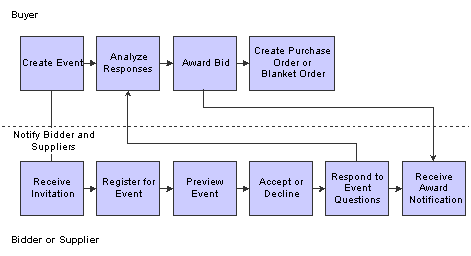
Operational Sourcing process flow
We discuss these business processes in the business process chapters in this implementation guide.
JD Edwards EnterpriseOne Operational Sourcing Integrations
The JD Edwards EnterpriseOne Operational Sourcing system integrates with these JD Edwards EnterpriseOne systems from Oracle:
JD Edwards EnterpriseOne Procurement.
JD Edwards EnterpriseOne Address Book.
JD Edwards EnterpriseOne Inventory Management.
JD Edwards EnterpriseOne General Accounting.
We discuss integration considerations in the implementation chapters in this implementation guide.
JD Edwards EnterpriseOne Procurement
The JD Edwards EnterpriseOne Procurement system integrates with the JD Edwards EnterpriseOne Operational Sourcing system by creating purchase orders and blanket orders when a buyer posts an award for an event.
JD Edwards EnterpriseOne Address Book
The JD Edwards EnterpriseOne Address Book system integrates with the JD Edwards EnterpriseOne Operational Sourcing system by providing mailing, contact, and supplier information for each supplier.
JD Edwards EnterpriseOne Inventory Management
The JD Edwards EnterpriseOne Inventory Management system integrates with the JD Edwards EnterpriseOne Operational Sourcing system by providing item information for each item in an event.
JD Edwards EnterpriseOne General Accounting
The JD Edwards EnterpriseOne General Accounting system integrates with the JD Edwards EnterpriseOne Operational Sourcing system by providing general ledger account numbers that are used in events that are created for services.
JD Edwards EnterpriseOne Operational Sourcing Implementation
This section provides an overview of the steps that are required to implement the JD Edwards EnterpriseOne Operational Sourcing system.
In the planning phase of your implementation, take advantage of all JD Edwards EnterpriseOne sources of information, including the installation guides and troubleshooting information. A complete list of these resources appears in the preface in About This Documentation, with information about where to find the most current version of each.
When determining which electronic software updates (ESUs) to install for JD Edwards EnterpriseOne Operational Sourcing, use the EnterpriseOne and World Change Assistant. EnterpriseOne and World Change Assistant, a Java-based tool, reduces the time that is required to search and download ESUs by 75 percent or more and enables you to install multiple ESUs at one time.
See JD Edwards EnterpriseOne Tools 8.98 Software Update Guide
 Installation Steps for the JD Edwards EnterpriseOne Collaborative Portal
You can use the JD Edwards EnterpriseOne Collaborative Portal to implement JD Edwards EnterpriseOne Operational Sourcing. You can either use the Sourcing Portal program (P43Q01) or the Supplier Relationship Management portlet.
See Understanding the JD Edwards EnterpriseOne Operational Sourcing Portal.
This guide does not describe in detail how to install and configure the Collaborative Portal. However, this section provides an overview of the general steps involved in installing and configuring the Collaborative Portal.
Use the following table as a guide to the installation and configuration process for the Collaborative Portal and the JD Edwards EnterpriseOne portlets. You should perform the steps in the order listed.
|
Step |
Reference |
|
1. Verify that you meet the minimum technical requirements (MTRs) to implement the JD Edwards EnterpriseOne Collaborative Portal. |
See http://www.peoplesoft.com/corp/en/iou/platforms/enterpriseone.jsp |
|
2. Install and configure the JD Edwards EnterpriseOne system. 3. Apply the updates, service packs, or ESUs that are specified in the MTRs. |
See your JD Edwards EnterpriseOne installation documentation. |
|
4. Install and configure the IBM WebSphere Portal. |
Use one of these guides:
|
|
5. Install and configure the JD Edwards EnterpriseOne Collaborative Portal. |
JD Edwards EnterpriseOne Tools Release 8.98 Portal Reference Guide For All Portals and Platforms |
|
6. Generate JD Edwards EnterpriseOne portlets in the WebClient_Portal.war file. |
Use both of these guides:
|
|
7. Install the WebClient_Portal.war file in the Collaborative Portal. |
WebSphere Portal for Multiplatforms: See www.ibm.com |
|
8. Create pages and add portlets to pages in the Collaborative Portal. |
WebSphere Portal for Multiplatforms: See www.ibm.com |
Global Implementation Steps
This table lists the suggested implementation steps for the JD Edwards EnterpriseOne Operational Sourcing system.
|
Step |
Reference |
|
1. Set up fiscal date patterns, companies, and business units. |
|
|
2. Create the chart of accounts and set up accounts and subledgers. |
|
|
3. Set up multicurrency processing. |
|
|
4. Set up inventory information, such as branch/plant constants, default locations and printers, automatic accounting instructions (AAIs) for manufacturing and distribution, and document types. |
|
|
5. Set up order line types. |
|
|
6. Set up order activity rules. |
|
|
7. Set up Procurement constants. |
|
|
8. Define Procurement next numbers. |
|
|
9. Set up AAIs. |
See Setting Up AAIs. |
|
10. Set up user defined codes. |
See Setting Up UDCs. |
|
11. Create tolerance rules. |
|
|
12. Set up order hold information. |
|
|
13. Set up landed costs. |
|
|
14. Set up nonstock items. |
|
|
15. Define print messages. |
|
|
16. Set up templates for purchase orders. |
|
|
17. Create model logs. |
See Creating Model Logs. |
JD Edwards EnterpriseOne Operational Sourcing Implementation Steps
This table lists the suggested application-specific implementation steps for JD Edwards EnterpriseOne Operational Sourcing.
|
Step |
Reference |
|
1. Set up roles. |
|
|
2. Set up user-defined codes. |
|
|
3. Set up bid questions. |
|
|
4. Set up address book records for bidders and suppliers. |
|
|
5. Set up JD Edwards EnterpriseOne Operational Sourcing system constants. |