Oracle® Insurance Rules Palette 9.4.0.0 E18894_01
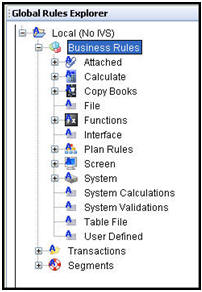
XML schemas are used by the Rules Palette to perform several functions. They determine the various categories as well as the rules that are placed into those categories. The XML schema also controls the dynamic editor used in the configuration of certain rules. Below you can see how the categories in the Global Rules Explorer are enabled and icons are present when schemas are loaded. Once a schema has been uploaded, the various categories become enabled and the appropriate icons appear for each of them.
Categories are Enabled and Icons are Present
After the initial Rules Palette installation and the environment creation set-up, the default schemas should be uploaded and applied to the system. If schemas are not present in the system then the categories in the Explorer window will be disabled and no icons will be displayed.
New schemas are uploaded by clicking the Upload Schemas button  located in the Tool Bar. If
schemas are not present in the system, the following pop-up window appears
after the initial log-in when the Upload Schemas button is clicked:
located in the Tool Bar. If
schemas are not present in the system, the following pop-up window appears
after the initial log-in when the Upload Schemas button is clicked:
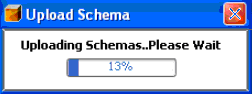
Upload Schemas Progress Bar
This pop-up will only appear the first time you log into the newly set-up environment. Once the default schemas are uploaded they will remain in the database.
The Upload Schemas button allows you to upload business rule XML schemas
into the database directly through the Rules Palette interface. You
can overwrite the default schema or other existing schemas in the database
by clicking this button. The Question pop-up window
will appear if the environment you are in already contains schemas and
you select the Upload Schemas toolbar button.
The system will ask you whether or not you wish to overwrite the existing schema.
Yes will overwrite the schema. You may wish to overwrite existing schemas if you have added new rules to the database, or if you are cleaning up existing schemas that may have invalid XML.
No will cancel your request.
Note: Any time you upload new schemas you must log-out of the environment and log-in in order for the schemas to be correctly uploaded to the database. If you attempt to Upload Schemas when you are not logged into an environment then you will be prompted with a message instructing you to log into the environment.
Copyright © 2009, 2011, Oracle and/or its affiliates. All rights reserved. Legal Notices