Oracle® Insurance Rules Palette 9.4.0.0 E18894_01
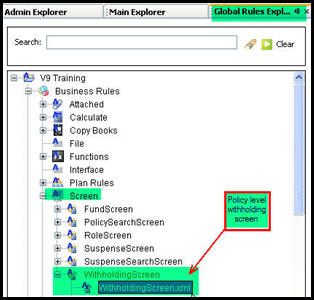
The policy level Withholding screen is configured in the Rules Palette. From the Global Rules Explorer tab, open the Business Rules | Screen folder. Scroll down to the WithholdingScreen.xml file and open it in the Configuration Area. The Withholding screen is configured using the XML Source pane.
Please see the XML Configuration Guide topic in this help system for a list of all elements, attributes and values needed for configuration. View Business Rules | Screen Rules | Withholding Screen.
Withholding Screen listed in Global Rules Explorer
Access the Withholding screen from the Policy link on the Main Menu in the Oracle Insurance Policy Administration (OIPA) system. Once a Variable Annuity policy is open, the Withholding link will be listed in the Left Navigation Menu.
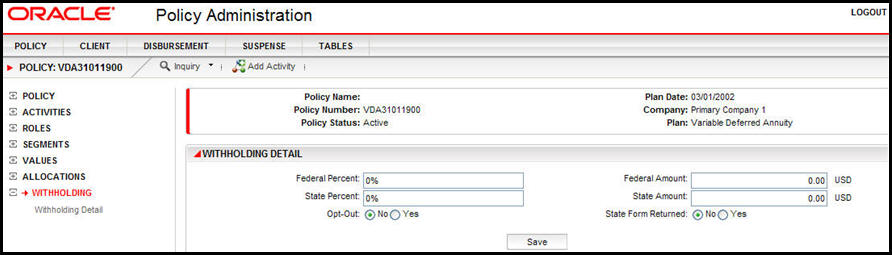
Withholding link on a Variable Deferred Annuity Policy in OIPA
An explanation of the fields on the Withholding Detail portion of the Withholding Screen is given below.
Federal Percent: percent of disbursements that should be held for federal taxes.
Federal Amount: dollar amount that should be held for federal taxes.
Note: If a federal percent is entered, a federal amount cannot also be entered. They are mutually exclusive.
State Percent: percent of disbursements that should be held for state taxes.
State Amount: dollar amount that should be held for state taxes.
Note: If a state percent is entered, a state amount cannot also be entered. They are mutually exclusive.
Copyright © 2009, 2011, Oracle and/or its affiliates. All rights reserved. Legal Notices