Oracle® Insurance Rules Palette 9.4.0.0 E18894_01
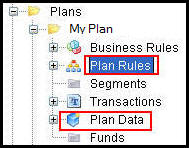
Each individual plan in the Rules Palette has six main categories of data associated with that specific plan. You can create new plans or edit existing plans from the Main Explorer tab. You can also modify plan data fields and values.
There are three database tables that store plan information.
AsPlan: stores the information entered when a new plan is created.
AsPlanFields: stores values for the plan. These values can be edited through the Plan Data folder in the Main Explorer.
AsPlanGroup: stores GUIDs of the parent and child plans.
Business Rules: Any rules that are attached to the plan, interface, screen, or system, rules that are user defined, and rules that apply to Calculate and CopyBooks.
Plan Rules: Any rules that are overridden at the plan level and are required for a plan to run in the application.
Segments: All the segments attached to the plan.
Transactions: All the transactions attached to the plan.
Plan Data: Constant values for a plan that can be used for configuration calculations.
Funds: Only for plans that use funds. This will store fund information.
Plan Folders
Copyright © 2009, 2011, Oracle and/or its affiliates. All rights reserved. Legal Notices