
1.5 开始管理群集
表 1-2 提供了一个管理群集的开始点。
表 1-2 Sun Cluster 3.0 管理工具|
操作意图 |
要执行的操作 |
详细请见 |
|---|---|---|
|
远程登录到群集 |
使用 ccp 命令来启动群集控制面板 (CCP)。然后选择下列图标之一:cconsole、crlogin 或 ctelnet。 | |
|
以互动方式配置群集 |
启动 scsetup 公用程序。 | |
|
显示 Sun Cluster 发行版本号和版本信息 |
使用 scinstall 命令并使用选项 -p 或者 -pv。 | |
|
显示安装的资源、资源组和资源类型 |
使用 scgradm -p 命令。 | |
|
以图形方式监视群集组件 |
使用 Sun Management Center 的 Sun Cluster 模块。 |
Sun Management Center 的 Sun Cluster 模块联机帮助 |
|
检查群集组件的状态 |
使用 scstat 命令。 | |
|
查看群集配置 |
使用 scconf -p 命令。 | |
|
检查全局安装点 |
使用 sccheck 命令。 | |
|
查看 Sun Cluster 系统信息 |
检查 /var/adm/messages 文件。 |
Solaris 系统管理文档 |
|
监视 Solstice DiskSuite 的状态 |
使用 metastat 或 metatool 命令。 |
Solstice DiskSuite 文档 |
|
监视 VERITAS 卷管理器 的状态 |
使用 vxstat 或 vxva 命令。 |
VERITAS 卷管理器 文档 |
1.5.1 如何远程登录到 Sun Cluster
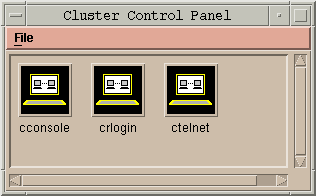
Cluster Control Panel (CCP) 为 cconsole、crlogin 和 ctelnet 工具提供一个启动 板。这三种工具都启动到一组指定的节点的一个多窗口连接。这个多窗口连接由指定的每个节点的主窗口和一个共用窗口组成。定向到共用窗口的输入会发送到各个主窗口。有关详细信息,请参见 ccp(1M) 和 cconsole(1M) 手册页。
-
检验是否满足以下先决条件。要启用 Cluster Control Panel (CCP),必须:
-
在管理控制台上安装相应的 Sun Cluster 软件(SUNWccon 软件包)。
-
确保管理控制台上的 PATH 变量包括 Sun Cluster 工具目录:/opt/SUNWcluster/bin 和 /usr/cluster/bin。可以通过设置 $CLUSTER_HOME 环境变量 为工具目录另指定一个位置。
-
如果使用终端集中器,请配 置 clusters 文件、serialports 文件 和 nsswitch.conf 文件。这些文件可以是 /etc 文 件或 NIS/NIS+ 数据库。有关更多信息,请参见 clusters(4) 和 serialports(4)。
-
-
确定是否有 Sun Enterprise E10000 server 平台。
-
如果没有,请进行步骤 3。
-
如果有,请登录 到 System Service Processor (SSP) 并使用 netcon 命令进行连接。连接好后,输入 Shift~@ 来 解锁控制台并获得写访问权。
-
-
启动 CCP 启动板。
从管理控制台,输入以下命令。
# ccp clustername
将显示 CCP 启动板。
-
要启动与群集的远程会话,请单击启动板中的相应图标 (cconsole, crlogin, or ctelnet)。
1.5.1.1 示例
以下示例显示 Cluster Control Panel。
图形 1-1 Cluster Control Panel
1.5.1.2 从此处可转到何处
还可以从命令行启动 cconsole、crlogin 或 ctelnet 会话。有关详细信息,请参见 cconsole(1M)。
1.5.2 如何访问 scsetup 公用程序
scsetup(1M) 公用程序可让您以互动方式配置群集的定额、群集传输、专用主机名、设备组和新节点选项。
1.5.3 如何显示 Sun Cluster发行版本和版本信息
执行这些步骤不需要作为超级用户登录。
显示 Sun Cluster 发行版本号。
% scinstall -p |
显示所有 Sun Cluster 软件包的 Sun Cluster 发行版本号和版本字符串。
% scinstall -pv |
1.5.3.1 示例-显示 Sun Cluster 发行版本号
以下示例显示群集的发行版本号。
% scinstall -p 3.0 |
1.5.3.2 示例-显示 Sun Cluster 发行版本和版本信息
以下示例显示所有软件包的群集发行版本信息和版本信息。
% scinstall -pv SunCluster 3.0 SUNWscr: 3.0.0,REV=1999.10.20.15.01 SUNWscdev: 3.0.0,REV=1999.10.20.15.01 SUNWscu: 3.0.0,REV=1999.10.20.15.01 SUNWscman: 3.0.0,REV=1999.10.20.15.01 SUNWscsal: 3.0.0,REV=1999.10.20.15.01 SUNWscsam: 3.0.0,REV=1999.10.20.15.01 SUNWrsmop: 3.0.0,REV=1999.10.20.15.01 SUNWsci: 3.0,REV=1999.09.08.17.43 SUNWscid: 3.0,REV=1999.09.08.17.43 SUNWscidx: 3.0,REV=1999.09.08.17.43 SUNWscvm: 3.0.0,REV=1999.10.20.15.01 |
1.5.4 如何显示已配置的资源类型、资源组和资源
执行此步骤不需要作为超级用户登录。
显示群集的已配置资源类型、资源组和资源。
% scrgadm -p |
1.5.4.1 示例-显示已配置的资源类型、资源组和资源
以下示例显示资源类型(RT 名称)、资源组(RG 名 称)和资源(RS 名称)) configured for the cluster schost.
% scgradm -p
RT Name: SUNW.SharedAddress
  RT Description: HA Shared Address Resource Type
RT Name: SUNW.LogicalHostname
  RT Description: Logical Hostname Resource Type
RG Name: schost-sa-1
  RG Description:
    RS Name: schost-1
      RS Description:
      RS Type: SUNW.SharedAddress
      RS Resource Group: schost-sa-1
RG Name: schost-lh-1
  RG Description:
    RS Name: schost-3
      RS Description:
      RS Type: SUNW.LogicalHostname
      RS Resource Group: schost-lh-1
|
1.5.5 如何检查群集组件的状态
执行此步骤不需要作为超级用户登录。
检查群集组件的状态。
% scstat -p |
1.5.5.1 示例-检查群集组件的状态
以下示例提供由 scstat(1M) 返回的群集组件状态信息的样例。
% scstat -p
-- Cluster Nodes --

                    Node name           Status
                    ---------           ------
  Cluster node:     phys-schost-1      Online
  Cluster node:     phys-schost-2      Online
  Cluster node:     phys-schost-3      Online
  Cluster node:     phys-schost-4      Online

------------------------------------------------------------------

-- Cluster Transport Paths --

                    Endpoint            Endpoint            Status
                    --------            --------            ------
  Transport path:   phys-schost-1:qfe1 phys-schost-4:qfe1 Path online
  Transport path:   phys-schost-1:hme1 phys-schost-4:hme1 Path online
...

------------------------------------------------------------------

-- Quorum Summary --

  Quorum votes possible:      6
  Quorum votes needed:        4
  Quorum votes present:       6

-- Quorum Votes by Node --

                    Node Name           Present Possible Status
                    ---------           ------- -------- ------
  Node votes:       phys-schost-1      1        1       Online
  Node votes:       phys-schost-2      1        1       Online
...

-- Quorum Votes by Device --

                    Device Name         Present Possible Status  Owner
                    -----------         ------- -------- ------  -----
  Device votes:     /dev/did/rdsk/d2s2  1        1       Online  phys-schost-2
  Device votes:     /dev/did/rdsk/d8s2  1        1       Online  phys-schost-4
...

-- Device Group Servers --

                         Device Group        Primary             Secondary
                         ------------        -------             ---------
  Device group servers:  rmt/1               -                   -
  Device group servers:  rmt/2               -                   -
  Device group servers:  schost-1           phys-schost-2      phys-schost-1
  Device group servers:  schost-3           -                   -

-- Device Group Status --

                              Device Group        Status
                              ------------        ------
  Device group status:        rmt/1               Offline
  Device group status:        rmt/2               Offline
  Device group status:        schost-1           Online
  Device group status:        schost-3           Offline

------------------------------------------------------------------

-- Resource Groups and Resources --

            Group Name          Resources
            ----------          ---------
 Resources: test-rg             test_1
 Resources: real-property-rg    -
 Resources: failover-rg         -
 Resources: descript-rg-1       -
...

-- Resource Groups --

            Group Name          Node Name           State
            ----------          ---------           -----
     Group: test-rg             phys-schost-1      Offline
     Group: test-rg             phys-schost-2      Offline
...

-- Resources --

            Resource Name       Node Name           State     Status Message
            -------------       ---------           -----     --------------
  Resource: test_1              phys-schost-1      Offline   Offline
  Resource: test_1              phys-schost-2      Offline   Offline
|
1.5.6 如何查看群集配置
执行此步骤不需要作为超级用户登录。
查看群集配置。
% scconf -p |
1.5.6.1 示例-查看群集配置
以下示例列出了群集配置。
% scconf -p
Cluster name:                                      cluster-1
Cluster ID:                                        0x3908EE1C
Cluster install mode:                              disabled
Cluster private net:                               172.16.0.0
Cluster private netmask:                           255.255.0.0
Cluster new node authentication:                   unix
Cluster new node list:                             <NULL - Allow any node>
Cluster nodes:                                     phys-schost-1 phys-schost-2 phys-schost-3 phys-schost-4

Cluster node name:                                 phys-schost-1
  Node ID:                                         1
  Node enabled:                                    yes
  Node private hostname:                           clusternode1-priv
  Node quorum vote count:                          1
  Node reservation key:                            0x3908EE1C00000001
  Node transport adapters:                         hme1 qfe1 qfe2

Node transport adapter:                          hme1
    Adapter enabled:                               yes
    Adapter transport type:                        dlpi
    Adapter property:                              device_name=hme
   Adapter property:                              device_instance=1
    Adapter property:                              dlpi_heartbeat_timeout=10000
...
Cluster transport junctions:                       hub0 hub1 hub2

Cluster transport junction:                        hub0
  Junction enabled:                                yes
  Junction type:                                   switch
 Junction port names:                             1 2 3 4
...
|
Junction port:                                   1
    Port enabled:                                  yes

Junction port:                                   2
    Port enabled:                                  yes
...
Cluster transport cables
                    Endpoint            Endpoint        State
                    --------            --------        -----
  Transport cable:  phys-schost-1:hme1@0 hub0@1        Enabled
  Transport cable:  phys-schost-1:qfe1@0 hub1@1        Enabled
  Transport cable:  phys-schost-1:qfe2@0 hub2@1        Enabled
  Transport cable:  phys-schost-2:hme1@0 hub0@2        Enabled
...
Quorum devices:                                    d2 d8

Quorum device name:                                d2
  Quorum device votes:                             1
  Quorum device enabled:                           yes
  Quorum device name:                              /dev/did/rdsk/d2s2
  Quorum device hosts (enabled):                   phys-schost-1
 phys-schost-2
  Quorum device hosts (disabled):
...
Device group name:                                 schost-3
  Device group type:                               SDS
  Device group failback enabled:                   no
  Device group node list:                          phys-schost-3, phys-schost-4
  Diskset name:                                    schost-3
...
|
1.5.7 如何检查全局安装点
sccheck(1M) 命令从 /etc/vfstab 文件中 检查群集文件系统及其全局安装点的配置错误。sccheck 命令仅返回错误。如果 未发现错误,sccheck 仅返回到 shell 提示符。
注意:
在进行的配置更改已影响设备或卷管理组件后,请运行 sccheck。
1.5.7.1 示例-检验群集配置
以下示例显示节点 phys-schost-3 缺少安装点 /global/schost-1。
# sccheck vfstab-check: WARNING - phys-schost-3 - Missing mount point /global/schost-1 |
- © 2010, Oracle Corporation and/or its affiliates