| Sun ONE Portal Server 6.1 Installation Guide |
Chapter 1
Planning the InstallationBefore you begin installing your Sun™ ONE Portal Server software, you must plan your installation carefully. Familiarize yourself with how the installation software is packaged, what the requirements for your system are, and what information you must have so that you can complete the installation successfully.
This chapter contains the following sections:
Installation OverviewThe Sun ONE Portal Server’s installation program installs components and provides initial system configuration. You can install the Sun ONE Portal Server and the Sun™ ONE Directory Server at the same time, or you can install them separately. For better performance, you may want to install the Sun ONE Portal Server and the Sun ONE Directory Server on separate machines. For installations that are upgrades, the installation program provides migration tools.
Consider these guidelines for your installation:
- You can install Sun ONE Portal Server on the same machine as Sun ONE Directory Server or on a separate machine. The Sun ONE Directory Server can also be an existing installation.
- If you install Sun ONE Portal Server and Sun ONE Directory Server separately, the Sun ONE Directory Server must be installed first.
- The machine running Sun ONE Portal Server must be able to access the machine running Sun ONE Directory Server. Any firewalls between the systems must not block connections to the Sun ONE Directory Server port.
- The Sun ONE Portal Server must be installed on the same machine as the Sun™ ONE Identity Server. The Sun ONE Portal Server can also be installed on an existing installation of the Sun ONE Identity Server.
- You cannot install Sun ONE Portal Server on a machine with an existing installation of the Sun™ ONE Web Server. The installation program installs the Sun ONE Web Server that is needed for Sun ONE Portal Server. If a web server is already installed, install the Sun ONE Web Server bundled with the Sun ONE Portal Server on a different port.
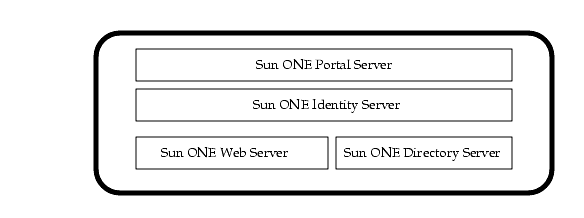
Figure 1-1 shows an example installation of the Sun ONE Portal Server, Sun ONE Identity Server, Sun ONE Web Server, and Sun ONE Directory Server on a single machine.
Figure 1-1 Single Machine Installation
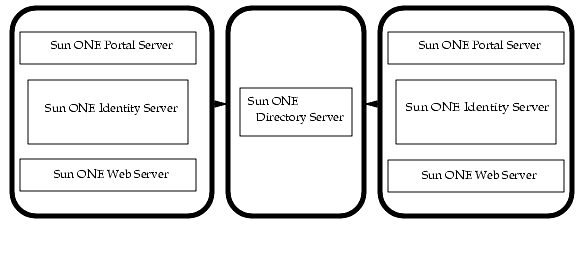
Figure 1-2 shows an example installation of the Sun ONE Portal Server, Sun ONE Identity Server, and Sun ONE Web Server on multiple machines using Sun ONE Directory Server on another machine.
Figure 1-2 Multiple Machines Installation
The Sun ONE Portal Server software also includes data migration tools for sites that are upgrading from previous Sun ONE Portal Server versions.
If you are upgrading from iPlanet™ Portal Server 3.0 Service Pack 3a or 4 to this version of the software, use the following guidelines:
Install the Sun ONE Portal Server Data Migration Tool Suite on the system.
- If you are migrating from an iPlanet™ Portal Server 3.0 (Service Pack 3a or 4) system to a separate Sun ONE Portal Server 6.1 system, you need two installations of the Sun ONE Portal Server 6.1 Data Migration Tool Suite, one on each system.
- You can install Sun ONE Portal Server 6.1 on an iPlanet Portal Server 3.0 (Service Pack 3a or 4) system for a single-system migration.
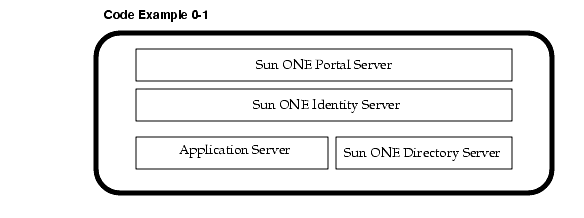
Figure 1-3 shows an example installation of the Sun ONE Portal Server, Sun ONE Identity Server, an application server, and Sun ONE Directory Server.
Figure 1-3 Sun ONE Portal Server Deployment Using Application Server
For more information on deploying Portal Server 6.1 on an application server see:
System RequirementsBefore installing the Sun ONE Portal Server software, ensure that your system meets the following requirements:
- Operating System Requirements, including patches
Hardware Requirements
For a new installation of the software, your system must meet the following minimal hardware requirements:
Software Requirements
The software discussed here is required for a successful installation of the Sun ONE Portal Server software. Older versions of these software products are not supported.
- Sun ONE Directory Server 5.1sp1
- Sun ONE Identity Server 6.0 SP1
- Java™ Development Kit (JDK™)
- JDK 1.3.1_06 if installing on the Sun ONE Web Server
- JDK 1.4.1_01 if installing on Sun™ ONE Application Server 7.0
- JDK 1.3.1_06 if installing on the BEA WebLogic 6.1 SP4 (default JDK provided with BEA WebLogic 6.1 SP4. No JDK is installed by pssetup.)
- JDK 1.3.1_05 if installing on IBM WebSphere 4.0.5 (JDK provided with IBM WebSphere)
Operating System Requirements
The Sun ONE Portal Server software requires at least a user distribution of the Solaris™ 8 Operating System or Solaris™ 9 Operating System. The Solaris 8 Operating System requires the following operating system patches as well for a successful installation of the product:
These are the minimum required patches. The last two digits of the patch number are the minor revision number. If updates to the patch have been released, install the most recent patch revision (the one with the higher revision number). Typically, these patches are made obsolete when a new patch is released and only the most recent patch is available at the SunSolve site. Please review the readme for each patch to find out what dependencies or patches may be required.
The installer will allow you to continue if you feel that the latest patches are installed.
Browser Recommendations
The following browsers are supported for administration and for accessing the Sun ONE Portal Server Desktop:
Configuration InformationDuring installation of the Sun ONE Portal Server software, you must specify some configuration information. Complete the checklists in this section before you install the software.
Checklist for Java™ Development Kit
If the Java™ Development Kit (JDK™) software is already installed on the system, Sun ONE Portal Server accepts it.
Answer these questions before you install Sun ONE Portal Server:
The JDK version depends on the web container being used. For details on which JDK version is used, see "Software Requirements."
For example, the directory for JDK 1.4.1_01 is /usr/java1.4.1_01 or /usr/java1.3.1_06 JDK 1.3.1_06.
Checklist for Sun™ ONE Directory Server
During installation, you must provide information about the server where Sun ONE Directory Server will be installed so that the URL to access the directory can be formulated.
Whether using an existing directory server or installing a new directory server, you must specify the following information:
The default base directory for a new Sun ONE Directory Server is /usr/ldap. The base directory must be a directory on a local disk drive; you cannot use a networked drive for installation purposes. The file sharing protocols such as AFS, NFS, and SMB do not provide file locking and performance suitable for use by the Sun ONE Directory Server. The server database index files may be damaged if they are not held on a local file system.
Port numbers can be any number from 1 to 65535.
The default LDAP port number is 389. The default port number for LDAP over SSL is 636. Therefore, do not use port number 636 for your standard LDAP installation, even if 636 is not already in use. You can also use LDAP over TLS on the standard LDAP port.
On UNIX platforms, Sun ONE Directory Server must be run as root or user nobody if it listens on either port 389 or 636.
Make sure the ports you choose are not already in use. To determine whether or not a port is in use, enter:
netstat -an | grep port-number
Also, if you are using both LDAP and LDAPS communications, make sure the port numbers chosen for these two types of access are not identical.
Checklist for Sun™ ONE Web Server
When installing the Sun ONE Web Server, specify the following basic configuration information:
The administration instances allows you use to manage your Sun ONE Web Server. Choose a random number for the administration instance to make it harder for someone to breach your server. When you configure your server, you use the Administration Server’s port number. For example, for server siroe.com, the server’s URL could be http://www.siroe.com:2634/.
Make sure the port you choose is not already in use. On UNIX systems, you can check the file /etc/services on the server machine to make sure you do not assign a port number that is reserved for another service. If you choose a port that is currently being used by another service, the installation program prompts you for another port.
If you use UNIX and you choose a server port number lower than 1024, you must be logged in as root to start the server. After the server binds to the port, the server changes from the root user account to the user account you specify. You can run services under 1024 if you run them as user nobody and all other non-root users do need to use ports higher than 1024. Since user nobody does not have a resolvable password, you have to be root to start processes that run as nobody. If you choose a port number higher than 1024, you do not need to be the root user to start the server.
By default, the software assigns port 8088 as the Sun ONE Web Server administration port.
Checklist for Deployment on Sun™ ONE Application Server
The Sun ONE Application Server needs to be installed before you install the Sun ONE Portal Server software. For installation requirements and instructions, see Appendix A, "Sun ONE Portal Server 6.1 Installation for Sun ONE Application Server 7.0."
Checklist for Deployment on BEA WebLogic Server
The BEA WebLogic Server needs to be installed before you install the Portal Server. software. For installation requirements and instructions, see Appendix B, "Sun ONE Portal Server 6.1 Installation for BEA Application Server."
Checklist for Deployment on IBM Application Server
The IBM WebSphere Server needs to be installed before you install the Portal Server software. The IBM WebSphere Server requires that you install a database before you install WebSphere.
For installation requirements and instructions, see Appendix C, "Sun ONE Portal Server 6.1 Installation for IBM Application Server."
Checklist for Sun™ ONE Identity Server
When installing the Sun ONE Identity Server, specify the following basic configuration information to install and configure the Sun ONE Identity Server for Sun ONE Portal Server.
The Sun ONE Portal Server must be installed on the system running Sun ONE Identity Server, and the Sun ONE Identity Server must be installed before installing the Sun ONE Portal Server. You can use an existing installation of the Sun ONE Identity Server if the version is compatible (see "Software Requirements" for more details). However, installation of the Sun ONE Portal Server into an existing Sun ONE Identity Server running as user nobody is not supported. Change Sun ONE Identity Server to run as root before installing the Sun ONE Portal Server (see Chapter 2, "Installing Sun ONE Portal Server" for more information on changing Sun ONE Identity Server to run as root).
The base directory must be a directory on a local disk drive; you cannot use a networked drive for installation purposes. The base directory must not already exist or must be empty.
The default base directory for Sun ONE Identity Server is /opt for Sun ONE Web Server and IBM WebSphere.
The default base directory for Sun ONE Identity Server is /opt/SUNWappserver7 for Sun ONE Application Server.
The default base directory for Sun ONE Identity Server is /opt/bea for BEA WebLogic.
If you have multiple Network Interface Cards (or NICs), ensure that you specify the correct IP address since multiple IP addresses can correspond to multiple NICs.
If you notice that the installation program is unable to detect the IP address of the system, ensure that you specify the fully qualified domain name of the system correctly.
Specify a port that your browser will use to communicate with your server. The default port number provided for the server component of the Sun ONE Portal Server software is 80 for non-SSL communication and 443 for SSL communication.
If you decide to run the Sun ONE Portal Server as user nobody, you can use all of the available ports including the reserved ports up to 1024. If you want to run as a regular (or non-root) user, make sure you use ports greater than 1024 when installing Sun ONE Portal Server.
Make sure the ports you choose are not already in use. To determine whether or not a port is in use, enter:
netstat -an | grep port-number
Note
For security reasons, the Identity Server Internal LDAP Authentication User password must not be the same as the passphrase.
Checklist for Sun ONE Portal Server
The default base directory for Sun ONE Portal Server is /opt. Or it is deployed in the same base directory as the Sun ONE Identity Server software’s base directory (see "Checklist for Sun™ ONE Identity Server" for more information).
If yes, see information on upgrading to this version of the software in the "Installation Overview" before installing the software and/or the migration utilities.
The Sun ONE Portal Server software ships with a sample portal. If you install the sample portal, you can see an example portal configuration. The sample portal acts as a starting point and it provides examples of how to use the various Desktop components.
The sample portal is not intended for deployment. It is necessarily generic (sample-like) in nature. You can configure the portal for your specific deployment needs.
Directory LayoutThis section outlines the default directory layout of the Sun ONE Portal Server software and its supporting components.
Table 1-1 is a five column table that contains the directory names and a description of their contents for each of the web containers. The first column lists the directories for the Sun ONE Web Server. The second column lists the directories for the Sun ONE Application Server. The third column lists the directories for the BEA WebLogic application server. The fourth column lists the directories for the IBM WebSphere application server. The fifth column provides a description of what the directory contains.