| Building J2EE Applications With Forte for Java |    
|
| Building J2EE Applications With Forte for Java |
|
| C H A P T E R 7 |
|
Transactions |
This chapter covers the use of EJB module property sheets to program container-managed transactions. For bean-managed transactions, see Building Enterprise JavaBeans Components.
Transaction boundaries are determined by the Transaction Attribute properties of the individual enterprise beans involved in the transaction. When you create an enterprise bean with the IDE's EJB wizards and specify container-managed transactions, the bean is create with a default Transaction Attribute.
This section shows you how to view the default Transaction Attribute settings and interpret them.
To open the Transaction Settings property editor:
 Right-click the EJB module node and choose the following sequence of commands from the contextual menu: Properties
  Transaction Settings property ellipsis (...) button.)
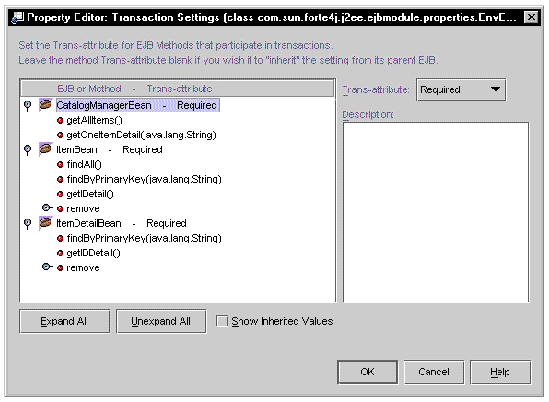
FIGURE 7-1 shows the Transaction Settings Property Editor for an EJB module. These are the default transaction attribute settings.
 [ D ]
[ D ]
There are several things you should notice about this editor:
Method that have the Required transaction attribute it must execute transactionally. If the method is called without an active transaction, the container starts a new transaction; if the method is called with an active transaction in progress, the container includes the method in the active transaction. This is the default behavior for your enterprise beans.
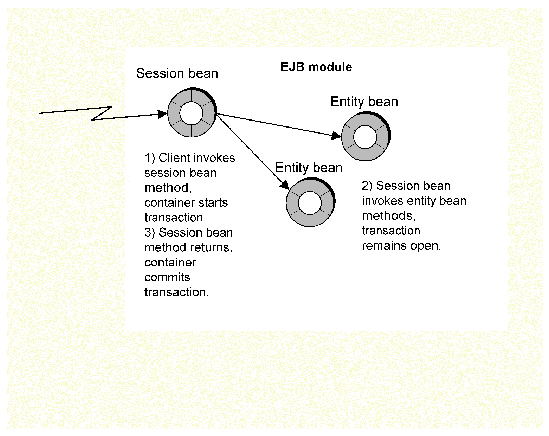
The business logic in an EJB module often spans several enterprise beans. A common architecture for an EJB module is a single session bean and several entity beans. The session bean receives all of the method calls, and then, to carry out the processing required, calls methods of the entity beans in the module. FIGURE 7-2 shows a transaction of this type.
 [ D ]
[ D ]
You want the container to recognize these transaction boundaries so that all of the work performed by several enterprise beans is handled as a single transaction, and either committed or rolled back together. You want the container to open a transaction when the session bean is called, and keep the transaction open while the session bean calls one or more entity beans. Eventually, the last call to an entity bean returns, and the session bean method completes. At this point, the container commits the transaction. All of the work initiated by the call to the session bean has ben included in a single transaction.
To instruct the container to do this, you modify the transaction attributes of the enterprise beans involved in the transaction. To modify transaction attributes:
1. Right-click the EJB module node and choose the following sequence of commands from the contextual menu: Properties Transaction Settings property ellipsis (...) button.)
This opens the Transaction Settings Property Editor.
2. Expand the entity bean nodes.
3. Click a business method of the session bean to select it.
In this example you want the business methods of the session bean to start new transactions whenever they are called, so you want to select the individual methods and change their transaction attribute values.
4. Click the Transaction Attribute field and change the value.
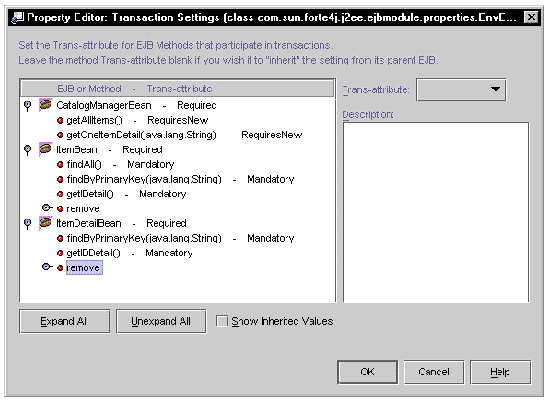
This changes the transaction attribute for the method you selected. Notice that the method name is now followed by the new transaction setting. In this example, the new value is RequiresNew. This instructs the container to open a new transaction whenever this method is called.
5. Continue until you have redefined the method boundaries.
In this example, the transaction attributes of entity bean business methods are set to Mandatory. You want these method to execute within the boundaries of the transactions opened by the session bean methods, and Mandatory tells the container that these methods can only be called if a transaction is already in progress.
 [ D ]
[ D ]
FIGURE 7-3 shows the Transaction Settings Property Editor for an EJB module. The following changes are in effect:
Notice that the transaction attributes were modified on the method level, and the method nodes now display the new transaction attribute values after the method names.
For each EJB module that you work with, you need to analyze the business logic and determine the different transaction models that are implied by the logic. Then use the Transaction Attribute property editor to implement those transaction models by setting the transaction attributes of the enterprise beans (or their methods) involved in those transactions.
| Building J2EE Applications With Forte for Java | 816-4061-10 |
|
Copyright © 2002, Sun Microsystems, Inc. All rights reserved.