
Login Button
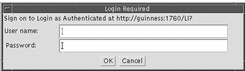
The Login Button provides a means of logging in for the duration of your connection to the directory. The login button grants the access rights specified in the access control rules on the directory server. Click the Login button to display a login request window. See Figure 5-4.
Type your user name and password and click OK.
If there are more than one entry in the directory with the attribute uid matching the user name, the login fails.
Figure 5-4 Login Request Window
To logout, click the logout button.
The access priviledges are cleared.
- © 2010, Oracle Corporation and/or its affiliates