 Setting Up a Local Unit, Course, or GPA Limit Requirement
This appendix is a supplement to the general documentation on limits, and provides examples and detailed instructions for setting up two types of course limit requirements:
Local unit, course, or GPA limit requirement.
Global course limit requirement.
See Also
Creating a Requirement Line Item
Setting Up a Local Unit, Course, or GPA Limit Requirement
Local limit requirements work to limit the number of units or courses that can be counted toward a specific requirement group, requirement, or requirement line. With the use of more advanced derived lists, local limits can also apply to a dynamically generated group of targets (such as all courses used by a particular plan). Unlike their global course limit requirement counterpart, local course limit requirements have a specific target to which they apply, even if that target is dynamically generated from a derived list.
Here's how to set up a simple local course limit requirement:
Create an academic course list that includes the course or courses that you want to limit. For example, Psychology 499 (to represent a special course for independent research that is repeatable, but that can count towards graduation up to a maximum of 8 units.)
Locate an existing All Stats academic requirement Line Item that requires or includes as options these same courses. For example, the Psychology Major requirement.
For the same requirement mentioned in step 2, add another line item with a Line Type of Unit, Course, or GPA Limit.
On the Line Item Parms page, for the Unit, Course, or GPA Limit line, specify a Maximum Units Allowed value of 8, and a Maximum Courses Allowed value of 999. The system will obey the lower of the two limit numbers (in this case, 8 units).
Access the Line Item Detail page for the limit line, and attach the course list you created in step 1.
To target the course limit to a requirement, intersect the course list for the limit line with a derived list that specifies the target in greater detail. For example, if the requirement has multiple requirement lines, and you want the maximum 8 units of Psychology 499 requirement to apply only to one of many lines in the requirement:
On the Line Item Detail page, insert a second Line Detail Type of DLST. Select a List Include Mode of I — Intersection With. Select a List Recall Mode of Used by Requirement, and specify the requirement and line number that you specifically want to limit.
Save the requirement.
The following diagram displays an overview of how to set up a local unit, course, or GPA limit requirement:
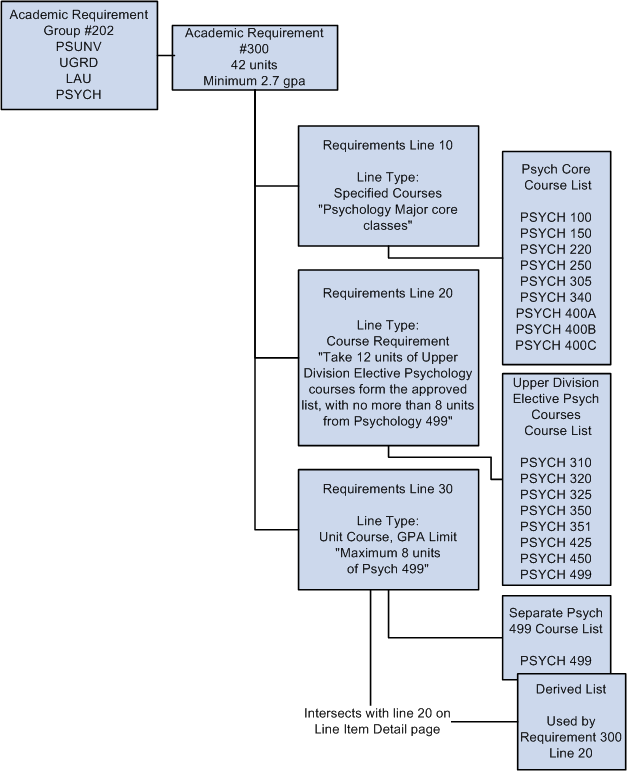
Unit, course, or GPA limit structure
Setting Up a Global Course Limit Requirement
Global limit requirements work to limit the number of units or courses that can be counted toward an overall advising report. Unlike their local course limit requirement counterpart, global course limit requirements typically have no specific target requirement, and go into effect as soon as they are encountered by the advising system.
The exception to the rule of global limits not requiring targets is when you want to apply a global limit to requirements that capture courses through a Credit Include Mode of Verify. As you will see in the following exhibit diagram, to enforce a global limit on Verify requirements, you must subtract a derived list of Used By (your global limit) from the Global Limit target requirement.
Reporting sequence and academic structure determine the order in which academic requirement groups are encountered.
See Understanding Academic Requirement Groups.
Follow these steps to set up a global course limit:
Create an academic course list that includes the courses you want to globally limit, or design a derived list that will capture the same group. For example, Physical Education ###, or a derived list of Grade category equal Pass/No Pass courses, respectively.
Create an academic requirement that houses the global limit, instead of attaching the limit as a requirement line (like you do for a local unit, course, or GPA limit). In the academic requirement, set the Line Type to Global Limit on the Line Item page, define maximum parameters on the Line Item Parameters page, then attach your course list or derived course list on the Line Item Detail page. By setting up the global limit requirement as a separate requirement, you can reuse it across requirement groups at the institution (which is typically the case with global course limits).
Save the academic requirement, and attach it to the highest level requirement groups for each group of students to whom you want this to apply. You can either attach it to a career level requirement group (so that it applies to all programs within the career), a program level requirement group (so that it applies to students in the programs that you specify), a plan level requirement group, or even a subplan level requirement group. What is important to note is that the system begins enforcing the global limit only when it is encountered by the advisement engine. Therefore, the higher you place the global limit, the sooner the system will "see" the requirement and begin enforcing it.
The following diagram displays an overview of how to set up two types of global course limits, one that stands alone, and another that both stands alone and limits a Verify requirement.
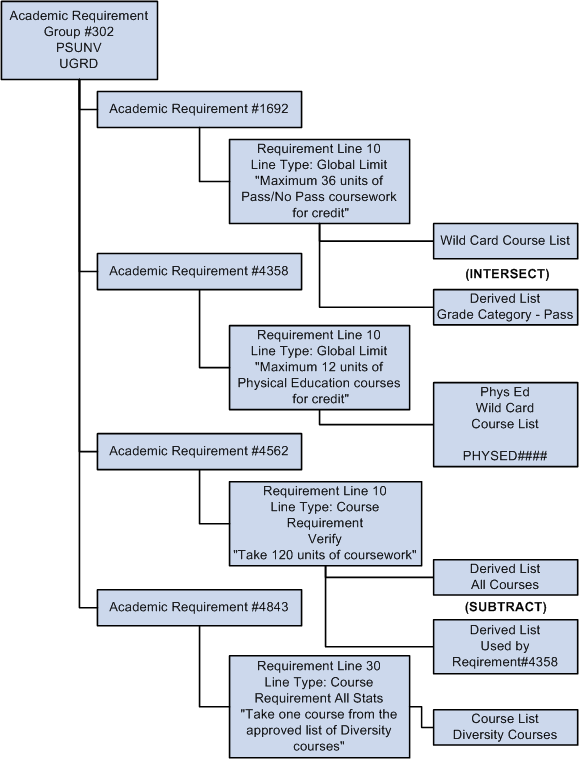
Global limit structure