 Financial Aid Overview
This chapter provides an overview of Financial Aid and discusses:
Financial Aid business processes.
Financial Aid integrations.
Financial Aid implementation.
Financial Aid Overview
Financial Aid automates federal and institutional financial aid processing for a more efficient operation. It provides flexibility and helps you manage financial aid activity for applicants and students.
With this application, you can:
Receive and track financial aid applications.
Design cost of attendance assessment by defining budget categories, items, and formulas.
Manage need analysis, packaging, disbursement, and loan processing.
Process origination and disbursement for FFELP, Direct Loan, and Pell Grant programs.
Calculate federal Pell awards.
Use award plans to automatically package students.
Match financial aid sources to eligible students.
Modify financial aid notification letters.
Maintain federal compliance with annual regulatory updates for ISIR, Pell, Direct Loan, FISAP, and other federal updates.
Post financial aid to student accounts.
Provide students with self-service access to view, accept, and decline awards.
Manage student work-study programs.
Financial Aid Business ProcessesFinancial Aid supports local management and awarding of federal aid, state aid, institutional aid, departmental aid, and scholarship funds. After you set up the system based on your institution's rules and practices, you can begin to receive and track financial aid applications. The awarding practice takes place when your institution receives the ISIR, PROFILE, or institutional application. After you load need analysis data, the system activates the student for the aid year. Activation of the aid year is the first step in updating student data for financial aid processing.
You can manually award a student or use award plans to automatically package a student. The Packaging process finds the best combination of aid to meet a student's financial need. Disbursing aid to students involves authorizing each disbursement. The system checks the disbursement rules that you have defined and determines whether a particular award can be disbursed. For the aid cycle to be successful, you must verify selected students, handle ISIR corrections, process budgets, track requested documents and loan applications, and monitor spending and reconciliation of funds.
The following process flow illustrates the Financial Aid business process:

Financial aid business process
Financial Aid IntegrationsFinancial Aid integrates with the following applications within PeopleSoft Campus Solutions:
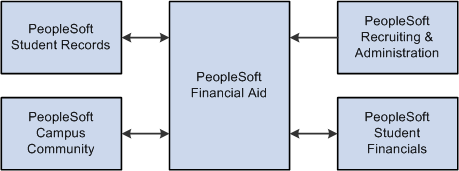
Financial Aid integrations
PeopleSoft Campus Community
Financial Aid integrates with Campus Community to receive personal, demographic, and relationship data.
PeopleSoft Student Records
Financial Aid integrates with Student Records to create financial aid term data to determine financial aid eligibility.
PeopleSoft Recruiting and Admissions
Financial Aid integrates with Recruiting and Admissions to create prospect data and provide early financial aid offers.
PeopleSoft Student Financials
Financial Aid integrates with Student Financials to manage financial aid and track student disbursements, charges, and payments.
Financial Aid ImplementationFinancial Aid enables you to generate a list of setup tasks for your organization based on the features that you are implementing. The setup tasks include the components that you must set up, listed in the order in which you must enter data into the component tables, and links to the corresponding PeopleBook documentation.
Financial Aid also provides component interfaces to help you load data from your existing system into Financial Aid tables. Use the Excel to Component Interface utility with the component interfaces to populate the tables.
This table lists all of the components that have setup component interfaces:
|
Component |
Component Interface |
References |
|
AGGR_AID_TBL |
SFAA_AGGR_AID_TBL |
|
|
AID_YEAR_CAR_TERM |
SFAG_AID_YR_CAR_TERM |
|
|
AWARD_MESSAGES |
SFAA_AWARD_MESSAGES |
|
|
BUDGET_GROUP_TABLE |
SFAB_BUDGET_GROUP_TABLE |
|
|
BUDGET_ITEM_TABLE |
SFAB_BUDGET_ITEM_TABLE |
|
|
FINANCIAL_AID_ITEM |
SFAG_FINANCIAL_AID_ITEM |
|
|
TIV_SCHOOL_CODE_TBL |
SFA_TIV_SCHOOL_CODE |
The following is a list of tasks that you should complete as part of setting up your financial aid system:
Design your financial aid awarding cycle. Decide how you want to implement your operational structure, awarding practices, and institutional procedures to work with your system.
Associate the financial aid year with your school code and identify all possible careers for each aid year and school code.
Specify which academic careers qualify for financial aid and set up the terms for each financial aid career.
Establish general financial aid processing defaults on the Financial Aid Defaults page. Default values can remain the same for many aid years and apply to students regardless of their career.
Assign the appropriate rule sets for need analysis calculations and financial aid processing.
Set up level/load rules with the student records staff. Set up and build financial aid terms.
Set up student budgets. Create budget categories and budget items within each category. Use budget formulas and budget trees to set eligibility criteria for each budget item.
Set up global application processing options.
Set up financial aid item types and define packaging and awarding rules.
Set up processing options for all loans awarded to your students by your institution.
Define Pell installation defaults, Pell institution identification, and payment information.
Establish disbursement rules.
Define which financial aid item types are used for Return of Title IV Fund calculations.
Set up self-service options.
Other Sources of Information
In the planning phase of your implementation, take advantage of all PeopleSoft resources of information, including the installation documentation, data models, business process maps, and troubleshooting guidelines.
See Also
PeopleSoft Financial Aid Preface
PeopleTools PeopleBook: PeopleSoft Setup Manager