 Understanding Business Projects
This chapter provides an overview of business projects for energy and discusses:
Start service.
Stop service.
Transfer service.
Understanding Business Projects
Business projects are structured, workflow-enabled task lists. You use business projects to coordinate and track the work involved in performing tasks. Business projects:
Codify the best practices of your organization into a reusable template.
Enforce the proper sequence of tasks.
Automate the delivery of status-based notifications.
Energy business processes are supported by business project workflow templates:
Start service.
Stop service.
Transfer service.
See Also
PeopleTools 8.52: PeopleSoft Integration Broker PeopleBook
Start Service Business Project
The delivered template for the Start Service Business Project is ENRGY_START_SVC.
The following diagram shows the process flow of the Start Service transaction, showing the steps that the system takes during each phase of the process from credit verification through completion of the order.

Start Service business project
Related Tasks for the Start Service Business Project
The following tasks are associated with the Start Service business project:
Phase 1 – Internal Credit Verification
Task – Internal Credit Verification for the customer.
Phase 2 – Publish order to fulfillment system.
Task – Publish discreet products (if any) to the fulfillment system.
Phase 3 – Create accounts in CRM and Billing.
Task 1 – Create relationship between site and new customer (sold to customer) and expire the relationship of the existing customer and site based on the Start Service Date.
Task 2 – Create account in CRM, if required.
Task 3 – Create customer and account in CIS, if required.
Phase 4 – Check if CRM account updated with CIS account number.
Task – Verify if CRM account record updated by CIS account information.
Phase 5 – Update installed product with customer account number.
Task – Update installed product with account number of new customer.
Phase 6 – Create work order.
Task – Create work order in Field Service.
Phase 7 – Publish activate service message to CIS system.
Task – Publish activate service message to CIS system.
Phase 8 – Update Order Line and Order Status.
Task 1 – Update Order Line.
Task 2 – Update Order Status.
See Also
Stop Service Business Project
The delivered template for the Stop Service Business Project is ENRGY_STOP_SVC.
The following diagram shows the process flow of the Stop Service transaction, showing the steps that the system takes during the process of stopping a customer's service from the initial request through process completion.
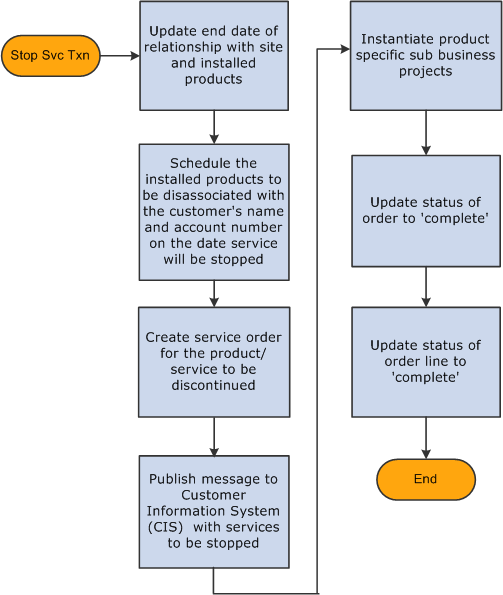
Process flow of the Stop Service transaction
Related Tasks for the Stop Service Business Project
The following tasks are associated with the Stop Service business project:
Phase 1 – Expire relationships.
Task 1 – Update end date of relationship between Site and Customer.
Task 2 – Disassociate customer account with installed product and update end date on account information.
Phase 2 – Create work order.
Task – Create work order in Field Service.
Phase 3 – Instantiate product - specific sub business projects (if any).
Task – Instantiate product - specific business projects.
Phase 4 – Publish deactivate service message to CIS system.
Task – Publish deactivate service message to CIS system
Phase 5 – Update Order Line and Order Status.
Task 1 – Update Order Line.
Task 2 – Update Order Status.
See Also
Transfer Service Business Project
The delivered template for the Transfer Service Business Project is ENRGY_TRSFR_SVC.
The following diagram shows the process flow of the Transfer Service transaction, during which a customer's service is transferred from one location to another.
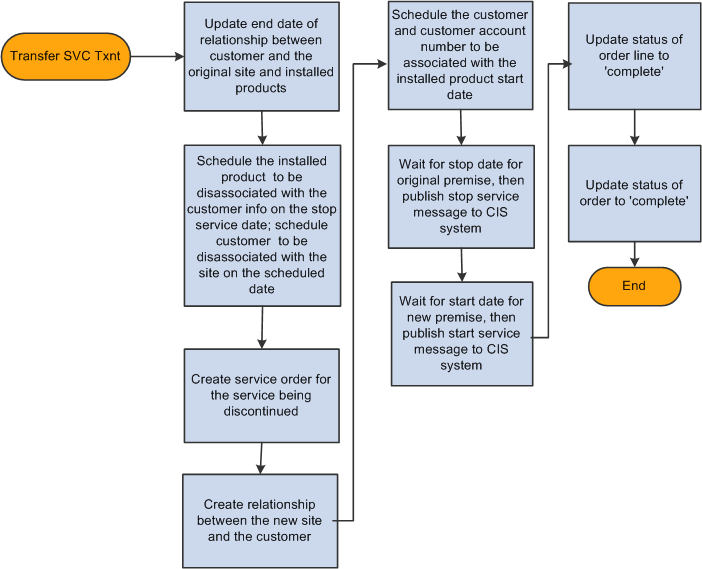
Transfer Service business project
Related Tasks for the Transfer Service Business Project
The following tasks are associated with the Transfer Service business project:
Phase 1 – Internal Credit Verification
Task – Internal Credit Verification for the customer.
Phase 2 – Publish order to fulfillment system.
Task – Publish discreet products (if any) to fulfillment system.
Phase 3 – Expire existing relationships.
Task 1 – Expire relationships between existing Site and Customer (Sold To – Customer), and expire the relationship of the existing customer and site based on Start Service Date.
Task 2 – Disassociate customer account from the existing installed product.
Phase 4 – Create work order.
Task – Create work order for the requested product/service.
Phase 5 – Establish new relationships.
Task 1– Create relationship between new site and customer (Sold To – Customer) and expire the relationship of the existing customer and site based on Start Service Date.
Task 2 – Associate customer account from the existing installed product.
Phase 6 – Create work order.
Task – Create work order for the requested product/service.
Phase 7 – Instantiate product - specific sub business project.
Task – Instantiate product - specific sub business project.
Phase 8 – Publish service message to CIS system.
Task 1– Publish de - activate service message to CIS system.
Task 2 – Publish activate service message to CIS system.
Phase 9 – Update Order Line and Order Status.
Task 1 – Update Order Line.
Task 2 – Update Order Status.
See Also