If the list under Common Connection Problems and your own knowledge fail to diagnose the connection problem, the recommended strategy is to test the components and connections starting at the data source and backtracking through the connections to Integration Services Console.
The client software must pass through three layers of components to connect to the data source containing OLAP Metadata Catalog and the data source, as illustrated in Figure 4, Integration Services Components and Connections.
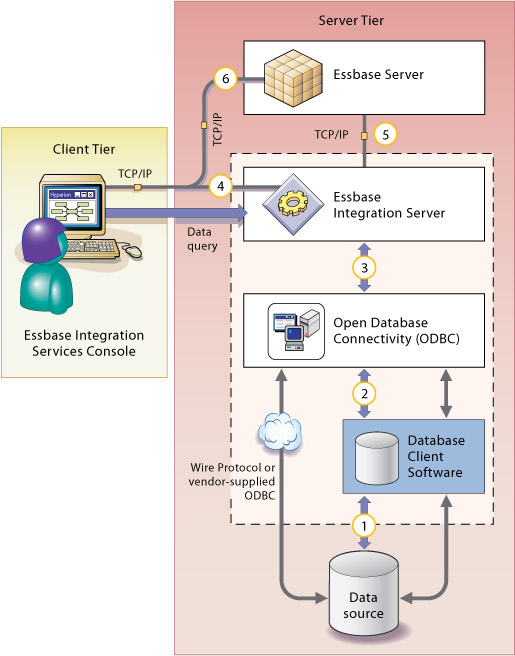
The numbers in Figure 4, Integration Services Components and Connections identify the general diagnostic steps that you should take to isolate connection problems. Follow these steps as indicated, starting with the connection between the database client software and the data source (1) and working backwards through the system to isolate connection problems. After you isolate a problem, refer to the appropriate components topic in Correcting Connection Problems.
 To isolate connection problems:
Attempt to connect to the data source databases using a database client utility program. See Testing the Database Client Connection to the Data Source.
Attempt to connect to the data source databases using ODBC. See Testing the ODBC Connection to the Data Source.
Attempt to connect to the data source databases using Integration Server. See Testing the Integration Server Connection to the Data Source.
Attempt to connect to the data source databases using Integration Services Console. See Testing the Integration Services Console Connection to Essbase Server.
Attempt to connect to Essbase Server using Integration Server. See Testing the Integration Server Connection to Essbase Server.
Attempt to connect to Essbase Server using Integration Services Console. See Testing the Integration Server Connection to Essbase Server.