About Free-Form Mode

In ad hoc analysis, if you are familiar with the dimensions and members of your database, you can use free-form mode by typing dimension and member names directly into cells. You can still use the POV and member selection and other ad hoc operations in free-form grids.

The graphic in this section shows the Smart View grid components. In the example Smart View grid, the Row dimensions are to the left and to the bottom of the Column dimensions. The Page dimensions can occur anywhere in the rows above the Column dimensions (applies to Essbase only).
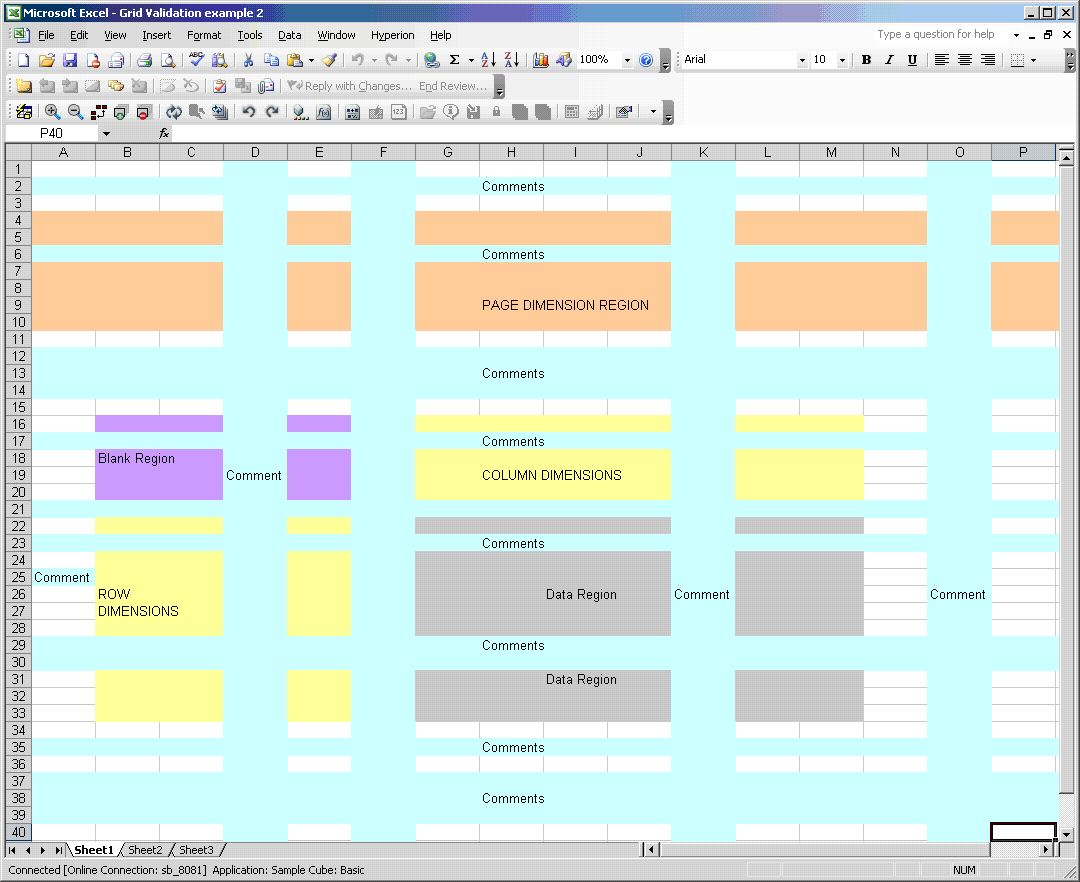
This graphic shows a grid of row, column, and page dimensions, data regions, and blank regions that are described in the following table.

The components of the Smart View grid are described in Table 17.

Table 17. Smart View Grid Components

Grid Component

Description

Row Dimension

A dimension or member placed down one column across one or more rows in a worksheet

Column Dimension

A dimension or member placed on a row across one or more columns in a worksheet

Page Dimension

A dimension that applies to the entire page (Essbase only)

Comments

Text added by the user

Data Region

Areas of the grid that contain data for dimensions or members

Blank Region

Areas of the worksheet that contain no entries