
Running the Transaction Loader
This topic provides an overview of the Transaction Loader run process and discusses how to run the Transaction Loader (AMIF1000).
Page Used to Run the Transaction Loader
|
Page Name |
Definition Name |
Navigation |
Usage |
|---|---|---|---|
|
Load Transactions into AM |
RUN_AMIF1000 |
|
Run the Transaction Loader process. |
Understanding the Transaction Loader Run Process
The Transaction Loader reads data staged in the loader tables and populates Asset Management tables with the data. Use the Transaction Loader whenever the loader tables have been populated as a result of integration with other applications or conversion from a previous fixed-asset system, or to complete data updates processed by a mass change or physical inventory.
Note: If you are converting from a previous fixed-asset system, you must run the Transaction Edit program (AMIFEDIT) before running the Transaction Loader. The Transaction Edit program performs edit checks on the data fields that you specify to help ensure that the information that you load into Asset Management is correct. Review the data loaded into INTFC_FIN, INTFC_PHY_A, and INTFC_PHY_B, and view the Transaction Loader (AMIF1000) carefully before you run it. You may need to change some of the data defaults that it contains.
If you are using the Transaction Loader to integrate information from Purchasing or Payables, you may want to consolidate or unitize load lines. This is necessary only if you are unable to use the serialization characteristics in the item master catalog. If you choose to do so, consolidation or unitization must be completed before you run the Transaction Loader.
Note: Serialization is not supported in Asset Management from PeopleSoft Payables for quantities greater than one (as it is from PeopleSoft Purchasing.)
For converted assets and assets loaded through the Transaction Loader, the default is to book accumulated depreciation to the previous period. However, if you complete the START_PD, END_PD, and FISCAL_YEAR fields on the Financial Loader table (INTFC_FIN) with the values for the current period, and the amount in the DEPR field is not 0, any accumulated depreciation is booked to the current period.
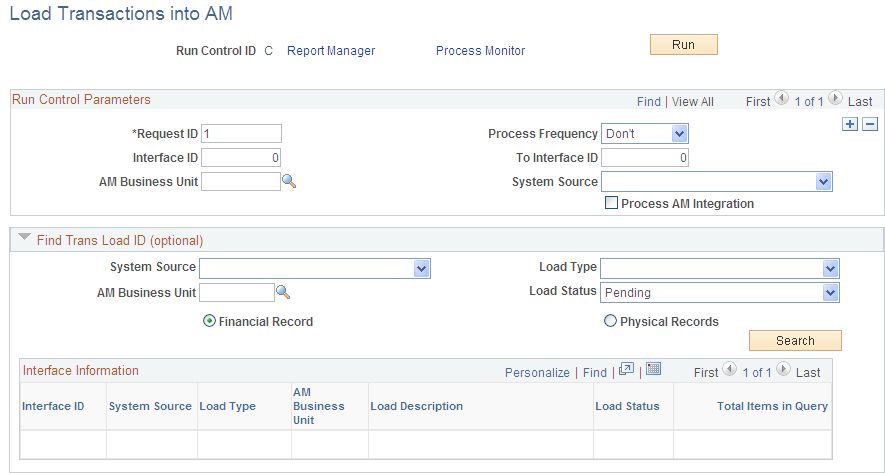
Load Transactions into AM Page
Use the Load Transactions into AM page (RUN_AMIF1000) to run the Transaction Loader process.
Image: Load Transactions into AM page
This example illustrates the fields and controls on the Load Transactions into AM page. You can find definitions for the fields and controls later on this page.
Run Control Parameters
Find Trans Load ID (optional)
If you do not already know the interface ID that you want to process, the Transaction Loader enables you to search for transactions based on system source, load type, AM business unit, load status, and whether they consist of physical or financial records. You can use as many or as few of these criteria as you want. The more you use, the narrower your search is.
The load status can be one of the following values. Enter the appropriate value:
|
Load Status |
Definition |
|---|---|
|
Consolidate (consolidated) |
Transactions Consolidated (will not be loaded). |
|
Errored |
Transaction Errors Note: To rerun transactions in status Errored, you have to change the load status to Pending. |
|
Excluded |
Transaction is being excluded from Asset Management due to the asset cost not meeting the corresponding capitalization threshold. A detailed message appears in the Error Message field that states that the capitalization threshold for this profile has determined that this is an expense and will not generate an asset ID. Additionally, the system inserts an entry in the audit table. |
|
In Process |
Processing is ongoing. |
|
Loaded |
Transactions Loaded |
|
On Hold |
Transactions are not processed. Set this status manually to prevent the processing of some rows if you are expecting another event to occur before running. |
|
Pending |
Transactions Not Loaded |
|
Replaced |
Transaction line replaced with alternate line. |
|
Unitized |
Transactions Unitized (will not be loaded) |