
Defining Financial Processing for PeopleSoft Asset Management
Use the Asset Categories (CATEGORY_DEFN) component and the Capitalization Limits (DEPR_CAP_LIMIT) component to define financial processing in PeopleSoft Asset Management.
This topic provides an overview of financial processing, lists the pages to define financial processing and describes how to:
Define asset categories.
Set up capitalization limits.
Set up capitalization threshold processing.
Set up fair value processing.
Pages Used to Define Financial Processing
|
Page Name |
Definition Name |
Navigation |
Usage |
|---|---|---|---|
|
Categories |
CATEGORY_DEFN |
|
Establish asset categories, which classify assets by type for accounting entry purposes. Typically, these categories reflect how assets are reported on balance sheets. Examples of commonly used asset categories are Furniture and Fixtures, Machinery and Equipment Office Equipment, Leasehold Improvements, and so forth. |
|
Inflation Information |
CATEGORY_SEC |
Click the Inflation Information link from the Category page. |
Establish an inflation adjustment factor by selecting the market index and rate to apply. |
|
Asset Categories Report |
RUN_AMAS1100 |
|
Run a report on asset categories. |
|
Cost Types |
COST_TYPE_DEFN |
|
Define cost types. |
|
Financing Codes |
FINANCING_CD |
|
Define financing codes to help you analyze your debit and credit relationships for capital-intensive and government projects. For example, you could set up codes to identify bonds, such as IRBs, IDBs, and TEBs. |
|
Indexes |
AM_INDEX_TBL |
|
Set up an index, which is used to remeasure assets according to set percentages. Gain and loss on retirement is then calculated by using the resulting net book value. Indexes are usually maintained by regulatory agencies, but you can set up your own as well. You can set up rates to associate with indexes on the Defining Market Rates page. |
|
C.A.P. Types (capital acquisition plan types) |
CAP_TYPE |
|
Set up C.A.P. types. If you are using Asset Budgeting, you set up codes to be used with the C.A.P. function. You can also use C.A.P. type codes to track assets acquired as part of a C.A.P. |
|
Capitalization Limit |
DEPR_CAP_LIMIT |
|
Set up capitalization limit codes by business unit by book, as necessary, especially Germany. |
|
Capitalization Thresholds |
CAP_THR_DEFN |
|
Establish capitalization thresholds by asset profile to be used in automatic classification of capital asset, noncapital asset or expense asset. |
|
Cap Threshold Validation |
AM_CAPVAL_RQST |
|
Run the process to validate whether an asset still meets conditions to remain in the capitalization status that it was originally catalogued upon asset addition based on the capitalization threshold process. |
|
Clearing Reconciliation |
AM_CLEREC_RQST |
|
Run the process to reconcile the clearing account that is created by trackable assets from feeder systems against the expense account. |
|
Review Expense Entries |
ASSET_NF_DIST |
|
Run a report to show the capitalization status of assets based upon criteria selection. |
|
Capitalization Summary Report |
AM_CAPSUM_RQST |
|
Run a report to show the capitalization status of assets based upon criteria selection. |
Understanding Financial Processing in PeopleSoft Asset Management
PeopleSoft Asset Management enables you to apply various attributes to assets for financial reporting purposes, such as categories, cost types, financing codes, and indexes. The purpose of defining these asset attributes is to help refine asset information into meaningful information blocks.
The combination of asset category and transaction code determines into which accounts an asset transaction is entered. Asset category is required.
To group assets by class for reporting or informational purposes only, use the asset class field.
Cost types represent different cost components of an asset, such as materials, labor, and overhead. For example, you can differentiate between the cost of building an asset and its market value by allocating the cost of production to one cost type and the margin of profit to another cost type. Cost type, in combination with asset category and transaction code, determines into which accounts the costs are entered in the general ledger.
Use indexes to remeasure assets according to set percentages. An index may consist of several subindexes, each of which has a separate index amount. You can set up a subindex for each asset category, with amounts that correspond to the inflation or valuation percentages for that year.
You also use indexes and subindexes to calculate replacement costs for assets. Tying an index, such as the consumer price index (CPI), to an asset profile enables replacement cost to be updated in adjustment, partial InterUnit transfer, partial retirement, and partial reinstatement transactions. Revaluation indexes are usually dictated by regulatory agencies, but you can also set up your own.
In compliance with Financial Accounting Standards (FAS) 157, which establishes U. S. guidelines for measuring the fair values of assets and liabilities, PeopleSoft Asset Management provides a framework by which to designate the appropriate valuation method for proper fair value valuation processing. Asset Management also supports fair value processing for international organizations.
PeopleSoft Asset Management validates capitalization limits when you add assets. At the business unit or book level, indicate whether validation should occur against a specific limit or against a table where you have stored step limit amounts and specified various messages for assets whose costs fall below these steps. You can also specify incremental valuation thresholds that identify the asset as a low value asset and how it should be treated during processing. The capitalization limit table accommodates the processing requirements of various countries. In some countries, a low value asset must be fully depreciated in the year of acquisition; in others, a low value asset may be added but must be taken as an expense.
PeopleSoft Asset Management can also determine capitalization status of an asset based on its cost according to capitalization thresholds that you define. When adding new assets, either online or batch, the system automatically classifies them according to their cost into capital assets, noncapital assets or expense assets. You create a Capitalization Threshold for each profile of asset that you want to evaluate and associate it with that asset profile. Processes are available to validate capitalization status and deal with adjustments to the original cost, reconcile any potential clearing account with feeder systems, and access reports and audit trails to facilitate control of these transactions.
See the topic “Capitalization Threshold” in Understanding Adding and Maintaining Assets
Categories Page
Use the Categories page (CATEGORY_DEFN) to establish asset categories, which classify assets by type for accounting entry purposes.
Typically, these categories reflect how assets are reported on balance sheets. Examples of commonly used asset categories are Furniture and Fixtures, Machinery and Equipment Office Equipment, Leasehold Improvements, and so forth.
Image: Categories page
This example illustrates the fields and controls on the Categories page. You can find definitions for the fields and controls later on this page.
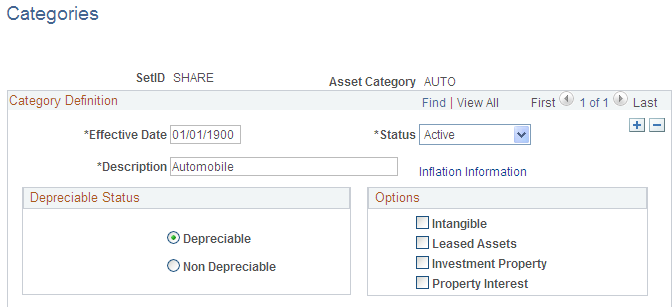
Complete the appropriate fields for each asset category. Identify the depreciable status as Depreciable or Non Depreciable.You can optionally associate inflation processing information with the category.
See Setting Up Asset Profiles.
Options
These options drive the accounting entries to display in the accounting entry template. When possible, assign these options at the asset category level to alleviate this identification at the individual asset level. Identification at the category or profile level is also necessary for handling batch transactions where there is no use intervention.
Cost Types Page
Use the Cost Types page (COST_TYPE_DEFN) to define cost types.
Image: Cost Types page
This example illustrates the fields and controls on the Cost Types page. You can find definitions for the fields and controls later on this page.
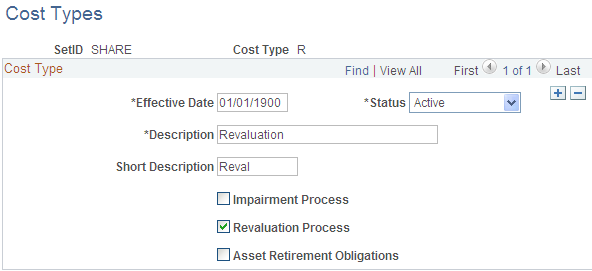
Note: When selecting a cost type for processing, you should update the accounting entry templates because new accounting entries need to be set up for these transactions.
Capitalization Limits Page
Use the Capitalization Limits page (DEPR_CAP_LIMIT) to set up capitalization limit codes by business unit by book, as necessary, especially Germany.
Image: Capitalization Limits page
This example illustrates the fields and controls on the Capitalization Limits page. You can find definitions for the fields and controls later on this page.
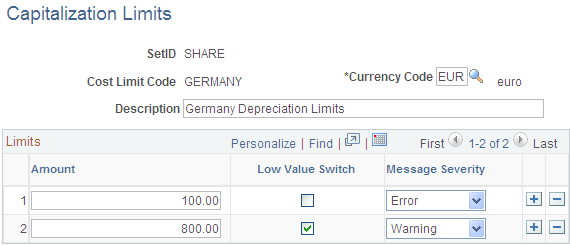
Create a cost limit code, complete the applicable fields, and select the Low Value Switch check box to identify which limit amount triggers low value asset reporting. This is used only in certain countries.
For example, you might set up capitalization limits for Germany. Using the Cap Limit table, you can set up your system so that assets with a cost less than 800.00 EUR could be added, but the system would generate a warning that the cost was below the capitalization limit; likewise, assets with a cost less than 100.00 EUR could not be added and would generate an error message.
Capitalization Thresholds Page
PeopleSoft Asset Management can determine capitalization status of an asset based on its cost or quantity according to limits that you define. This can be accomplished by enabling the optional Capitalization Threshold feature. Once you enable this feature and complete the required setup, the system automatically classifies assets using the defined thresholds when adding new assets, either online or in batch: Assets are classified within one of the following categories:
Capital Assets - The system generates an asset ID and stores physical and financial information. Financial information is stored in the cost table (COST). The system also stores acquisition details. Therefore, these assets are trackable from both a physical and financial standpoint. This term is interchangeable with Financial Assets.
Noncapital Assets - The system generates an asset ID and stores only physical information. The cost information is stored in the noncapitalized cost table, (COST_NON_CAP). The system also stores acquisition details. Therefore, these assets are trackable from a physical standpoint only. This term is synonymous with Trackable Assets or Nonfinancial Assets.
Expense Assets - The system does not generate an asset ID. If an asset is entered online that does not meet the capitalization threshold, an error message appears saying that the asset has been catalogued as an expense due to its cost amount and could not be considered as an asset. If the asset is entered in batch, the system stores a message in an audit table that explains why that interface line was not processed. Because of their low cost, these assets are considered an expense when acquired and there is no interest in tracking them within the Asset Repository.
To begin using the Capitalization Threshold feature, complete the following setup steps:
Enable the Cap Threshold Processing option at the system level within Installation Options - Asset Management.
Enable the Capitalization Threshold option at the business unit level.
See Understanding Asset Management Business and Cash Generating Units.
Define Capitalization Thresholds and associate them to the appropriate asset profiles.
Use the Capitalization Thresholds page (CAP_THR_DEFN) to establish capitalization thresholds by asset profile to be used in automatic classification of capital asset, noncapital asset or expense asset.
Image: Capitalization Thresholds page
This example illustrates the fields and controls on the Capitalization Thresholds page. You can find definitions for the fields and controls later on this page.

Capitalization Threshold Validation Page
The Capitalization Threshold Validation process validates whether assets still belong to the capitalization brackets to which they were initially catalogued after adjustments are made to the original cost. If an asset is in the same bracket as originally classified, then this process takes no further action; however, if it is not, the asset is moved to its respective capitalization bracket.
The following graphic represents the process flow for the capitalization threshold validation process:
Image: Capitalization Validation process flow
Capitalization Threshold validation process flow:

Use the Capitalization Threshold Validation page (AM_CAPVAL_RQST) to run the process to validate whether an asset still meets conditions to remain in the capitalization status that it was originally catalogued upon asset addition based on the capitalization threshold process.
Image: Capitalization Threshold Validation page
This example illustrates the fields and controls on the Capitalization Threshold Validation page. You can find definitions for the fields and controls later on this page.

Supply the selection criteria for assets to be evaluated for capitalization threshold validation.
Clearing Reconciliation Page
When an asset is deemed trackable by the capitalization threshold process, the asset ID is generated but in fact no accounting activities take place. Additionally, when assets are added through feeder sources, it is likely to debit the Fixed Account and credit a Clearing account that was previously debited at the source accounting. The Clearing Reconciliation process provides a way to balance out (credit) the clearing account that was previously debited at the source product accounting and debit the expense account. This is not applicable to the trackable assets that are entered directly into Asset Management with no clearing account at all. In this instance, the expense account is most likely debited when the asset is added.
This process checks the noncapital cost lines, determines the expense and clearing accounts from the accounting entry templates and inserts rows into the staging table (DIST_LN) to be loaded as journal entries into general ledger for posting.
Use the Clearing Reconciliation page (AM_CLEREC_RQST) to run the process to reconcile the clearing account that is created by trackable assets from feeder systems against the expense account.
Image: Clearing Reconciliation page
This example illustrates the fields and controls on the Clearing Reconciliation page. You can find definitions for the fields and controls later on this page.
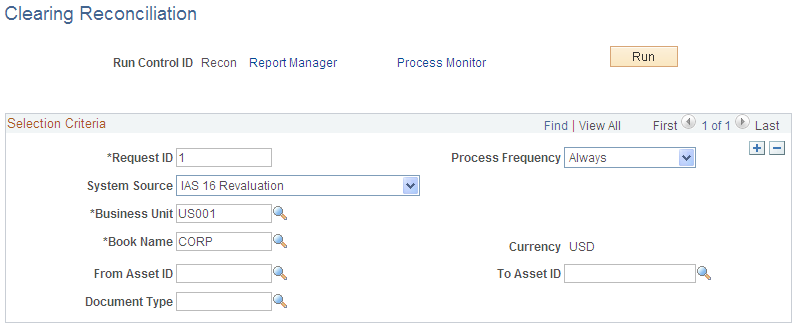
This process creates the clearing accounting entries from the noncapitalized assets that have the selected system source. For each noncapital row that matches the criteria, an entry is generated in the DIST_LN table that credit the clearing account and debit the expense account according to the accounting entry template for the EX distribution type. This distribution type is available for the ADD and ADJ accounting entry templates for those template IDs that have the capitalization threshold enabled.
Capitalization Threshold Summary Report Page
Use the Capitalization Threshold Summary Report page (AM_CAPSUM_RQST) to run a report to show the capitalization status of assets based upon criteria selection.
Image: Capitalization Threshold Summary Report page
This example illustrates the fields and controls on the Capitalization Threshold Summary Report page. You can find definitions for the fields and controls later on this page.

Select criteria to report assets as they are classified according to the Capitalization Threshold process. The report displays the acquisition date, asset ID, description, quantity, tag number, serial ID, capitalized cost and noncapitalized cost.