
Setting Up Asset Profiles
Use the Asset Profile Definition (PROFILE) component to define asset profiles.
This topic provides an overview of asset profiles and discusses how to:
Define asset profiles.
Specify asset books for a profile.
Set up special terms for depreciation methods information.
Set up inflation information for a profile.
Set up salvage rounding rules.
Specify tax attributes in a profile.
Specify child asset inheritance attributes in a profile.
Pages Used to Set Up Asset Profiles
|
Page Name |
Definition Name |
Navigation |
Usage |
|---|---|---|---|
|
Asset Profile |
PROFILE_DEFN |
|
Define asset profiles. |
|
Asset Profile - Depreciation |
PROFILE_BK_01 |
|
Identify the criteria to use in depreciation calculations. |
|
Depreciation Method Information |
PROFILE_DEPR_DETL |
Select the Special Depr check box and click Special Terms on the Depreciation page of the Asset Profile component. |
Set special depreciation terms for an asset profile and select an accounting method for these special terms. These are commonly used to meet depreciation requirements for specific countries. |
|
Inflation Information |
PROFILE_SEC |
|
Establish an inflation adjustment factor by selecting the market index and rate to apply. |
|
Salvage Rounding Options |
SALVAGE_OPTION_SEC |
Click Salvage Rounding Options on the Asset Profile - Depreciation page. |
Enter options for rounding depreciation amounts for this book. This is for use in Japan. |
|
Asset Profile - Tax |
PROFILE_BK_03 |
|
Specify property type and tax depreciation criteria and identify which tax credits will be used by the profile. |
|
Asset Profile - Child Asset Inheritance |
PROFILE_PAR_BK_ECD |
|
Specify child asset attributes that will be used by the profile and inherited from the parent asset for Express Add, Basic Add, and batch-created assets. The inheritance based on the selected items happens upon defaulting the profile in Express Add and capitalizing the asset in Basic Add, and when you are using Default Profile processing in the Transaction Loader if the Business Unit option is selected. |
|
Profile Changes In Mass |
RUN_AMPRFCHG |
|
Copy an asset profile from one set ID to another, or update a profile by changing some of its attributes. |
Understanding Asset Profiles
An asset profile is a template that contains standard depreciation criteria for an asset type and its corresponding asset books. The information established in an asset profile can be used as default values when you're adding assets to the system. Profiles associated with indexes enable replacement cost calculations. Profiles are recommended when you have a large number of assets of the same type. Defining default values minimizes data entry, ensures consistency, and enhances accuracy levels.
Set up asset profiles to match most, if not all, of the major asset categories that you track on your books. These can range from the standard categories such as Land, Furniture & Fixtures, Machinery & Equipment, and Expensed Items, to more detailed categories that you may want to track, such as Computers, Software, Phones, and Fax Machines.
Note: You must set up at least one asset profile before you can add any assets to the system. Remember that profiles are templates that help reduce data entry when you are actually adding an asset. When you go through the process of entering assets into the system, you can override any of the fields in an asset profile. Because profiles are required when you are using ExpressAdd, Oracle recommends that you set up a blank dummy profile for nonstandard assets.
Asset Profiles – Definition Page
Use the Asset Profiles - Definition page (PROFILE_DEFN) to define asset profiles.
Image: Asset Profiles - Definition page
This example illustrates the fields and controls on the Asset Profiles - Definition page. You can find definitions for the fields and controls later on this page.

You create asset profiles from the Profile (PROFILE) component. You can create profiles with varying levels of detail. The level that you use depends on how much information you want to be provided by default into the system when you add an asset. Some asset profiles are used to define financial attributes, while others are not. To successfully create a financial profile, you must enter at least the following information:
Profile ID.
Asset category.
Asset book name.
Depreciation attributes.
Asset type.
Each profile has a unique profile ID. You can use this ID to group profiles by type. For example, you might want to have several automobile profiles, such as Autos, Autos-Luxury, and Autos-Leased.
| Asset Description |
Enter a description for this asset profile. |
| Asset Class |
Select the asset class with which an asset profile will be associated by default. The available options are defined when you establish asset class codes. |
| Asset Type |
Select the asset type. Oracle delivers these asset types: Hardware, Software, Equipment, Property, Fleet, Machinery, Furniture, Facility, Intangible, Other. |
| Asset Subtype |
Select the asset subtype. Valid values for the selected asset type appear from the drop-down list box. |
| Acquisition Code |
Select the acquisition code from the drop-down list box. Available options are:
|
| Taggable Asset |
Select to indicate that an asset is taggable. Most physical assets can be tagged with a tag number to help keep track of them. Some assets, however, such as buildings or leasehold improvements, cannot be tagged. If an asset is taggable, it probably already has a tag number associated with it, which is recorded when the asset is added. Sometimes, however, an asset may be taggable, but not yet tagged. The Taggable Asset check box can be used to flag this type of asset. Note: To use the Physical Inventory functionality in PeopleSoft Asset Management, your assets must be tagged. |
| Capitalized Asset |
Select to indicate whether this profile will be used for assets with cost and depreciation associated with them. Most assets in the PeopleSoft Asset Management system will be capitalized assets. If you are setting up a profile for noncapitalized assets, (assets with no cost or depreciation criteria), deselect Capitalized Asset. Typically these assets are expensed, not actually owned, or fully depreciated, but you still want to track them. |
| Use As Tool |
Select if the asset is sued as a tool in connection with the maintenance or repair of another asset. |
| Asset Retirement Obligations |
Select this option for an asset profile to apply asset retirement obligation (ARO) defaults to the associated asset, thus flagging the asset as eligible for ARO processing. You can select the Asset Retirement Obligation check box for any asset profile to apply ARO defaults when adding an asset. If you decide that the asset is not ARO-eligible, you can deselect the defaults for the asset manually when adding it. Conversely, if you do not use an asset profile, or the selected profile does not carry the ARO defaults, you can manually select the ARO options for the asset when adding it in the Basic Add component. to be used specifically as default profiles for assets requiring ARO treatment when you add new assets. The ARO functionality provides asset retirement obligation measurement and reporting in compliance with Financial Accounting Standards for leased assets, group assets, and asset impairment. See Understanding Adding and Maintaining Assets For more information, see Accounting for Asset Retirement Obligations |
| Index Name |
Select the index by which replacement or valuation cost will be calculated. When you run the Calculate Replacement Cost (AMRCCALC) process, it multiplies the asset cost by the amount in the index selected here. |
| SubIndex Name |
Select the subindex category for the index to use to calculate replacement or valuation cost. |
| Threshold ID |
Select the Threshold ID to be used as the default value for assets within a given profile when using the optional Capitalization Threshold feature. Capitalization thresholds are defined on the Capitalization Thresholds page and selected at the asset profile level. When the Capitalization Threshold feature is enabled, PeopleSoft Asset Management:
Note: This field appears only when the Capitalization Threshold feature has been enabled from the Asset Management Installation Options page. |
(AUS) Using Research and Development Information
Research and Development Information is used to meet Australian asset processing requirements; for others, these fields are informational.
See (AUS) Using PeopleSoft Asset Management Options to Meet Australian Requirements.
Asset Profiles - Depreciation Page
Use the Asset Profiles - Depreciation page (PROFILE_BK_01) to identify the criteria to use in depreciation calculations.
Image: Asset Profiles - Depreciation page
This example illustrates the fields and controls on the Asset Profiles - Depreciation page. You can find definitions for the fields and controls later on this page.
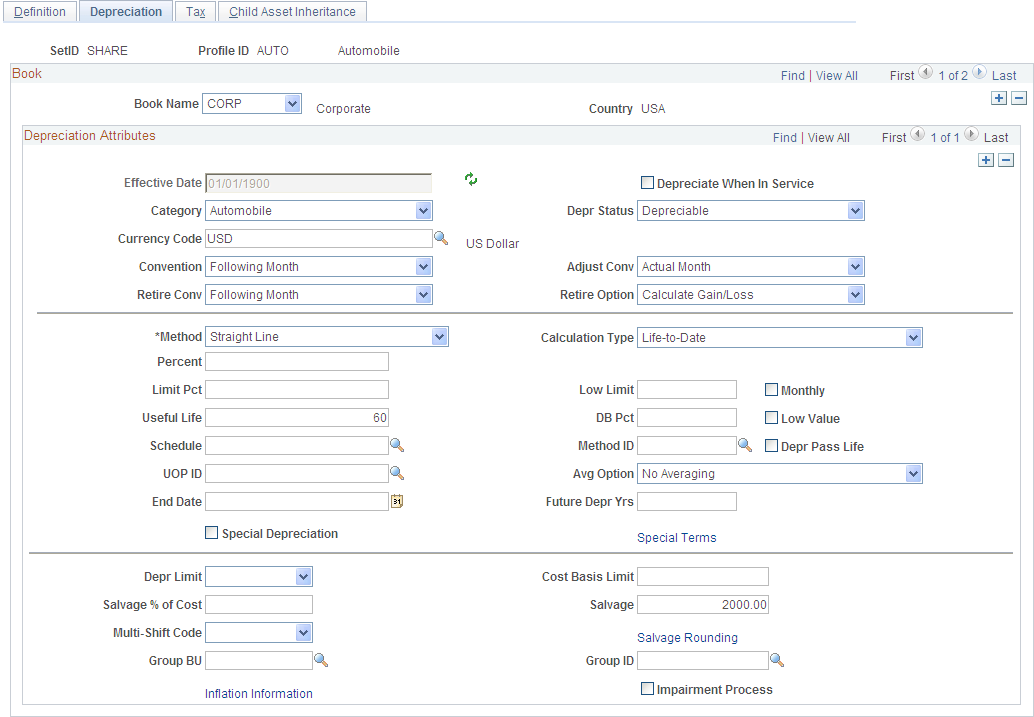
Note: Each asset can report to multiple books and have multiple depreciation attributes per book.
| Book Name |
Enter a book name that defines the rules for the assets entered with this profile. Books are defined during system setup and associated with business units. Only valid books can be assigned. |
| Effective Date |
Enter the date that indicates when the convention and depreciation method take effect. If you want a history of changes made to a profile, be sure to add new rows to the table and use effective dating to update profiles, rather than making changes to the initial row. |
| Depreciate When in Service |
Select to allocate annual depreciation as of the date that you placed the asset in service. If you do not select this option, PeopleSoft Asset Management allocates annual distribution as of the date determined by the depreciation convention. This option is valid only in the year that the asset was acquired. |
| Category |
Defines the category of an asset, such as Furniture & Fixtures or Machinery & Equipment. The available category codes are those you entered on the Category Code table. In general, these will correspond to the General Ledger asset accounts. Asset Category is used in accounting entry generation. |
| Depr Status |
Enter the depreciation status. |
| Currency Code |
Select a currency code. |
| Adjust Conv (adjustment convention) |
Select an adjustment convention. |
| Convention |
Select a depreciation convention. |
| Retire Conv |
Select a retirement convention. |
| Retire Option |
Select the retirement calculation option to be processed for assets within a given profile. These retirement options are available at the profile, book and asset levels. See Retire Assets Page. |
| Method |
Select a depreciation method. Some depreciation methods require you to enter additional information. Note: If you specify the depreciation method as Flat Rate or a Declining Balance method or Manual depreciation for tax books, you should enter the recovery life. |
Note: If you select Non Depreciable on this page, you must still enter values for Useful Life and Convention. However, you need not update the remainder of the Asset Profiles pages. Because the profile is defined for nondepreciable assets, the information in these pages will not be used in any processing.
Ensure that you establish an effective date for the profile that is valid for the currency code specified for the profile.
|
Method |
Fields That Appear |
|---|---|
|
Declining Balance w/SL by Limit % |
DB Pct (declining balance percent) and Limit Pct |
|
Declining Balance |
Percent, Low Limit, Monthly |
|
Declining Balance w/SL |
DB Pct |
|
Depreciation Schedule |
Schedule |
|
Flat Rate % |
Percent, Low Limit, Avg Option (averaging option) |
|
France Derogatory Balance |
DB Pct Percent, Low Limit, Depr Pass Life (depreciate past life) |
|
Germany Staffel Method |
DB Pct, Percent, Low Limit, Depr Pass Life |
|
Japan − Lease Depreciation |
No additional fields appear. |
|
Japan − Intangible/Strt Line |
DB Pct, Percent, Low Limit, Depr Pass Life |
|
Japan − Tangible / Declining Bal |
DB Pct, Percent, Low Limit, Depr Pass Life |
|
Japan − Tangible/Strt Line |
DB Pct, Percent, Low Limit, Depr Pass Life |
|
Japan −Changes DB to SL |
DB Pct, Percent, Low Limit, Depr Pass Life |
|
Japan - Changes DB to SL Rev |
DB Pct, Percent, Low Limit, Depr Pass Life Available for assets acquired on or after April 1, 2007. |
|
Japan - Tangible / Strt Line Rev |
DB Pct, Percent, Low Limit, Depr Pass Life Used for assets acquired on or after April 1, 2007. |
|
Manual Depreciation |
No additional fields appear. The Manual Depreciation method enables you to adjust depreciation amounts that are generated by some other method. To use manual depreciation, you must therefore first create depreciation entries using another method. When this has been done, you can make your adjustments. |
|
Straight Line |
Useful Life |
|
Straight Line Percent |
(IND) Percent |
|
Sum of the Years |
NA |
|
Units of Production |
UOP ID (units of production ID) |
|
User Defined Method |
Method ID, DB Pct, Percent, Low Limit, Depr Pass Life |
The following table defines the additional fields:
Note: Using the flat rate depreciation method will cause any depreciation to be posted to the end of the calendar. If this is not your intention, you must enter a low limit of .01 when you first select the depreciation method for this asset. If you have not already done this, update the Depreciation Method field by selecting Flat Rate and entering .01 in the Low Limit additional field that appears.
Note: Each group member asset profile can be used by only one business unit.
Depreciation Method Information Page
Use the Depreciation Method Information page (PROFILE_DEPR_DETL) to set special depreciation terms for an asset profile and select an accounting method for these special terms.
These are commonly used to meet depreciation requirements for specific countries.
Select the Special Depr check box and click Special Terms on the Depreciation page of the Asset Profile component.
Image: Depreciation Method Information page
This example illustrates the fields and controls on the Depreciation Method Information page. You can find definitions for the fields and controls later on this page.

Note: Additional fields are provided to comply with the depreciation methods used in countries other than the U.S.
When you use additional terms, they affect depreciation calculations in the following ways:
|
Term |
Depreciation |
|---|---|
|
Special |
Depreciation × Rate |
|
Accelerated |
Depreciation × Rate |
|
Initial |
Cost × Rate |
|
Increase |
Depreciation × Rate |
Note: Year of Change(displayed from the ASSET_DPR_DETAILS page) is available only when the depreciation method is Japan-Change DB to SL.
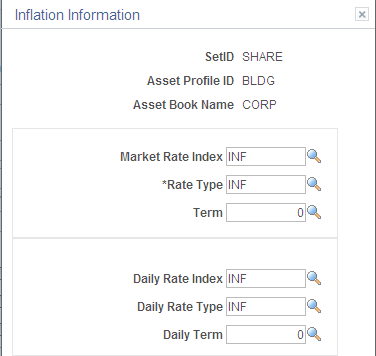
(ARG, BRA, and MEX) Asset Profiles - Inflation Information page
Use the Asset Profiles - Inflation Information page (PROFILE_SEC) to establish an inflation adjustment factor by selecting the market index and rate to apply.
Image: Asset Profiles - Inflation Information page
This example illustrates the fields and controls on the Inflation Information page. You can find definitions for the fields and controls later on this page.
(JPN) Salvage Rounding Options page
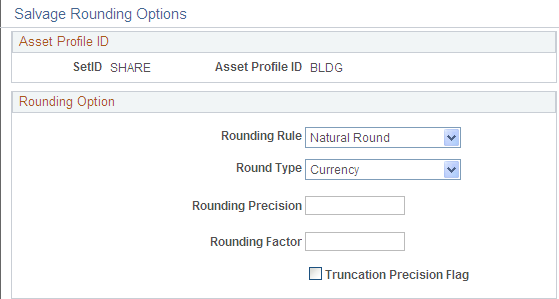
Use the Salvage Rounding Options page (SALVAGE_OPTION_SEC) to enter options for rounding depreciation amounts for this book.
This is for use in Japan.
Image: Salvage_Rounding_Options
This example illustrates the fields and controls on the Salvage_Rounding_Options. You can find definitions for the fields and controls later on this page.
See Understanding PeopleSoft Asset Management in Global Settings.
Asset Profiles - Tax Page
Use the Asset Profiles - Tax page (PROFILE_BK_03) to specify property type and tax depreciation criteria and identify which tax credits will be used by the profile.
Image: Asset Profiles - Tax page
This example illustrates the fields and controls on the Asset Profiles - Tax page. You can find definitions for the fields and controls later on this page.
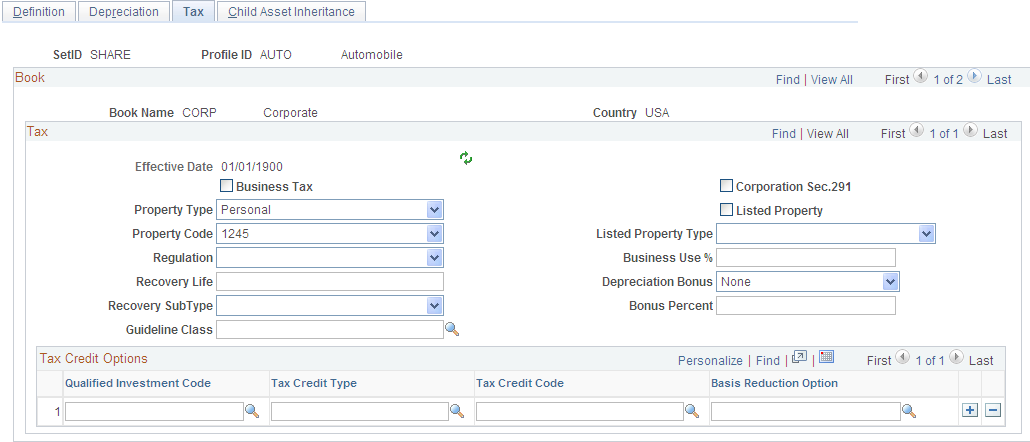
Note: Asset tax attributes primarily address Unites States tax issues except where noted.
| Property Type and Property Code |
Determine the amount of gain treated as ordinary income on the disposition of this asset. |
| Regulation |
Identifies the depreciation system elected for this asset:
|
| Recovery Life and Recovery Subtype |
For reporting purposes, you can further classify the asset by specifying the recovery life expressed in years and the recovery subtype, for example, 15-Year Low-Income Housing. You can also specify the asset guideline class. All current classifications are set up in the Tax Class table in the delivered tableset. |
| (IND) Guideline Class |
Processing tax and depreciation in India requires the designation of a tax class rate that is associated with an asset block. To associate the tax class rate with a profile, enter the tax class and associated asset block rate here. |
| Corporation Sec. 291 (corporation section 291) |
Select if this company is a corporation. This check box must be selected if the company is a corporation for the AMTX3210 tax report (Tax Retirement Capital Gains) to accurately reflect the correct Sec. 1231/Ordinary gains. |
| (FRA) Business Tax |
Select if assets using this profile are subject to a business tax. This is required in some countries. |
| Listed Property |
Select to record whether the asset is listed property. Listed property is a certain kind of asset that is conducive to mixed business or personal use, such as:
|
| Listed Property Type |
Select the property type that corresponds to the Listed Property check box. |
| Business Use % (business use percentage) |
Enter the percentage amount of the business use of this listed property asset. Based on the business use percentage that you enter, the basis calculated for depreciation is: (Basis) = (Cost*Bus_Use_%) |
| (USA) Depreciation Bonus |
Select to indicate the specific depreciation bonus definition if the asset qualifies for depreciation bonus treatment. You can also create your own depreciation bonus definitions for selection in this field using the Depreciation Bonus Info page. See Defining Depreciation Bonus Information. PeopleSoft delivers the following values:
|
| (USA) Bonus Percent |
Supply the amount (percentage) to be applied if the asset qualifies for a depreciation bonus based on the acquisition date and in-service date. |
Using Tax Credit Options
The rate and amount of the tax credit are based on federal tax law and determined by the qualified investment code, tax credit type and code, and basis reduction option in PeopleSoft Asset Management.
Select a qualified investment code if applicable:
Select a tax credit type if applicable. In the U.S., certain business incentive credits can be taken:
| R (rehabilitation): |
Rehabilitation Credit |
| E (energy): |
Energy Credit |
| I (investment): |
Regular Investment Credit |
| U (user): |
User-defined |
The tax credit code further defines the tax credit. For example, a 20 percent rehabilitation tax credit is available for historic buildings. Some credits require a corresponding reduction in the cost basis of the asset.
The basis reduction option indicates whether a reduction in the cost basis is required. Three codes are provided:
| B (basis): |
Basis Reduction |
| P (percentage): |
Percentage Rate Reduction |
| N (no): |
No Reduction |
Child Asset Inheritance Page
Use the Asset Profile - Child Asset Inheritance page (PROFILE_PAR_BK_ECD) to specify child asset attributes that will be used by the profile and inherited from the parent asset for Express Add, Basic Add, and batch-created assets.
The inheritance based on the selected items happens upon defaulting the profile in Express Add and capitalizing the asset in Basic Add, and when you are using Default Profile processing in the Transaction Loader if the Business Unit option is selected.
Image: Asset Profiles - Child Asset Inheritance page
This example illustrates the fields and controls on the Asset Profiles - Child Asset Inheritance page. You can find definitions for the fields and controls later on this page.
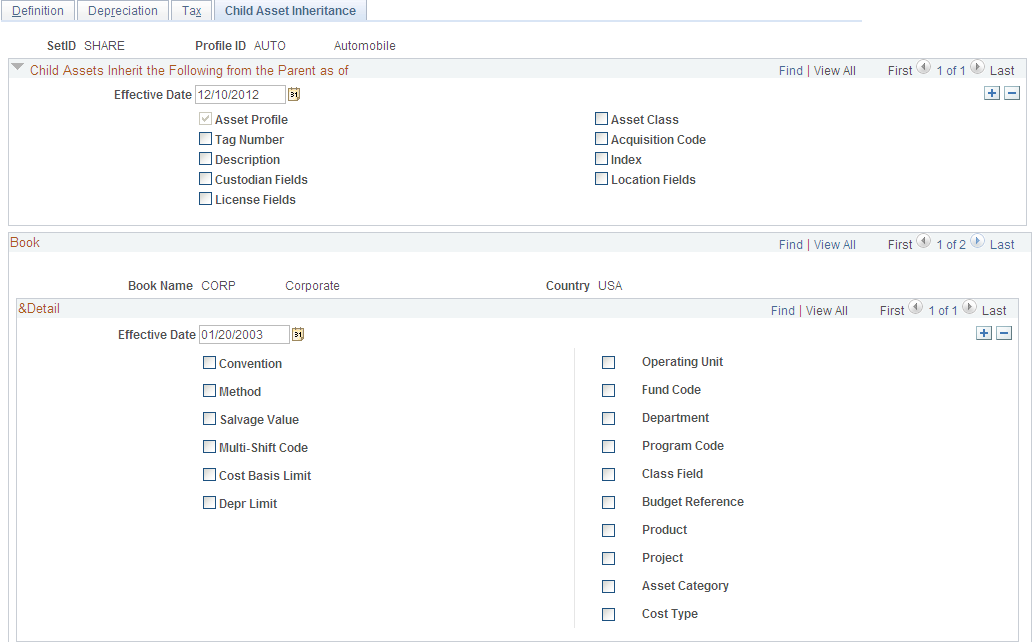
Select the attributes and other information that the child asset inherits from the parent asset.