
Accounting for Asset Retirement Obligations
This topic provides an overview of accounting for asset retirement obligations (ARO), lists the pages to define ARO, and describes how to:
Enable assets for ARO processing.
Capture asset retirement obligations.
Depreciate the Asset Retirement Cost.
Review ARO processing results.
Report for asset retirement obligations.
Settle the asset retirement obligation.
Understanding Accounting for Asset Retirement Obligations (ARO)
PeopleSoft Asset Management facilitates compliance with U.S. Generally Accepted Accounting Principles (GAAP) by automating the recognition of asset retirement obligations and the corresponding accretion and depreciation expense. When configured, PeopleSoft Asset Management:
Flags assets with legal obligations that are associated with retirement to facilitate proper reporting and processing of the retirement obligations in accordance with GAAP.
Captures the initial measurement of an asset retirement obligation.
Calculates depreciation of the Asset Retirement Cost.
Recognizes and measures the asset retirement obligation.
Provides online schedule of expenses for asset retirement obligation for review.
Provides accounting and settlement of asset retirement obligation.
Compliance for leased assets, group assets, and asset impairment.
Provides reports for asset retirement obligation.
Image: Asset Retirement Obligation Process Flow
This diagram presents the Asset Retirement Obligation process flow within Asset Management:

Common Terminology
The following table includes common terms used in Asset Retirement Obligation functionality:
Accounting for Asset Retirement Obligations
The accounting entry templates that correspond to an asset that is flagged as eligible for asset retirement obligations include the distribution types required for ARO processing. Configuration of the ARO distribution types is available from the Accounting Entry Templates and the Accounting Templates in Mass components.
|
Transaction Types |
Distribution Type |
|---|---|
|
ADJ; RET |
ARO Liability |
|
ADJ |
Accretion Expense |
|
RET |
ARO Settlement |
|
RET |
ARO Gain |
|
RET |
ARO Loss |
For more information, see Understanding Accounting Entry and Financial Processing.
Note: The ARO distribution types are included in the Accounting Template Book Code Update process (AM_BKCD_TMPL) and the Book Code Discrepancy Report (AMAE1100).
The ARO distribution types are used to record the following ARO accounting events:
|
Event Description |
Account |
Account |
Debit |
Credit |
|---|---|---|---|---|
|
1) Record initial fair value of the ARO liability: |
||||
|
Long-lived asset (ARC) |
XX |
|||
|
ARO Liability |
XX |
|||
|
2) Record accretion expense: |
||||
|
Accretion Expense |
XX |
|||
|
ARO Liability |
XX |
|||
|
3) Record revision in estimated ARO Liability (increase): |
||||
|
Long-lived Asset (ARC) |
XX |
|||
|
ARO Liability |
XX |
|||
|
4) Record revision in estimated ARO Liability (decrease): |
||||
|
ARO Liability |
XX |
|||
|
Long-lived Asset (ARC) |
XX |
|||
|
5) Record ARO settlement. See |
The following ARO accounting entries do not require ARO-specific distribution types.
Record depreciation expense. See
Record removal after settlement. See
ARO Processing for Asset Impairment
PeopleSoft asset impairment functionality satisfies asset retirement obligation requirements. When asset retirement obligations are recorded in PeopleSoft, an asset cost adjustment recognizes the increase in the carrying value of the related long-lived asset. The carrying amount of the asset being tested for impairment should include amounts of capitalized asset retirement costs.
Note: In the event of a ChartField transfer for an ARO-enabled asset, all accounting entries associated with that asset reflect the new ChartField(s) as of the transaction date of the transfer with an accounting date in the current open period as specified on the transaction.
ARO Processing for Leased Assets
PeopleSoft supports the recording of asset retirement obligations in accordance with GAAP for leased assets. Leased assets are available for ARO selection and processing.
ARO Processing for Group Assets
PeopleSoft Asset Management provides the ability to record asset retirement obligations against group member assets. The asset search criteria on the Asset Retirement Obligations components recognize a business unit this is enabled for group asset processing and displays Group Asset ID as an additional search field.
ARO Processing and Document Sequencing
Asset Retirement Obligations should be recorded using a separate document type. All documents entered will be numbered sequentially.
Pages Used to Account for Asset Retirement Obligations
|
Page Name |
Definition Name |
Usage |
|
|---|---|---|---|
|
ARO Cash Flows |
ARO_CFLOW_DEFN |
Set up expected cash flow definitions to be used in the ARO measurement and describe the specific purpose for the ARO. |
|
|
ARO Measurement |
ARO_MEASUREMENT |
|
Define the parameters to be used in the ARO calculations for an individual asset. |
|
Accretion Schedule |
ARO_ACCR_SCHED |
|
Review the scheduled accretion expense as calculated by month over the life of the asset. |
|
ARO Measurement in Mass – Selection Criteria |
ARO_MASS_SEL |
|
Retrieve a list of eligible ARO-enabled assets for which to define ARO measurement information. |
|
ARO Measurement in Mass – Process Parameters |
ARO_MASS_PAR |
|
Define ARO measurement parameters for multiple assets at once. |
|
ARO Measurement in Mass – Accretion Schedule |
ARO_ACCR_MAS |
|
Review the scheduled accretion expense as calculated by month over the life of the assets that were selected for ARO processing. |
|
Expense Schedule |
ARO_EXP_SCHED_YR |
|
|
|
Expense Schedule by Period |
ARO_EXP_SCHED_PD |
|
|
|
ARO Reports |
AM_ARO_RPT_RQST |
|
Run ARO reports that provide information for FAS-compliant disclosures. |
Enabling Assets for ARO Processing
In order to facilitate reporting and processing of asset retirement obligations in PeopleSoft, assets with legal obligations associated with their retirement should be flagged as such. To enable assets for ARO processing:
Enable ARO processing at the system level (Installation Options – Asset Management page). See Installation Options - Asset Management Page.
Use the delivered Cost Type for ARO (value = O) or establish your own to be used for identifying assets that require ARO processing. See Cost Types Page.
Create an ARO asset profile (or profiles) to be used in assigning defaults for assets that you designate as subject to ARO processing. Asset Profiles – Definition Page.
Enable ARO for each business unit that has assets requiring ARO processing. See AM Business Unit Definition Page.
When adding an asset using the Basic Add component, you can either select an ARO profile to designate the asset as one that requires ARO treatment, or if the profile defaults do not apply to the asset, you can identify the asset eligible for ARO processing by selecting the Asset Retirement Obligations check box. See General Information Page.
When adding an asset using Express Add, you can select the Asset Retirement Obligations checkbox to designate assets eligible for ARO processing. See Cost/Asset Information Page.
Capturing Asset Retirement Obligations
The initial measurement of an asset retirement obligation represents the amount by which the obligation could be settled in a current transaction between willing parties. An organization assesses whether an obligating event has occurred and an asset retirement obligation should be recognized. Use the following components for measuring Asset Retirement Obligations (ARO):
ARO Measurement (ARO_MEASUREMENT)
ARO Measurement in Mass (ARO_MASS_RQST)
ARO Expense Schedule (ARO_EXP_SCHED)
This section discusses how to
Establish the ARO cash flow definition.
Set up ARO Measurement
Set up ARO Measurement in Mass
ARO Cash Flows Page
Use the ARO Cash Flows page (ARO_CFLOW_DEFN) to set up expected cash flow definitions to be used in the ARO measurement and describe the specific purpose for the ARO.
.
Image: ARO Cash Flows Page
This example illustrates the fields and controls on the ARO Cash Flows Page. You can find definitions for the fields and controls later on this page.
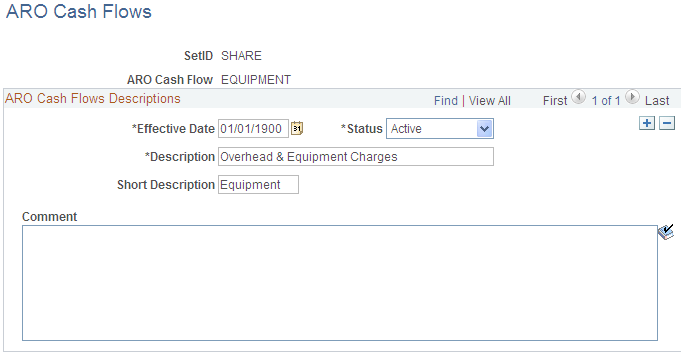
Establish effective-dated ARO Cash Flow definitions by setID to enable consistent data entry of estimated cash flow categories and descriptions.
Measuring Asset Retirement Obligations
This section discusses how to:
Define ARO Measurement by asset.
Review the Accretion Schedule.
Define ARO Measurement for multiple assets.
ARO Measurement Page
Use the ARO Measurement page (ARO_MEASUREMENT) to define the parameters to be used in the ARO calculations for an individual asset. (Asset Management, Asset Transactions, Asset Disposal, ARO Measurement, ARO Measurement):
Image: ARO Measurement Page
This example illustrates the fields and controls on the ARO Measurement Page. You can find definitions for the fields and controls later on this page.
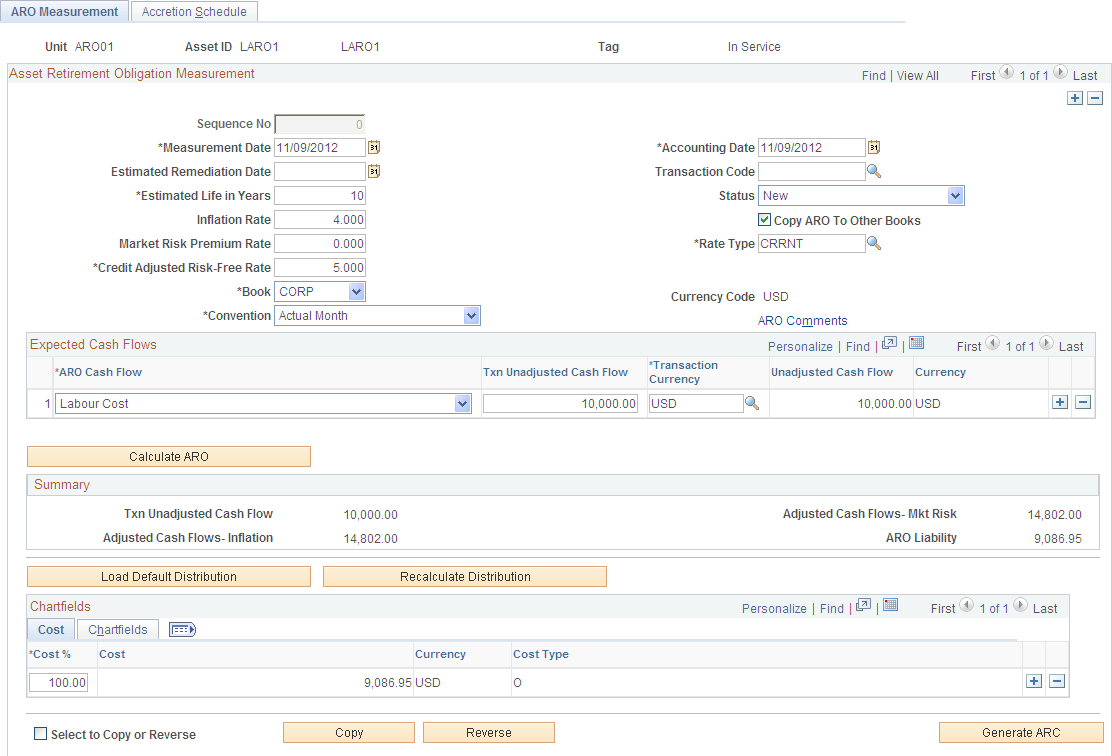
Asset Retirement Obligations can only be measured for assets that have a status other than Disposed or Transferred. You can search for assets that are eligible for asset retirement obligation treatment (see Enabling Assets for ARO Processing and establish the ARO measurement by asset.
Expected Cash Flows
Summary
ChartFields
Recording the Initial Fair Value of the ARO Liability
The Generate ARC button creates the entry to record the ARC and the corresponding ARO Liability:
|
Removal of Capitalized ARC |
Debit |
Credit |
|---|---|---|
|
Long-lived Asset (ARC) |
XXXX |
|
|
ARO Liability |
XXXX |
Accretion Schedule Page
Use the Accretion Schedule page (ARO_ACCR_SCHED) to review the scheduled accretion expense as calculated by month over the life of the asset. (Asset Management, Asset Transactions, Asset Disposal, ARO Measurement, Accretion Schedule):
Image: Accretion Schedule Page
This example illustrates the fields and controls on the Accretion Schedule Page. You can find definitions for the fields and controls later on this page.
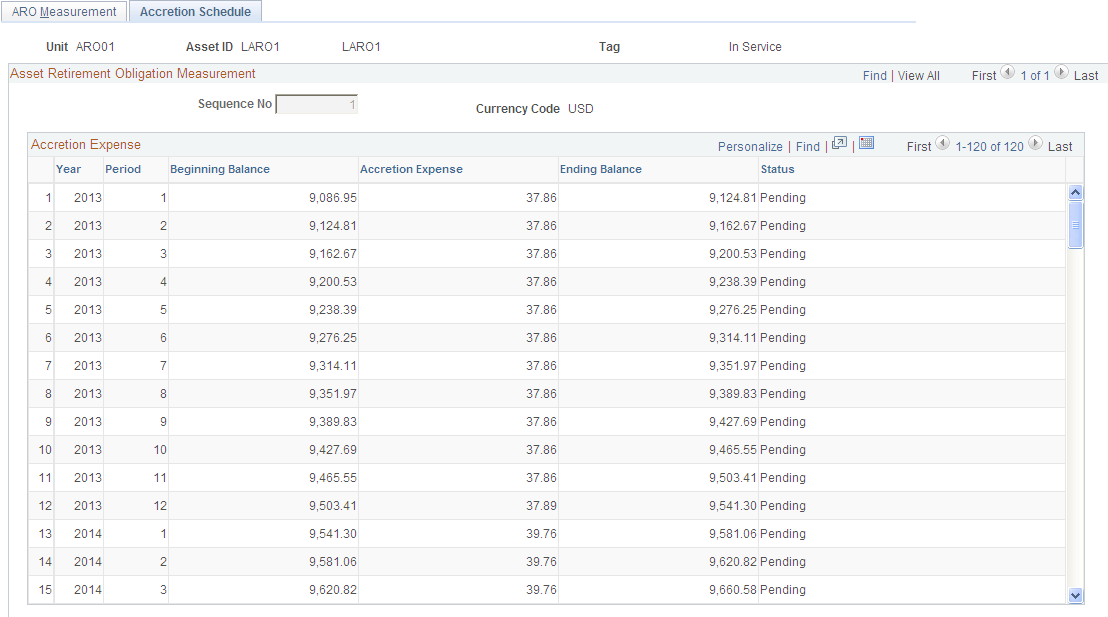
The Accretion Schedule page displays the scheduled accretion expense, by period, over the asset life using the parameters from the ARO Measurement page. This page also displays the beginning balance of the ARO liability, increased by the accretion expense for each period, the ending balance of the ARO liability, and the ARO status.
See Accreting the Asset Retirement Obligation.
When a correction is performed to the ARO Measurement and you create a reversal, the posted Accretion Expense rows are reversed and those rows not yet posted are deleted. Accretion Expense entries should use the same ChartField combinations that are entered for the ARO measurement.
Depreciating the Asset Retirement Cost
When an asset retirement obligation is measured, an asset retirement cost is capitalized by increasing the carrying amount of the long-lived asset by the same amount as the liability. Since the asset retirement cost is included in the cost basis of the asset, it is subject to the regular depreciation process. Depreciation that corresponds to asset retirement cost is identified by ARO sequence number.
Each ARO sequence number represents each incremental liability measured.
Note: Bonus depreciation does not apply to asset retirement cost.
|
Record depreciation expense |
Debit |
Credit |
||
|---|---|---|---|---|
|
Depreciation Expense (ARC) |
XX |
|||
|
Accumulated Depreciation |
XX |
Accreting the Asset Retirement Obligation
Organizations are to recognize period-to-period changes in the liability for the asset retirement obligation resulting from the passage of time, and revisions to either the timing or amount of the original estimated future cash flows.
The Accretion Expense is processed through the Depreciation Close program (AM_DPCLOSE).
|
Record accretion expense |
Debit |
Credit |
||
|---|---|---|---|---|
|
Accretion Expense |
XX |
|||
|
ARO Liability |
XX |
Changes due to the passage of time are measured by recognizing accretion expense. The method commonly used to calculate accretion expense is the interest method of allocation. Using the interest method of allocation, accretion expense is determined by multiplying the carrying value of the liability at the beginning of each period by a constant effective interest rate. The interest rate used should be the credit-adjusted risk-free rate applied when the liability was measured initially. The rate should not change subsequent to the initial measurement.
Monthly Accretion = (Beginning ARO Liability Balance for year x Credit-Adjusted Risk-Free Rate)/yearly calendar (similar to Depreciation Close process).
ARO Measurement in Mass – Selection Criteria Page
Use the ARO Measurement in Mass – Selection Criteria page (ARO_MASS_SEL) to retrieve a list of eligible ARO- enabled assets for which to define ARO measurement information. (Asset Management, Asset Transactions, Asset Disposal, ARO Measurement in Mass, Selection Criteria):
Image: ARO Measurement in Mass - Selection Criteria Page
This example illustrates the fields and controls on the ARO Measurement in Mass - Selection Criteria Page. You can find definitions for the fields and controls later on this page.

Asset Search Criteria
Enter your selection criteria to retrieve a list of ARO-enabled assets that are eligible for ARO accounting treatment and click the Retrieve button. Once you have selected the assets to process from the search results, defined the process parameters, and reviewed the accretion expense schedule, click the Run button to process the selected assets for ARO. The search criteria fields on this page are the same as those on the ARO Measurement page. See ARO Measurement Page.
Search Results
ARO Measurement in Mass – Process Parameters Page
Use the ARO Measurement in Mass – Process Parameters page to define ARO measurement parameters for multiple assets at once.
Image: ARO Measurement in Mass - Process Parameters Page
This example illustrates the fields and controls on the ARO Measurement in Mass - Process Parameters Page. You can find definitions for the fields and controls later on this page.
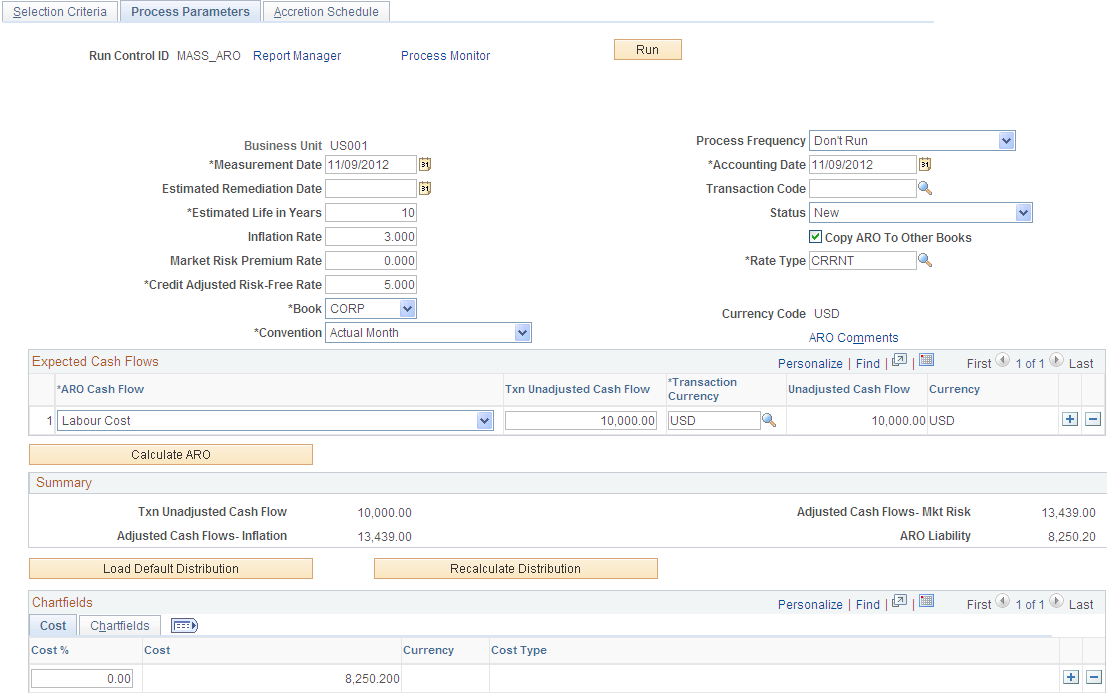
After selecting the assets to be processed for ARO accounting treatment from the Selection Criteria page, you can set your process parameters on this page for processing those assets at once.
The fields on the Process Parameters page are the same as to those on the ARO Measurement page. The ARO Measurement page, however, is used for processing individual assets as opposed to processing a group set of assets. See ARO Measurement Page.
When you have entered the process parameters on this page, click the Run button to process the selected assets. The AM_ARO_MASS Application Engine process then populates the tables that are defined in ARO Measurement component. You can review the output of this process from the inquiries and reports that are provided for meeting ARO reporting requirements. See Reviewing ARO Processing Results and Reporting for Asset Retirement Obligations.
ARO Measurement in Mass – Accretion Schedule Page
Use the ARO Measurement in Mass – Accretion Schedule page (ARO_ACCR_MAS) to review the scheduled accretion expense as calculated by month over the life of the assets that were selected for processing. (Asset Management, Asset Transactions, Asset Disposal, ARO Measurement in Mass, Accretion Schedule):
This page is identical to the ARO Measurement - Accretion Schedule page.