
Reviewing ARO Processing Results
PeopleSoft Asset Management delivers the following inquiries by which to review ARO processing results:
Expense Schedule
Expense Schedule by Period
Expense Schedule Page
Use the Expense Schedule page (ARO_EXP_SCHED_YR ) to view the ARO-related accretion and depreciation expense for an asset by year to verify results
Image: Expense Schedule Page
This example illustrates the fields and controls on the Expense Schedule Page. You can find definitions for the fields and controls later on this page.
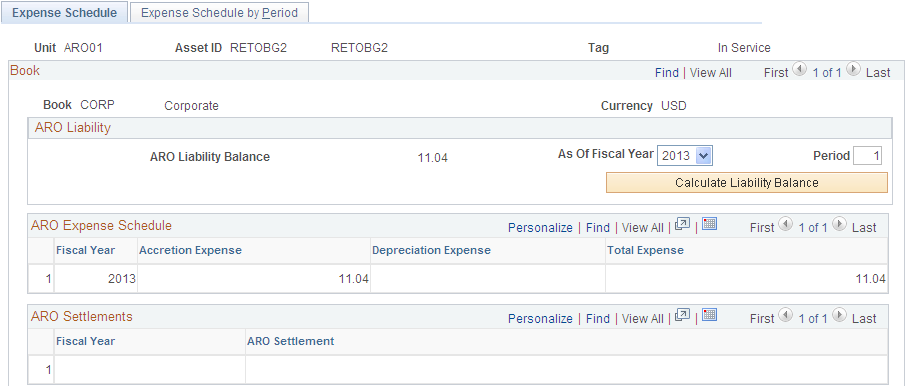
The schedule of expenses related to asset retirement obligations includes accretion expense for the liability and depreciation expense for the associated asset retirement cost. If the ARO liability has been settled, the ARO Settlement and associated fiscal year appear.
ARO Expense Schedule
View the Accretion, Depreciation, and Total Expense related to ARO for the asset by fiscal year. You can click the Fiscal Year link to access the expense detail for the entire year.
Expense Schedule by Period Page
Use the Expense Schedule by Period page (ARO_EXP_SCHED_PD) to view the ARO-related accretion and depreciation expense for an asset by period to verify results.
Image: Expense Schedule by Period Page
This example illustrates the fields and controls on the Expense Schedule by Period Page. You can find definitions for the fields and controls later on this page.
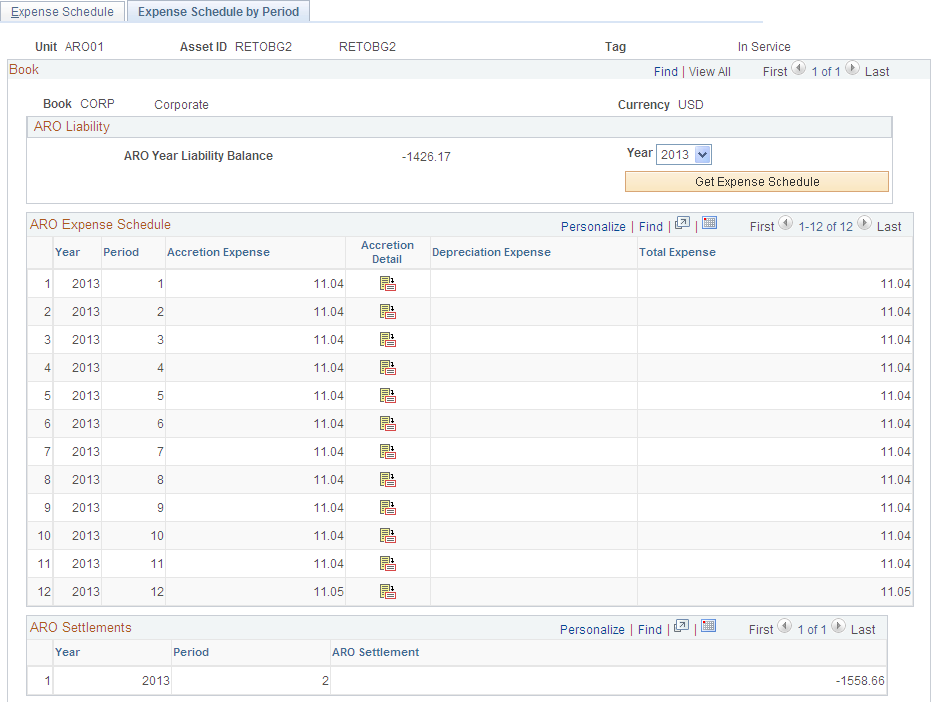
ARO Expense Schedule
Settling the Asset Retirement Obligation
Asset retirement obligations can be settled partially or in full. When an asset is retired and the asset retirement obligation is settled, the difference between the asset retirement obligation liability and the amount actually incurred is to be recognized as either a gain or loss. If the actual cost is greater than the ARO liability, a loss is recognized, and if the actual cost is less than the asset retirement obligation liability, a gain is recognized.
Use the Retire/Reinstate Asset component or the Disposal Worksheet component to record the settlement of asset retirement obligations.
See Initiating Asset Retirement Using the Disposal Worksheet
Accounting Entties for Settlement of Asset Retirement Obligation
The following tables present the scenarios for accounting entries of ARO Settlement:
|
Settlement of ARO Without Recognized Gain or Loss: |
Debit |
Credit |
|---|---|---|
|
ARO Liability |
XXXX |
|
|
ARO Settlement |
XXXX |
|
Settlement of ARO with Recognized Gain |
Debit |
Credit |
|---|---|---|
|
ARO Liability |
XXXX |
|
|
ARO Settlement |
XXXX |
|
|
Gain on Settlement of ARO |
XXXX |
|
Settlement of ARO with Recognized Loss |
Debit |
Credit |
|---|---|---|
|
ARO Liability |
XXXX |
|
|
ARO Settlement |
XXXX |
|
|
Loss on Settlement of ARO |
XXXX |
|
Removal of Capitalized ARC |
Debit |
Credit |
|---|---|---|
|
Accumulated Depreciation |
XXXX |
|
|
Long-lived Asset (ARC) |
XXXX |
Reporting for Asset Retirement Obligations
PeopleSoft Asset Management delivers the following ARO reports:
Asset Retirement Obligations (AMARORPT01 BI Publisher report) – This report identifies the beginning and ending aggregate carrying amount of an asset retirement obligation and provides the information to assist in preparing disclosures in accordance with Financial Accounting Standards.
ARO Pending Settlement (AMARORPT02 BI Publisher report) – This report identifies outstanding asset retirement obligation settlements and provides Asset Managers and Asset Accountants with visibility to those assets retired but pending remediation.
ARO Reports Page
Use the ARO Reports page (AM_ARO_RPT_RQST) to run reports that provide ARO compliance information.
Image: ARO Reports Page
This example illustrates the fields and controls on the ARO Reports Page. You can find definitions for the fields and controls later on this page.
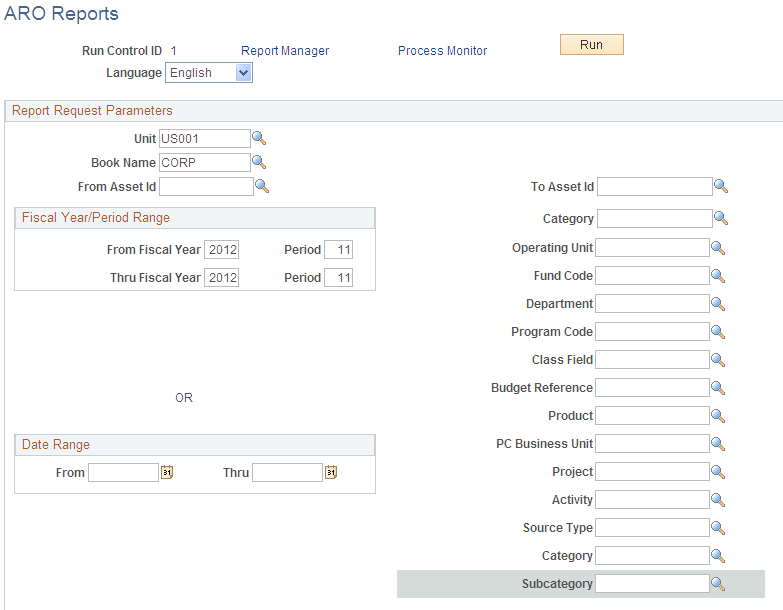
Select from any or all of the report request parameters to produce the ARO reports by business unit, book name, and range of asset IDs. You can limit the report period by entering a range of fiscal years and periods or select any date range.
You can further limit your resulting report data by specifying any of the ChartField values, including the Project Costing ChartFields.