
Creating Accounting Entries
This section provides an overview of the Depreciation Close process, lists common elements, and discusses how to:
Request accounting entry creation.
Run the Depreciation Close process.
Close accounting periods.
Pages Used to Create Accounting Entries
|
Page Name |
Definition Name |
Navigation |
Usage |
|---|---|---|---|
|
Create Accounting Entries |
AM_AMAEDIST_RQST |
|
Set up and initiate a request or set of requests for accounting entry creation. |
|
Run Depreciation Close Process |
DEPR_CLOSE_RQST |
|
Enter and initiate a depreciation close request or requests. |
|
Close Accounting Period |
DEPR_CLOS_PD |
|
Close accounting periods to ensure that you do not make any new transactions in the period. |
|
Review Financial Entries - List |
ASSET_DIST_LIST |
|
Review accounting financial entries in summary list. In the case where there are multiple "Future-dated" EFFDT, only the MAXIMUM effective-dated row will be displayed in the prompt for ACCOUNT in the Review Financial Entries component. |
|
Review Financial Entries - Detail |
ASSET_DIST_DETAIL |
|
Review accounting financial entries in detail. In the case where there are multiple "Future-dated" EFFDT, only the MAXIMUM effective-dated row will be displayed in the prompt for ACCOUNT in the Review Financial Entries component. |
|
Review Operating Leases - List |
ASSET_NF_DIST_LN |
|
Review operating lease entries in summary list. |
|
Review Operating Leases - Detail |
LEASE_DIST_DETAIL |
|
Review operating lease entries in summary list. |
|
Review Asset Journals |
AM_GL_DRILL |
|
Review asset journal information. |
|
Calculate Inflation - Request |
DEPR_INF_RQST |
|
Run a process to calculate inflation for assets. |
|
Review Expense Entries - List |
ASSET_NF_LIST |
|
Review the expense entries (nonfinancial assets) that were created by running the Clearing Reconciliation process. |
|
Review Expense Entries - Details |
ASSET_NF_DET |
|
Review the expense entry details (nonfinancial assets) that were created by running the Clearing Reconciliation process. |
|
Clearing Reconciliation |
AM_CLEREC_RQST |
|
Run the process to reconcile the clearing account that is created by trackable assets from feeder systems against the expense account. |
Understanding the Depreciation Close Process
The Depreciation Close process generates period depreciation accounting entries for all depreciable assets in a particular accounting period, including lease payments and offset accounts for the period. Run this process only for an accounting period that has not yet been closed. You can reverse or rerun this process if errors are detected in the results. The flexible run parameters allow processing to close the period, reversing the output of the last posting run, or reversal with reprocessing of the close entries.
Open and close accounting periods are maintained in General Ledger and migrated to the financial subsystems. Each subsystem application can either use the periods that are created in General Ledger or update the open and close periods at the application business unit level.
When you run the Depreciation Close process, you have two options: Rerun Depreciation Close and Reverse Posted Entries. The following examples demonstrate how these options affect processing.
Example of the Rerun Depreciation Close Option
With Rerun Depreciation Close enabled and the journal entries not yet created, the Depreciation Close process creates a new accounting entry, as shown in this table, and deletes the existing one (if any). If the journal entries have already been created, depreciation close will neither delete nor generate entries. No actions occur.
|
DISTRIBUTION_TYPE |
DTTM_STAMP |
AMOUNT |
GL_DISTRIB_STATUS |
REVERSE_STATUS |
REVERSE_DTTM_STAMP |
Journal ID |
Journal Dttm Stamp |
|---|---|---|---|---|---|---|---|
|
AD |
2009-09-05 14:25:20 |
–110.00 |
N |
|
NULL |
|
NULL |
|
DE |
2009-09-05 14:25:20 |
110.00 |
N |
|
NULL |
|
NULL |
When the journal entries have been posted, the system updates the general ledger distribution status to D (done).
This table shows the results after the PeopleSoft General Ledger run:
|
DISTRIBUTION_TYPE |
DTTM_STAMP |
AMOUNT |
GL_DISTRIB_STATUS |
REVERSE_STATUS |
REVERSE_DTTM_STAMP |
Journal ID |
Journal Dttm Stamp |
|---|---|---|---|---|---|---|---|
|
AD |
2009-09-05 14:25:20 |
–110.00 |
D |
|
NULL |
XX |
Journal Dttmstamp |
|
DE |
2009-09-05 14:25:20 |
110.00 |
D |
|
NULL |
XX |
Journal Dttmstamp |
Example of the Reverse Posted Entries Option
When the Reverse Posted Entries option is selected and the journal entries have been created, the original entry is reversed with new rows inserted showing the reversed amounts. The new entries display the statuses R for reversal and X for reversed entries.
This table shows the original entry:
|
DISTRIBUTION_TYPE |
DTTM_STAMP |
AMOUNT |
GL_DISTRIB_STATUS |
REVERSE_STATUS |
REVERSE_DTTM_STAMP |
Journal ID |
Journal Dttm Stamp |
|---|---|---|---|---|---|---|---|
|
AD |
2009-09-05 14:25:20 |
–110.00 |
D |
X |
NULL |
XX |
Journal Dttmstamp |
|
DE |
2009-09-05 14:25:20 |
110.00 |
D |
X |
NULL |
XX |
Journal Dttmstamp |
This table shows the reversed entry:
|
DISTRIBUTION_TYPE |
DTTM_STAMP |
AMOUNT |
GL_DISTRIB_STATUS |
REVERSE_STATUS |
REVERSE_DTTM_STAMP |
Journal ID |
Journal Dttm Stamp |
|---|---|---|---|---|---|---|---|
|
AD |
2009-09-12 17:37:25 |
110.00 |
N |
R |
2003-09-05 14:25:20 |
|
|
|
DE |
2009-09-12 17:37:25 |
–110.00 |
N |
R |
2003-09-05 14:25:20 |
|
|
Example of Both the Rerun Depreciation Close and Reverse Posted Entries Options
When the Reverse Posted Entries and the Rerun Depreciation Close options are both selected, and the journal entries have been created, then the original entry is reversed as shown in the previous example, and a new accounting entry is created.
This table shows the original entry:
|
DISTRIBUTION_TYPE |
DTTM_STAMP |
AMOUNT |
GL_DISTRIB_STATUS |
REVERSE_STATUS |
REVERSE_DTTM_STAMP |
Journal ID |
Journal Dttm Stamp |
|---|---|---|---|---|---|---|---|
|
AD |
2009-09-05 14:25:20 |
–110.00 |
D |
X |
NULL |
XX |
Journal Dttmstamp |
|
DE |
2009-09-05 14:25:20 |
110.00 |
D |
X |
NULL |
XX |
Journal Dttmstamp |
This table shows the reversed entry:
|
DISTRIBUTION_TYPE |
DTTM_STAMP |
AMOUNT |
GL_DISTRIB_STATUS |
REVERSE_STATUS |
REVERSE_DTTM_STAMP |
Journal ID |
Journal Dttm Stamp |
|---|---|---|---|---|---|---|---|
|
AD |
2009-09-12 17:37:25 |
110.00 |
N |
R |
2003-09-05 14:25:20 |
|
|
|
DE |
2009-09-12 17:37:25 |
–110.00 |
N |
R |
2003-09-05 14:25:20 |
|
|
This table shows the results of the rerun with the new entry:
|
DISTRIBUTION_TYPE |
DTTM_STAMP |
AMOUNT |
GL_DISTRIB_STATUS |
REVERSE_STATUS |
REVERSE_DTTM_STAMP |
Journal ID |
Journal Dttm Stamp |
|---|---|---|---|---|---|---|---|
|
AD |
2009-09-12 17:37:25 |
–140.00 |
N |
|
NULL |
|
NULL |
|
DE |
2009-09-12 17:37:25 |
140.00 |
N |
|
NULL |
|
NULL |
Common Elements Used in This Section
Create Accounting Entries Page
Use the Create Accounting Entries page (AM_AMAEDIST_RQST) to set up and initiate a request or set of requests for accounting entry creation.
| Cost Summarize |
Select to create cost summary while creating accounting entries. |
| From Asset ID and To Asset ID |
Enter the transaction range to process. |
Note: The system calls the Inter/IntraUnit central processor to create balanced accounting entries.
See Understanding PeopleSoft Interunit and Intraunit Functionality.
Run Depreciation Close Process Page
Use the Run Depreciation Close Process page (DEPR_CLOSE_RQST) to enter and initiate a depreciation close request or requests.
Note: If you use the interface between PeopleSoft Asset Management and PeopleSoft Billing, accounting entries are created by these integrated transactions. How the entries are created is described in more detail in the PeopleSoft Billing documentation.
See Understanding How PeopleSoft Asset Management Integrates with Other Applications.
See Understanding Asset Management Business and Cash Generating Units.
See Understanding General Ledger Journal Entries.
See Understanding PeopleSoft Billing and Asset Management Integration.
Closing Accounting Period Page
Use the Close Accounting Period page (DEPR_CLOS_PD) to close accounting periods to ensure that you do not make any new transactions in the period.
Enter the year and period to be closed, and save the page. When a period has been closed, you cannot create additional depreciation-related accounting entries for that period.
Clearing Reconciliation Page
Use the Clearing Reconciliation page (AM_CLEREC_RQST) to run the process to reconcile the clearing account that is created by trackable assets from feeder systems against the expense account.
Image: Clearing Reconciliation page
This example illustrates the fields and controls on the Clearing Reconciliation page. You can find definitions for the fields and controls later on this page.
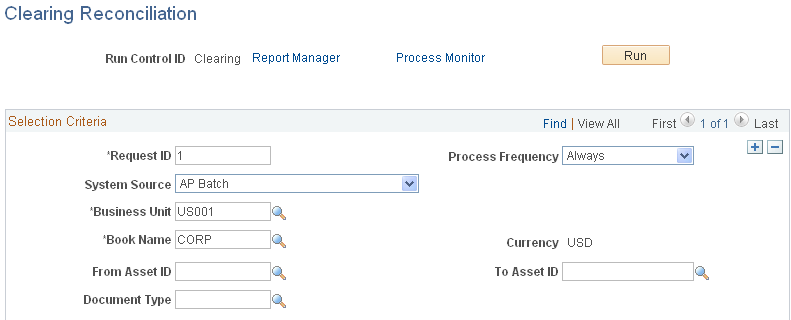
PeopleSoft Asset Management provides an optional Capitalization Threshold feature that, once enabled, can automatically determine capitalization status of an asset, by profile, based on its cost or quantity according to limits that you define. The system classifies assets as capital, noncapital, or expense. The Clearing Reconciliation process (AM_CLEREC) provides a way to reconcile accounting entries for expensed assets.
See Capitalization Thresholds Page.
When assets came from other sources, a debit is usually recorded to a fixed asset account and a clearing account is credited that was previously debited in the source system. When an asset is deemed trackable because of the specified threshold, the asset ID is generated but no accounting activities take place. This reconciliation process provides a way to balance out the clearing account that was debited in the source system and debit the expense account instead. This is not applicable to expensed (trackable) assets that are entered directly in Asset Management with no clearing account.
Enter the parameters and run the process. The system searches noncapital assets for the specified parameters in the acquisition detail. For each noncapital row that matches the system source, the following entry is generated in the DIST_LN table:
|
Debit |
Credit |
Distribution Type |
|---|---|---|
|
Expense Account |
EX |
|
|
Clearing Account |
AP |