
Defining Payment Predictor Methods
To define payment predictor methods, use the Predictor Method (PP_METHODS) and Predictor Method Review (METHOD_REVIEW) components.
This section provides an overview of payment predictor methods, lists a prerequisite, and discusses how to:
Define a payment predictor method.
Review an example of a payment predictor method.
Pages Used to Define a Payment Predictor Method
|
Page Name |
Definition Name |
Navigation |
Usage |
|---|---|---|---|
|
Predictor Method |
PP_METHODS_TABLE |
|
Define a payment predictor method. |
|
Predictor Method Review - Review |
PP_METHODS_REVIEW |
|
View, but do not change, an existing payment predictor method. The fields on this page are identical to those on the Predictor Method page. |
Understanding Payment Predictor Methods
A payment predictor method tells Payment Predictor how to handle the different situations it encounters during processing. Each method consists of a series of conditions and actions based on remittance information. You can define as many methods as you want, but keep the methods as simple as possible and tailor them closely to the remittance patterns of your customers to optimize the efficiency of auto matching. Although PeopleSoft Receivables ships with sample methods, you must create your own methods and assign them to a SetID or individual customers.
Ideally, the methods that you define should enable Payment Predictor to apply all your regular payments, leaving only the exceptions to be applied online using payment worksheets. To minimize the number of exceptions, your methods must reflect the ways that your customers pay you. You can assign methods to an entire business unit or to specific customers so that you can tailor your methods to groups of customers with similar payment practices.
If you have a mixed situation with some overrides, diagnosing problems is much easier if your methods are stored under one SetID. Deposit business unit values and item business unit values, if different, should both point to the same, common TableSet. Oracle also recommends that you keep the number of methods that you use to a minimum. Start with one method that is specified at the deposit business unit level. Then add methods for handling customers who consistently pay you in a way that is different from your other remit from customers.
When you define a payment predictor method, consider the reference information that comes with the payment and how it can be used to match the payment to the customer. The type of reference information determines which algorithms you use.
Oracle recommends that the first algorithm group in a method apply the most payments.
Important! If you use the vendor rebate option in PeopleSoft Purchasing or the claim back option in PeopleSoft Order Management, create payment predictor methods that do not write off the remaining balance for items. Assign those methods to the business unit that is set up for vendor rebate and claimback processing. Use the Claims Management Workbench in PeopleSoft Purchasing or PeopleSoft Order Management to handle write-offs. This enables the system to determine whether the write-offs meet the write-off tolerances for claim processing.
Payments Without Reference Information
For payments with no reference information, use the following algorithm groups.
#BALANCE
#COMBOS
#OLDEST1
#OLDESTC
#OVERDUE
#PASTDUE
#STATMNT
Payments with Summary Reference Information
For payments with summary reference information (that is, references with item identification but no amount), use the following algorithm groups:
#REFS
#REF_ONE
#REF_NG
If you use the Cash Drawer Receipts feature to record payments for counter sales, use one of these algorithm groups in your payment predictor method to apply the payments.
Note: Use an algorithm group for detail references if you receive payments with summary reference information that pay for multiple line items with the same item ID.
Payments with Detail Reference Information
For payments with detail reference information (that is, references with item identification and amount), use the following algorithm groups:
#DETAIL
#DTL_TLR
#DTL_PM
#DTL_TPM
Prerequisite
You must define the algorithm groups for payment methods, because methods use algorithm groups to select items.
Predictor Method Page
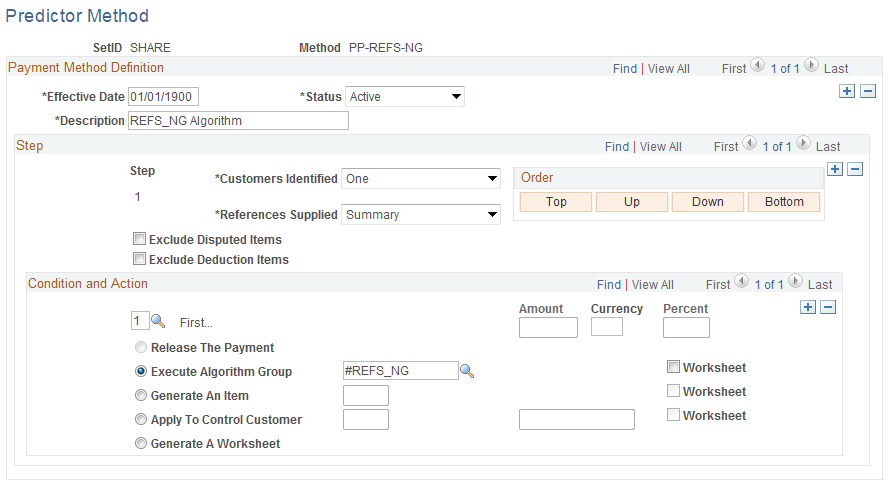
Use the Predictor Method page (PP_METHODS_TABLE) to define a payment predictor method.
Image: Predictor Method page
This example illustrates the fields and controls on the Predictor Method page. You can find definitions for the fields and controls later on this page.
Step
Each step consists of one or more payment conditions; each condition has an action. The step number determines the order in which the step is processed in the method.
Click the Order buttons to change the order of the steps.
Condition and Action
A step must have at least one condition. You can assign up to seven conditions to a step and select one of five actions for each condition. The conditions cannot conflict with each other. The number of the condition determines the order in which it will be processed within the step. Values are:
First...
Any Overpayment
Overpayment Exceeds
Overpayment Is Less Than
Any Underpayment
Underpayment Exceeds
Underpayment Is Less Than
Note: If you use Any Overpayment or Any Underpayment, you cannot use the tolerance choices for overpayments or underpayments that exceed or fall short of a certain amount. The reverse is also true. If you use Overpayment Exceeds, Underpayment Exceeds, or Underpayment Is Less Than, you cannot use Any Overpayment or Any Underpayment. The exceptions are the #DTL_TLR and the #DTL_TPM algorithm group. For the #DTL_TLR and #DTL_TPM algorithm groups, you should not select any of the underpayment or overpayment conditions. The conditions for exceptions for this algorithm group are defined using the Predictor Detail Options page.
See Receivable Options - Predictor Detail Options Page.
You must select one of the following actions:
Note: If you select Apply To Control Customer and Payment Predictor cannot identify any customers, Payment Predictor determines whether the default method associated with the deposit business unit indicates Apply To Control Customer when the customer identification is missing or is set to Doesn't Matter.
Reviewing an Example of a Payment Predictor Method
This section includes an example of a summary reference Payment Predictor method.
The sample method contains five steps. Each step is based on remittance characteristics: how to structure Payment Predictor's actions based on the results of customer identification and the presence or absence of summary reference information. Each step considers various payment conditions and each condition has an associated action.
The example assumes that you receive a mix of payments, some with payment summary references—references without associated item amounts—and some without summary references. It places the steps using algorithm groups for payments with references first, because it is normally more efficient to perform those steps first.
Note: To create an example of a detail reference method, change the algorithm group in Step 1 to one of the algorithm groups for detail references.
Step 1
In Step 1, the method's remittance conditions take into account payments with references. Regardless of whether customers are identified, if payment summary references are supplied, Payment Predictor runs the algorithms in the #REFS group.
For the Customers Identified field, select Doesn't Matter. For References Supplied, select Summary.
Step 2
The second step in the sample method runs regardless of the results of customer identification and only if you did not receive references.
For Customers Identified, select Doesn't Matter to ask Payment Predictor to process any payment for which at least one customer was identified. For References Supplied, select No.
Step 3
Step 3 repeats the same remittance conditions as Step 2. It runs regardless of the results of customer identification and only if you did not receive references.
This step is useful for customers who often pay their entire open-item balance. An algorithm variation exists for handling earned discounts.
For Customers Identified, select Doesn't Matter so that Payment Predictor processes any payment for which at least one customer is identified. For References Supplied, select No.
| Step 3, Condition 1 (First) |
Select Execute Algorithm Group, and then select #BALANCE. |
Step 4
Step 4 repeats the same remittance conditions as Steps 2 and 3. It runs regardless of the results of customer identification and only if you did not receive references.
For Customers Identified, select Doesn't Matter to ask Payment Predictor to process any payment for which at least one customer was identified. For References Supplied, select No.
| Step 4, Condition 1 (First) |
Select Execute Algorithm Group, and then select #PASTDUE. |
This step shows how the order in which algorithms are run must be taken into consideration. More than one algorithm group could apply to the same payment.
For example, if a remit from group has only one open item (for a new or low-volume customer), then either #COMBOS or #BALANCE would work. If all of the open items are past due (customer has not bought anything recently), then #BALANCE or #PASTDUE would work. Under these circumstances, you should order the algorithms from most to least efficient, which would result in the order #COMBOS, followed by #BALANCE, and then #PASTDUE.
Other factors, such as the number of payments that a given algorithm group applies, are also important. If #PASTDUE could apply to 90 percent of payments, #BALANCE to 10 percent, and #COMBOS to 10 percent (the total can exceed 100 percent), then an option is to place #PASTDUE first. These decisions must be made on an individual basis, looking at both payment profiles and enabled algorithms.
When you start using Payment Predictor, begin by ordering steps according to efficiency. If production runs demonstrate that most payments are applied in a step far down in the method, reorder the steps until you establish an optimal configuration.
Step 5
Step 5 runs regardless of remittance conditions. It places any payments that steps 1 through 4 did not apply on account for a control customer. It acts as a catch all for payments that it could not identify.
For Customers Identified, select Doesn't Matter to enable Payment Predictor to process any payment for which at least one customer is identified. For References Supplied, select Doesn't Matter.