
Reviewing Payment Files
The Review Bank Payment Files pages enable you to review the status of the transmitted payment files. You can see whether the system successfully transmitted a file. And if a file was not successfully transferred, use the Payment File Events page to determine exactly where the system encountered a file transmittal error.
Important! Any user with access to these pages can view the file details. Restrict user access to these pages by using PeopleTools Security functionality.
Note: The Process Monitor message log will not provide the cause of an error that occurred as the result of a payment dispatch process involving BI Publisher template layouts. In such cases, you must inspect the content of the payment file for the cause of the error by accessing the Payment File Data page.
See Understanding the Layout Catalog.
See the product documentation for PeopleTools: Security Administration.
This section discusses how to:
Review payment files.
Change payment file status
Pages Used to Review Payment Files
|
Page Name |
Definition Name |
Navigation |
Usage |
|---|---|---|---|
|
Payment Files |
PMT_FILE_DEFN |
|
Review payment file transmittal information. |
|
Payment File Details |
PMT_FILE_DETAILS |
Click the File ID link for a specific payment file. |
View summary information about the payments that are included in the specified payment file. |
|
Payment File Events |
PMT_FILE_EVENT |
Click the View Event Log icon on the Review Payment Files page. |
View summary information of system events that occurred to the payment file during transmittal. Colored icons indicate the transmittal status of the file. A green circle indicates that the file was successfully transmitted; a red square indicates that the file was not successfully transmitted. |
|
Payment File Data |
PMT_FILEDATA_SP |
Click View File on the Review Payment Files page. |
. View detailed payment file data that were transmitted to the bank. This page cannot be edited. |
|
Override Payment File Status |
PMT_FILE_DEFN |
|
Change the status of a payment file. |
Payment Files Page
Use the Payment Files page (PMT_FILE_DEFN) to review payment file transmittal information.
Image: Payment Files page
This example illustrates the fields and controls on the Payment Files page. You can find definitions for the fields and controls later on this page.
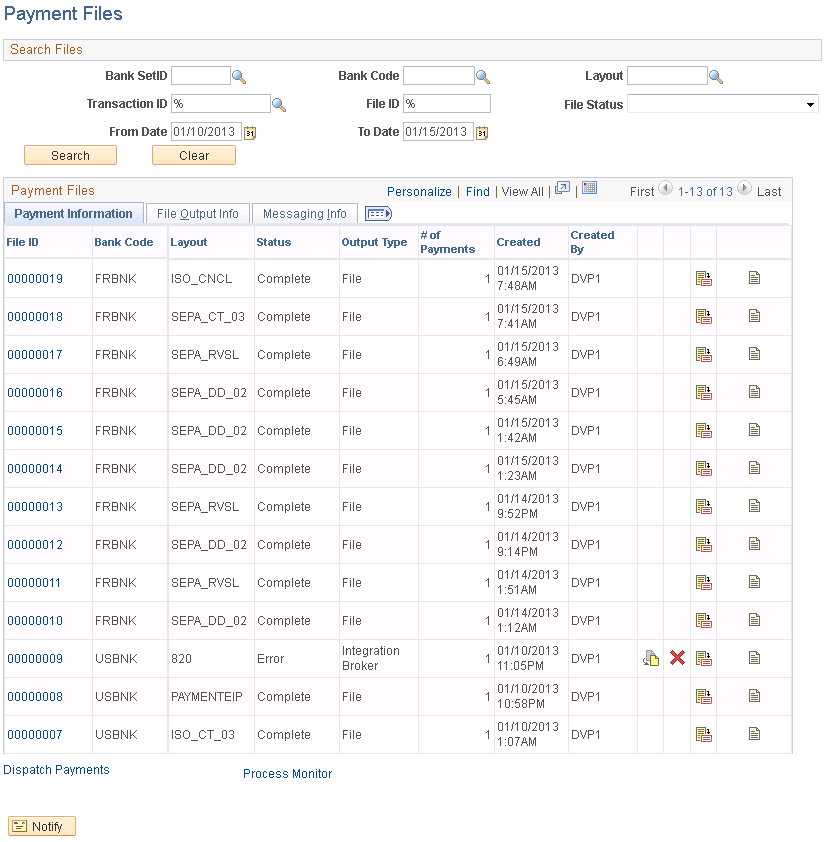
Enter the search parameters and click Search.


Override Payment File Status Page
Use the Override Payment File Status page (PMT_FILE_DEFN) to change the status of a payment file.
Image: Override Payment File Status page
This example illustrates the fields and controls on the Override Payment File Status page. You can find definitions for the fields and controls later on this page.
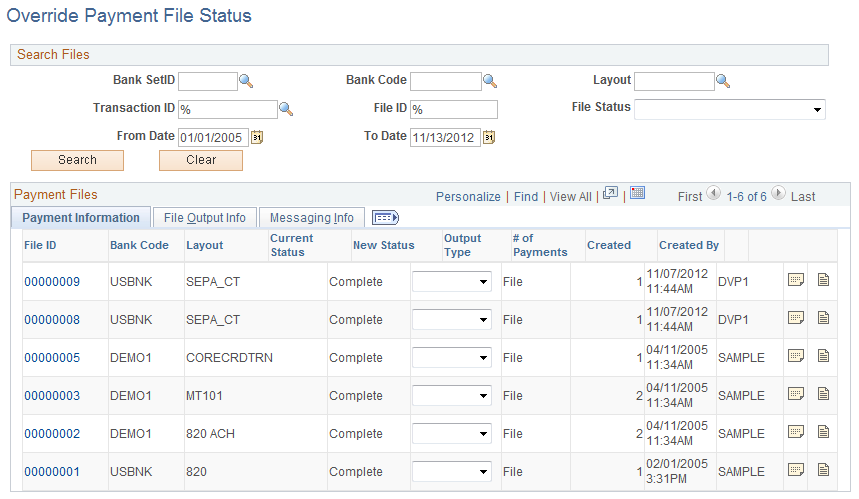
Note: Access to this page and the ability to change the payment file status is limited to users who are assigned to the administrator role.
The options for changing the status of a payment file are limited and depend on the current status of the payment file. This table lists the options that are available for each payment file status.
|
Current Status |
Available Status |
|---|---|
|
Canceled |
No change allowed. |
|
Complete |
Error |
|
Complete with Errors |
Complete Error |
|
Error |
Complete Canceled |
|
In Process |
No change allowed. |
|
Received by Bank |
Complete Error |
|
Sent to Bank |
Complete Error |