Setting Up Common Components for Bank Statement, Payment, and Payment Acknowledgment Processing
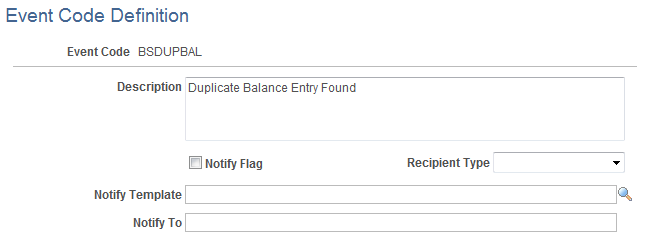
To define event code notification, use the Enter Event Code Definition component (TR_EVENT_CD_DEF_GBL).
This section discusses how to set up components that are used to:
Import bank statements.
Dispatch payments.
Import payment acknowledgements.
Pages Used to Set Up Common Components for Bank Statement, Payment, and Payment Acknowledgment Processing
|
Page Name |
Definition Name |
Navigation |
Usage |
|---|---|---|---|
|
Layout Catalog |
PMT_FORMAT_CATLOG |
|
Create new or modify existing bank statement, payment, and payment acknowledgment layouts by defining transformation processing details, payment methods, parameters, and properties. |
|
Allowed format properties |
PMT_FORMAT_VALUES |
Banking, Administer Banking, Layout Catalog, click Allowed Values link. |
Select the type of list option to apply as the allowed format property. |
|
Code Mappings |
TR_CODE_MAPPINGS |
|
Define input and output values for mappings of a selected code map group. |
|
Event Code Definition |
TR_EVENT_CD_DEF_PG |
|
Enter codes for system events, and define actions for the system to perform when they occur. |
|
Encryption Profile |
ENCRYPTION_PRFL |
|
Define encryption standards to be used to protect data when communicating with banks. Determine algorithms and store public and private keys that are used in encryption. |
Components Common to Bank Statement, Payment, and Payment Acknowledgment Processing
These application pages are common to setting up the three electronic banking processes:
Layout Catalog
The Layout Catalog is a repository of information that is used for establishing how data should be formatted when processing bank statements, payments, and payment acknowledgements.
Code Mappings
For Bank Statement Import processing, you map external bank codes to their internal PeopleSoft equivalents to ensure efficient statement processing.
For Dispatch Payment processing, the Code Mappings page is used to associate PeopleSoft input code values with external bank output code values.
(Optional) Event Code Definition
You can setup events that can occur during Bank Statement Import and Dispatch Payment processing so that interested parties will be notified by email of those events.
(Optional) Encryption Profile
You can use encryption algorithms to secure statement and payment files that are sent between your organization and your bank.
Understanding the Layout Catalog
The Layout Catalog is the central repository for information regarding all supported bank payment, payment acknowledgment, and bank statement layouts. After a layout is added to this component, it is available for use within the system. The component contains all the information about a layout—such as the transformation Application Engine program or application class that contains the logic to process the layout—that the system needs at setup and runtime. This component can be configured to meet each bank's specific formatting needs.
Note: PeopleSoft also provides additional miscellaneous layouts in the layout catalog that are used for importing various kinds of data.
See Layout Catalog Page.
Delivered Payment Layouts
You can view these layouts by accessing the Layout Catalog page (Banking, Administer Bank Integration, Layout Catalog, Layout Catalog).
PeopleSoft delivers these bank payment layouts:
|
Layout ID |
Layout Name |
Supported Payment Method |
|---|---|---|
|
820 |
EDI 820 payment layout |
Wire Transfer (WIR) |
|
820 ACH |
EDI 820 payment layout for ACH |
Automated Clearing House (ACH) Direct Debit (DD) |
|
CCD |
NACHA CCD payment layout |
ACH DD |
|
CCD+ |
NACHA CCD+ payment layout |
ACH DD |
|
CTX |
NACHA CTX payment layout |
ACH DD |
|
DEU_INTL |
German International EFT (Used with BI Publisher template) |
Electronic Funds Transfer (EFT) |
|
DEU_DOM |
German Domestic Payments (Used with BI Publisher template) |
WIR |
|
DIRDEB |
Edifact version 96A payment layout |
DD |
|
ESP_EFT |
Spanish EFT payment (Used with BI Publisher template) |
EFT |
|
FRA_EFT |
French EFT payment format. (Used with BI Publisher template) |
EFT |
|
FUNDTRNFR |
Funds Transfer |
WIR |
|
IAT |
NACHA IAT payment format |
ACH DD |
|
ISO_CT_03 |
ISO 20022 Credit Transfer V3, Pain.001.001.03 This layout is used for generic credit transfers. |
ACH EFT WIR |
|
ISO_DD_02 |
ISO Direct Debit Pain.008.001.02 This layout is used for generic direct debits. |
DD |
|
ISOV2 |
ISO 20022 Credit Transfer V2, Pain.001.001.02 This layout is used for generic credit transfers. |
ACH EFT WIR |
|
ISOV2_DD |
ISO 20022 Direct Debit Pain.008.001.01 This layout is used for generic direct debits. |
DD |
|
JPN_ZENGIN |
Japanese Zengin Format (Used with BI Publisher template) |
EFT |
|
MT101 |
SWIFT MT101 payment layout |
WIR EFT |
|
MT103 |
SWIFT MT103 payment layout |
WIR EFT |
|
MT103 BULK |
Multi 103 payment layout |
WIR EFT |
|
NLD_INTL |
Netherlands International EFT (Used with BI Publisher template) |
EFT |
|
PAYMENTEIP |
PeopleSoft XML layout, PAYMENT_DISPATCH IP Message |
ACH DD WIR EFT |
|
PAYMUL |
Edifact Version 96A payment layout |
EFT |
|
CORECRDTRN |
ISO 20022 Payment Initiation |
WIR |
|
PPD |
NACHA PPD Payment Format |
ACH DD |
|
SEPA_CT |
SEPA Credit Transfer, Pain.001.001.02 |
ACH EFT WIR |
|
SEPA_CT_03 |
SEPA Credit Transfer V3, Pain.001.001.03 Adheres to Rulebook version 4.0. |
ACH EFT WIR |
|
SEPA_DD |
SEPA Direct Debit, Pain.008.001.01 |
DD |
|
SEPA_DD_02 |
SEPA Direct Debit V2, Pain.008.001.02 Adheres to Rulebook version 4.0. |
DD |
|
STPCREDTRN |
ISO 20022 STP Credit Transfer |
WIR |
Delivered system-defined payment layout properties:
|
Layout ID |
Layout Name |
Description |
|---|---|---|
|
ISO_CNCL |
ISO Payment Cancellation Layout |
This layout is defined with document type Payment Cancellation and is used to send payment cancellation request to the bank. It is associated with corresponding payment layout through layout property. |
|
ISO_RVSL |
ISO Payment Reversal |
This layout is defined with document type Payment Reversal and is used to send payment reversal request to the bank. It is associated with corresponding payment layout through layout property. |
|
ISO_RVS_2 |
ISO Payment Reversal |
This layout is defined with document type Payment Reversal and is used to send payment reversal request to the bank. It is associated with corresponding payment layout through layout property. |
|
SEPA_RVSL |
Payment Reversal |
This layout is defined with document type Payment Reversal and is used to send payment reversal request to the bank. It is associated with corresponding payment layout through layout property. |
|
SEPA_RVS_2 |
Payment Reversal - Pain 007.001.02 |
This layout is defined with document type Payment Reversal and is used to send payment reversal request to the bank. It is associated with corresponding payment layout through layout property. |
Delivered Bank Statement Layouts
You can view these layouts by accessing the Layout Catalog page (Banking, Administer Bank Integration, Layout Catalog, Layout Catalog).
PeopleSoft delivers these bank statement layouts:
|
Layout ID |
Layout Name |
Document Type |
|---|---|---|
|
BAI2 |
BAI2 bank statement layout |
Bank Statement |
|
EDI822 |
EDI 822 account analysis |
Bank Statement |
|
FINSTA |
FINSTA bank statement layout |
Bank Statement |
|
PSBD1 |
PeopleSoft Business Document version 1 |
Bank Statement |
|
PSBD2 |
PeopleSoft Business Document version 2 |
Bank Statement (for PeopleSoft FMS 8.8 and later - see note) |
|
MT940 |
SWIFT MT940 bank statement layout |
Bank Statement |
|
MT942 |
SWIFT MT942 bank statement layout |
Bank Statement |
Note: You can import bank-statement, data files using the PSBD2 layout if you have Cash Management 8.8 or a later version installed and are using a third-party communication toolkit that has the capability of processing files in XML format. Sample files that can be used as guidelines for transforming bank statement date files into the PSBD2 layout can be found on Oracle's My Oracle Support website.
Delivered Bank Payment Acknowledgment Layouts
You can view these layouts by accessing the Layout Catalog page (Banking, Administer Bank Integration, Layout Catalog, Layout Catalog).
PeopleSoft delivers these Payment Acknowledgment layouts:
|
Layout ID |
Layout Name |
Document Type |
|---|---|---|
|
ACHNOC |
ACH Notification of Change |
Payment Return (notification that the payment contains errors) |
|
ACHRETURN |
NACHA acknowledgment |
Payment Return (payment or prenotification error – statement of changes to be made before payments can be processed) |
|
BANSTA |
Edifact Version 96A Acknowledgment layout |
Payment Acknowledgment (bank payment acknowledgment) |
|
CONTRL |
Edifact Version 96A Acknowledgment layout |
Payment Acknowledgment (bank payment file acknowledgment) |
|
EDI997/824 |
EDI X12 997/824 |
Payment Acknowledgment (payment validated and payment complete) |
|
EDI 827 |
EDI Functional return layout |
Functional Return (payment error – statement of changes to be made before payment is allowed) |
|
PMTACKEIP |
PeopleSoft Acknowledgment layout |
Payment Acknowledgment |
|
PMTINITACK |
ISO 20022 payment status XML |
Payment Acknowledgment |
|
PMT_STATV2 |
ISO 20022 payment status V2, Pain.002.001.002 |
Payment Acknowledgment |
|
PMT_STATV3 |
ISO 20022 payment status V3, Pain.002.001.003 |
Payment Acknowledgment |
|
PAYREQEIP |
Inbound Payment Request |
PeopleSoft Inbound Payment layout in CSV or fixed-length, flat-file format. |
Delivered Miscellaneous Layouts
You can view these layouts by accessing the Layout Catalog page (Banking, Administer Bank Integration, Layout Catalog, Layout Catalog).
PeopleSoft delivers these additional layouts:
|
Layout ID |
Layout Name |
Document Purpose |
|---|---|---|
|
POOL |
Pool Import |
Importing investment pool data in Cash Management |
|
STOCK |
Stock Import |
Importing stock quotes for Deal Management. |
|
SEC_MARKET |
Security Values |
Importing security market values |
|
OFAC |
OFAC sanctions list |
Importing list of Specially Designated Nationals (SDN) |
|
EU |
EU sanctions list |
Importing European Union SDN list |
|
SDN_LOAD |
Enterprise sanctions list |
Importing SDN list from within an enterprise |
|
SECURITY |
Security Definition Import |
Importing the security definition. |
See Maintaining Pool Positions.
See Maintaining Equities.
Understanding Code Mapping
Code Mappings enable you to define the mappings between external system codes with their equivalent internal PeopleSoft codes. For example, PeopleSoft stores 03 account types as checking accounts, and the required code for the EDI 820 bank statement layout is DA for deposit account. Code mappings are used to map these hard-coded field values to each other so that the transformation program component can use them. This allows a single transformation program to be used across multiple banks even though the program may need different code mappings.
Code mappings are most useful for fields that may change for every bank. Bank statement processing uses mappings for three fields: bank statement codes, reconciliation or "recon" codes, and statement activity types. For example, a bank identifies certain miscellaneous fees with the numeric code 564. If you define it as a Bank Fee, you can assign the input value of 564 to the output value of BKFEE. Other banks may use a different value to identify bank fee.
See Defining Statement Activities.
There are three levels to the code mapping data-structure hierarchy:
Code Map Group: The highest level, this is a container for all the fields for a given code map set. For instance, a code map group could represent all the code mappings for a particular bank.
Code Map Header: The second level, this represents a particular field for which the transformation Application Engine obtains the code map.
Code Map Items: The items contain all the possible input and output values for a particular field or header.
To access Code Mappings defined in the database, use an application class entitled CodeMapper within the transformation program.
Class CodeMapper
To access Code Mappings, which is defined in the database, use an application class entitled CodeMapper within the transformation program. This table provides the details of the CodeMapper Application Class (Package - TR_CODE_MAPPING.Utilities).
Note: The CodeMapper application class should only be accessed by advanced users to customize their layouts or create a new layout program.
|
Method |
Description |
|---|---|
|
public CodeMapper() |
The constructor for this class. |
|
public String getDefault(String groupID, String fieldName) |
Obtains the default value for a code map field based on the group ID and field name. |
|
public String getInput(String groupID, String fieldName, String outputVal) |
Obtains an input value based on the group ID, field name, and output value that are passed into the method. |
|
public String getOutput(String groupID, String fieldName, String inputVal) |
Obtains an output value based on the group ID, field name, and input value that are passed into the method. |
initializeRowset(String groupID) |
Initializes the rowset that is used by the component. In essence, this method will obtain all the possible mappings for the given group ID. This minimizes the number of trips to the database and in turn decreases the amount of time to search for a value. This method must be called prior to any of the previous methods being called. |
The following code sample illustrates how to use the CodeMapper class within PeopleCode:
/* Import the code mapping class into the people code where it is to be
called */
import TR_CODE_MAPPING:Utilities:CodeMapper;

/* Initialize the object (this initiates the constructor for the class */
&oMapper = create CodeMapper();

/* Initializes the object to contain the data for the given Group */
&oMapper.initializeRowset(&strGroupID);

/* Obtain the output value for the given Group ID, the field called
"BANK_STMT_CODE" and the value in &strInput */
&strOutput = &oMapper.getOutput(&strGroupID, "BANK_STMT_CODE", &strInput);
Understanding File Encryption
The files that are sent to and received from your bank during the Dispatch Payment and Bank Statement processes can be encrypted and decrypted. This functionality is provided by the PeopleSoft Encryption Technology (PET), which supports several industry standard encryption formats that are used by a large number of banks. To enable encryption and decryption, you need to create encryption profiles in PeopleTools. For complete instructions on setup and configuration, see PeopleTools: Security Administration.
The general steps for setting up an encryption profile are:
Consult your bank to determine a common algorithm to use.
Most likely, your bank will support either the PGP, SMIME, or PKCS#7 format.
Install the required toolkit to produce the encryption format.
PGP requires a software developer kit to be purchased from the PGP Corporation. PKCS#7 requires OpenSSL. Some OpenSSL files are delivered with PeopleTools. Installation instructions can be found in PeopleTools: Security Administration.
Load public and private keys into the PeopleTools PET Keyset store.
PGP, SMIME, and PKCS7 require a key pair to be generated. PGP functionality requires a secondary utility called PGP Mail to help facilitate managing and creating keys. OpenSSL provides a command line where X509 key pairs can be generated. In either case, you will need to exchange public keys with your bank and load the banks public keys into the keystore.
Note: Installing PGP Mail may cause encryption errors if you install it on the same machine as the PeopleSoft Process Scheduler and the PGP SDK.
Also, OpenSSL provides some documentation on their Web site to help with the preceding setup task. See http://www.openssl.org/docs/HOWTO/. The PKCS#7 keys should not be self-signed certificates. They must be signed by a real Certification Authority (CA), such as VeriSign or your bank, or signed by a CA that you created with OpenSSL.
Layout Catalog Page
Use the Layout Catalog page (PMT_FORMAT_CATLOG) to create new or modify existing bank statement, payment, and payment acknowledgment layouts by defining transformation processing details, payment methods, parameters, and properties.
Image: Layout Catalog page (1 of 2)
This example illustrates the fields and controls on the Layout Catalog page (1 of 2). You can find definitions for the fields and controls later on this page.
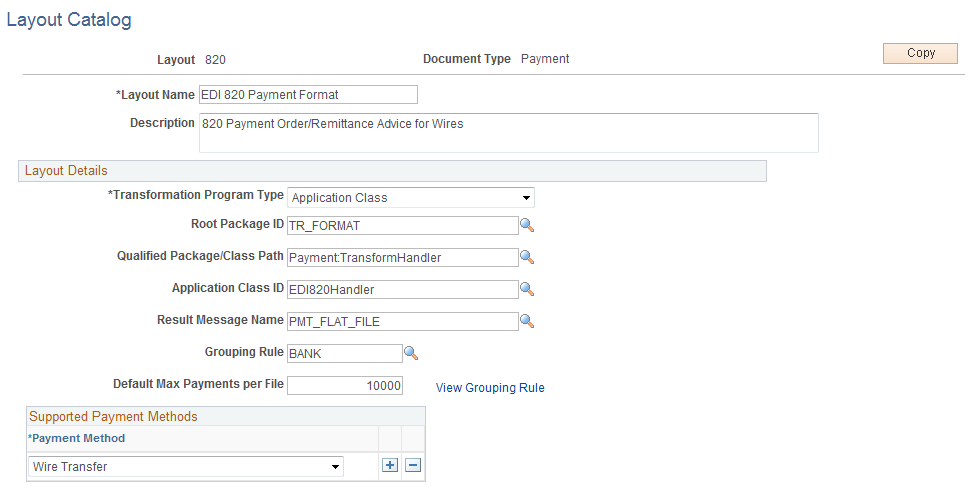
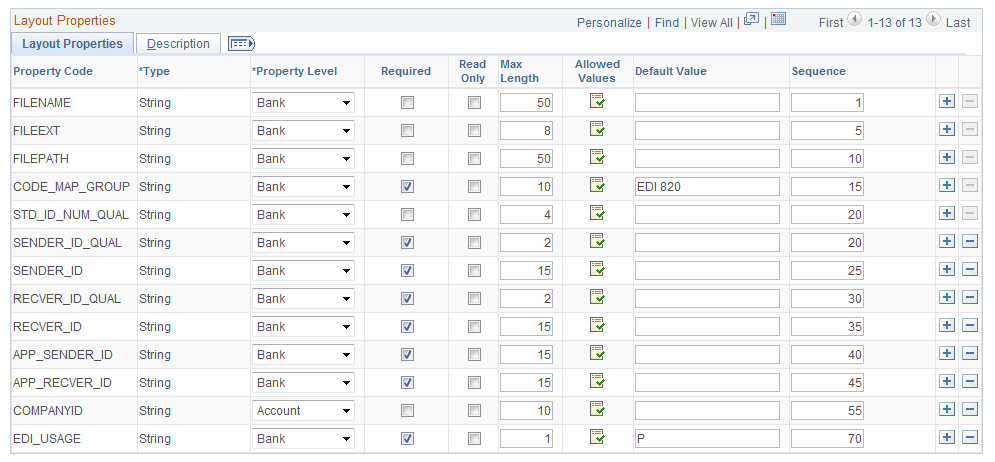
Image: Layout Catalog page (2 of 2)
This example illustrates the fields and controls on the Layout Catalog page (2 of 2). You can find definitions for the fields and controls later on this page.
Define the file layouts, output type, and integration options that a particular bank supports. The catalog stores information about the layout, the program name containing the logic to generate or process the layout, and additional required setup or processing parameters that the layout requires.
If the bank does not support any of the delivered layouts or has a modified version of a delivered layout, you can create a new layout or edit a delivered layout. After a new or modified layout is added to the Layout Catalog, it is available for use in the system.
If you are adding new layouts or editing existing layouts for an organization's payment processing requirements, you must first create the new layout before you can continue this setup procedure. Follow the procedures to create a new layout that are outlined in the sections Defining Payment Grouping Rules, Defining Code Mappings for Banks Statements, Payments, and Payment Acknowledgments, and Creating Payment Layouts. Then add the new layout to the Layout Catalog.
See Understanding the Layout Catalog.
See Code Mappings Page.
Layout Details
Supported Payment Methods
This group box appears only for payment layouts and is used for defining the specific payment methods that are supported by the payment layout.
Select a layout payment method. Values are:
Automated Clearing House
Direct Debit
Electronic Funds Transfer
Wire Transfer
See the payment layout table for a list of delivered layouts and their corresponding payment methods.
Layout Properties
Layout Properties are information that is needed by a transformation program to successfully create and process a layout. A layout property can be anything, but generally is either a data value that is needed by a layout that is not captured in the system or a processing flag that is needed by a transformation program. These properties are defined at design time, bound with values at setup time, and available to the transformation program at runtime. The values for these defined properties are captured at setup time for every bank.
For example, the layout property SENDER_ID, which is used by the EDI 820 payment layout, identifies the ID of the party that is sending the file. No field is defined in Financial Gateway to store this value, yet this layout requires the property at runtime. Adding SENDER_ID to the layout properties allows this value to be set up for every bank. At runtime, this value is available to the transformation program to be included in the 820 layout.

Code Mappings Page
Use the Code Mappings page (TR_CODE_MAPPINGS) to define input and output values for mappings of a selected code map group.
Image: Code Mappings page
This example illustrates the fields and controls on the Code Mappings page. You can find definitions for the fields and controls later on this page.
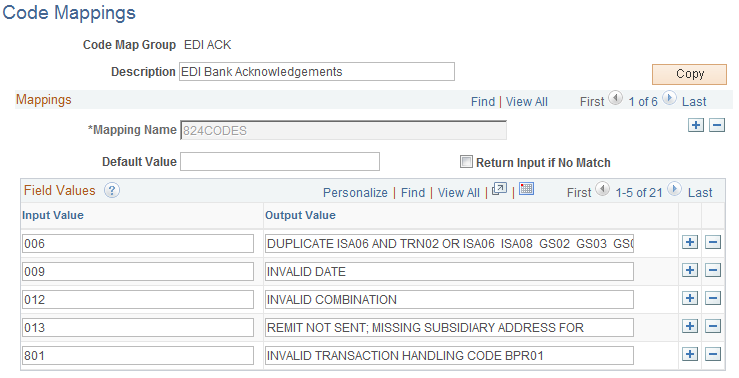
This page enables you to define the mapping between external bank codes with their equivalent internal PeopleSoft codes for both bank statement and bank payment processing.
Bank statement processing uses mappings for three fields: Bank Statement Codes, Reconciliation Codes, and Statement Activity Types.
For example, a financial organization identifies certain miscellaneous fees with the numeric code 564. If you define a statement activity type of Bank Fee (BNKFEE), you can assign the input value of 564 to the output value of BNKFEE.
Event Code Definition Page
Use the Event Code Definition page (TR_EVENT_CD_DEF_PG) to enter codes for system events, and define actions for the system to perform when they occur.
Image: Event Code Definition page
This example illustrates the fields and controls on the Event Code Definition page. You can find definitions for the fields and controls later on this page.