
Maintaining Equities
This section provides an overview of equity maintenance and discusses how to:
Record equity (stock) splits.
Record dividends.
Manage equities after mergers.
Import equity quote data.
Create equity detail reports.
Pages Used to Maintain Equities
|
Page Name |
Definition Name |
Navigation |
Usage |
|---|---|---|---|
|
Split Details |
TRX_EQTY_SPLIT |
Click the Split link on the Equity Definition page. |
Enter equity split details. |
|
Dividend Details |
TRX_EQTY_DVND |
Click the Add Dividend link on the Equity Definition page. |
Enter equity dividend details. |
|
Rights Details |
TRX_EQTY_RIGHTS |
Click the Record Rights link on the Equity Definition page. |
Enter equity rights details. |
|
Merger |
TRX_EQTY_MERGE |
Click the Merger link on the Equity Definition page. |
Enter details of the merger. |
|
Layout Catalog |
PMT_FORMAT_CATLOG |
|
Create or modify the existing layout used for importing equity quote information from an external source into your system using the Equity Quote Import page. PeopleSoft delivers the preconfigured STOCK layout for this purpose. |
|
Equity Quote Import |
BSP_IMPORT |
|
Run the File Import Application Engine process (IMPORT_FILE) to download stock quote information from an external source. |
|
Equity Details |
RUN_TRC3020 |
|
Create the Equity Details report (TRX3020) that lists all the details of each stock that is held in the portfolio. Stock symbol, current price, split details, dividend details, type of shares, and number of shares held are shown in this report for each stock. |
Understanding Equity Maintenance
During the life of an equity in Deal Management, four major events are tracked:
Investing in equities.
Equity splits.
Dividends paid.
Company mergers.
Investing in Equities
Once an equity is defined within Deal Management, you invest in the equity using the equity instrument type in the standard deal capture process.
Equity Splits
If the invested equity is strong and doing well, the company may announce a split. For example, in a 2:1 split, a company issues one additional share for every outstanding share. After the split, two shares exist for every pre-split share. This results in a price adjustment for each share that is held based on the equity-split ratio, as well as a change in the number of shares that are held. The system calculates the quantity of shares and the price once you initiate an equity split.
The split of an equity should be recorded in the system after the date of the split to reflect the current condition of the underlying deals. The deal does not have a split date and adjusts its shares and price when the split is recorded in the system. Because the ratio of the price of the equities and the number of shares changes, but the total monetary amount stays the same, no impact results to the accounting that is already entered for this deal.
Deal Management supports the following methods for handling fractional shares of equities as a result of an equity split:
Issue fractional certificates.
Round up or round down to the nearest whole number of shares.
The system adjusts the number of shares automatically.
Sell the fractional share and send the shareholder a check for its value.
The accounting for this event is similar to the accounting for a received dividend.
Note: The method that is used for the adjustment of fractional shares must be specified at the equity definition level for every equity.
Dividends Paid
The company, whose stock has been invested in, may announce dividends. The dividend can be in the form of cash or more stock. Dividends are ad hoc occurrences and so the process of generating dividends cannot be automated. Every time a dividend is announced, it must be entered into the system.
The method that is used to process dividends differs depending on the type of dividend. For cash dividends, the amount is recorded and accounted for in the same manner as an interest payment. For stock dividends, a new deal is created for the number of shares that are declared and the description of the deal indicates that this deal is the result of a dividend.
Yield for the dividend is calculated in the batch process once the dividend is recorded. This yield is the dividend amount divided by the current market price and is displayed in the dividend history.
Company Mergers
Two possible results may occur for equities as a result of a merger between two companies:
A cash buyout of all existing stock.
No stock in the merged company is issued.
In the event of a cash buyout of all existing stock, the buyout must be recorded as a sale.
An exchange of existing stock for stock of the merged company.
This is often an uneven ratio of the existing stock for the merged company stock.
If the merger results in an exchange of the existing stock for stock of the merged company, then the system replaces the existing stock holdings with the merging stock. All of the existing deals with the original stock are updated for the stock of the merged company. The price and number of shares are adjusted depending upon the exchange ratio that is specified on the Merger page. The status of the existing equity is changed to Inactiveas of the merger date.
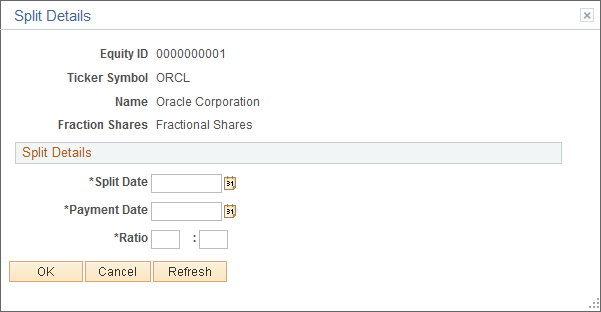
Split Details Page
Use the Split Details page (TRX_EQTY_SPLIT) to enter equity split details.
Image: Split Details page
This example illustrates the fields and controls on the Split Details page. You can find definitions for the fields and controls later on this page.
Dividend Details Page
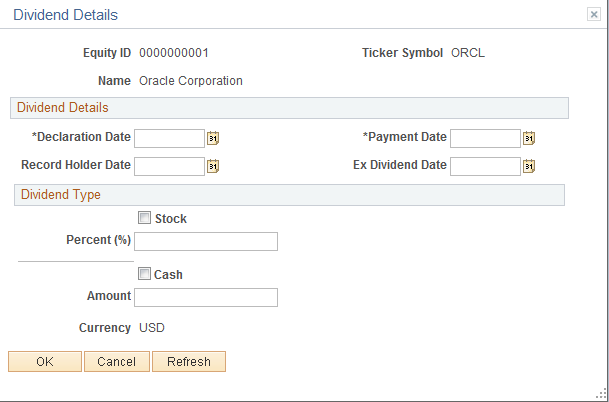
Use the Dividend Details page (TRX_EQTY_DVND) to enter equity dividend details.
Image: Dividend Details page
This example illustrates the fields and controls on the Dividend Details page. You can find definitions for the fields and controls later on this page.
Dividend Type
Merger Page
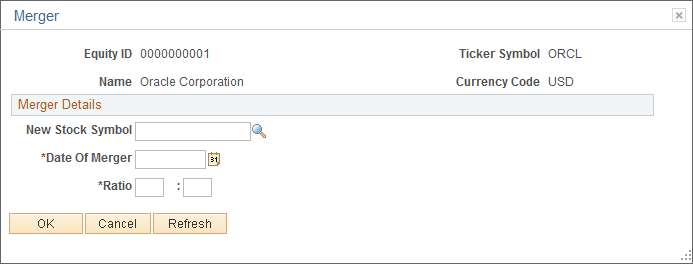
Use the Merger page (TRX_EQTY_MERGE) to enter details of the merger.
Image: Merger page
This example illustrates the fields and controls on the Merger page. You can find definitions for the fields and controls later on this page.
Equity Quote Import Page
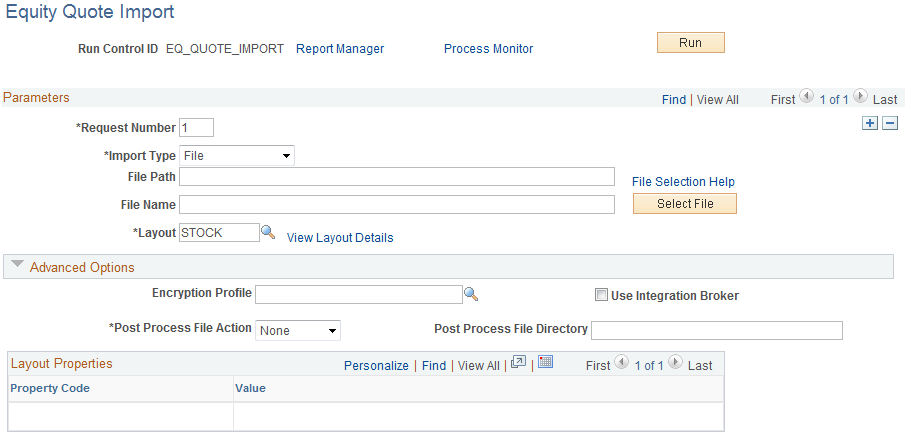
Use the Equity Quote Import page (BSP_IMPORT) to run the File Import Application Engine process (IMPORT_FILE) to download stock quote information from an external source.
Image: Equity Quote Import page
This example illustrates the fields and controls on the Equity Quote Import page. You can find definitions for the fields and controls later on this page.
Parameters
| Import Type |
Select a method for importing the equity-quote files. The options are:
|
| Integration Node |
Enter the node that will be used to relay the equity-quotes files from the external source to your system. This field appears only if FTP or HTTP is selected as the import type. See Defining Integration Broker Settings for Bank Statements and Payment Acknowledgments. See PeopleTools PeopleBook: Integration Broker Administration, "Adding and Configuring Nodes," Configuring Nodes See PeopleTools PeopleBook: Integration Broker Administration, "Using Listening Connectors and Target Connectors," Working With the AS2 Connectors |
| View Integration Node Details |
Click to access the Integration Node Details page and review property details of the selected node. This link appears only if FTP or HTTP is selected in the Import Type field. |
| File Path |
Enter the complete file path location. To select files using the Select File button, the file path must have a trailing backslash (\). You can also search for files of a specific type by entering an asterisk and the extension suffix. For example, to search all files with an .XML suffix, enter: \*.XML Note: Be sure that the application server and the Process Scheduler have access to the directory where the files are stored. |
| File Selection Help |
Click to view help information about specifying file paths and file names. |
| File Name |
Enter the name of the specific file to import or click the Select File button to search for the file. If you want to import multiple files based on extension, leave this field blank. |
| Layout ID |
Select an equity-quote file layout. PeopleSoft delivers the STOCK layout, which is preconfigured for this purpose. |
| View Layout Details |
Click to access the Layout Catalog page (PMT_FORMAT_CATLOG) to view details of the equity-quote file layout. |
Advanced Options
Layout Properties
| Value |
Property codes and values appear by default from values that are defined on the selected layout ID. If you configure unique code mappings for a layout (on the Code Mappings page) you need to modify the displayed CODE_MAP_GROUP value with the appropriate unique map value. See Code Mappings Page. |
Note: If you are importing multiple files for a single run control ID, you must add requests (by using the Add button) for each file that is being requested. Do not enter a file name and run the import process, and then edit the file name and run the import process again. Doing this can result in duplicate-file-loading errors.