
Defining General Ledger Business Units
To define General Ledger business units, use the General Ledger Definition component (BUS_UNIT_TBL_GL). Your business practices determine how to set up General Ledger business units and the journal processing options.
This section discusses how to:
Define a General Ledger business unit.
Define General Ledger business unit ID numbers.
Specify an ADB incremental calculation method.
Define and maintain a mandate sequence number.
Pages Used to Define General Ledger Business Units
|
Page Name |
Definition Name |
Navigation |
Usage |
|---|---|---|---|
|
General Ledger Definition - Definition |
BUS_UNIT_TBL_GL1 |
|
Define a General Ledger business unit. |
|
GL Business Unit ID Numbers |
BU_ID_NBRS_GL_SEC |
Click the Business Unit ID Numbers link on the General Ledger Definition - Definition page. |
Enter the ID for the reporting entity for a business unit. |
|
Incremental Calculation Method |
BU_ADB_INCR_SEC |
Click the ADB Incremental Calc Method (ADB incremental calculation method) link on the General Ledger Definition - Definition page. |
Identify the ADB definition and period type combinations that the system runs regularly, and use the incremental method to calculate average balances. |
|
Maintain Mandate Sequence Number |
PMT_SEQ_NUM_SEC |
Click the Mandate Sequence Number link on the General Ledger Definition - Definition page. |
Identify the sequence type (mandate ID and reference number), beginning sequence number, maximum length and last auto-assigned number to apply to a mandate form. |
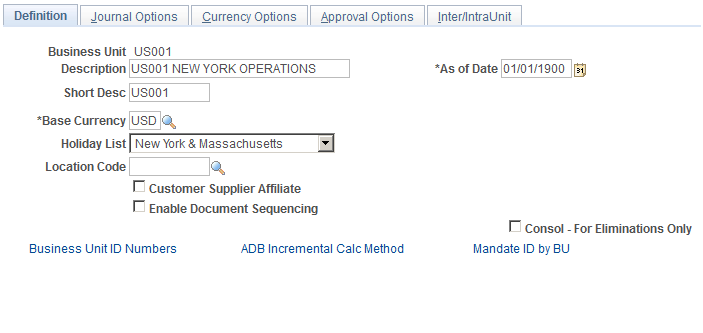
General Ledger Definition - Definition Page
Use the General Ledger Definition - Definition page (BUS_UNIT_TBL_GL1) to define a General Ledger business unit.
Image: General Ledger Definition - Definition page
This example illustrates the fields and controls on the General Ledger Definition - Definition page. You can find definitions for the fields and controls later on this page.
GL Business Unit ID Numbers Page
Use the Business Unit ID Numbers page (BU_ID_NBRS_GL_SEC) to enter the ID for the reporting entity for a business unit.
Click the Business Unit ID Numbers link on the General Ledger Definition - Definition page.
Image: GL Business Unit ID Numbers
This example illustrates the fields and controls on the GL Business Unit ID Numbers. You can find definitions for the fields and controls later on this page.

Incremental Calculation Method Page
Use the Incremental Calculation Method page (BU_ADB_INCR_SEC) to identify the ADB definition and period type combinations that the system runs regularly, and use the incremental method to calculate average balances.
Click the ADB Incremental Calc Method (ADB incremental calculation method) link on the General Ledger Definition - Definition page.
Maintain Mandate Sequence Number Page
Use the Maintain Mandate Sequence Number page (PMT_SEQ_NUM_SEC) to identify the sequence type (mandate ID and reference number), beginning sequence number, maximum length and last auto-assigned number to apply to a mandate form.
Click the Mandate Sequence Number link on the General Ledger Definition - Definition page.
A mandate is an authorization and expression of consent given by the debtor to the creditor, which enables the creditor to initiate collections by debiting the specified debtor's bank account and enables the debtor's bank to comply with these instructions in accordance with the SEPA (Single European Payment Area ) Rulebook.
The mandate sequence number is an auto-assigned number on the Mandate Entry page. It is maintained by GL Business Unit. Mandate Reference Number is used to uniquely identify a mandate provided by a customer. You can print mandate forms where the reference number is auto-assigned.
| Sequence Type |
Select the following sequence types for which to track the auto-assigned sequence numbers:
|
| Beg Seq (beginning sequence) |
Enter the beginning number from which to increment the sequential counter for the sequence number. |
| Max Length (maximum length) |
Enter the maximum length of the sequence number. |
| Last Auto-Assigned Number |
Enter the number of the last sequence number that the system assigned. |