
Viewing and Loading Estimate to Complete Transactions
This topic provides and overview of the Load Estimate to Complete Application Engine process (PGM_ETC_LOAD) and discusses how to:
Set up estimate to complete analysis types.
Load estimate to complete transactions.
View estimate to complete transactions.
Pages Used to View and Load Estimate to Complete Transactions
|
Page Name |
Definition Name |
Navigation |
Usage |
|---|---|---|---|
|
Installation Options - Project Costing Integration |
INSTALLATION_PCINT |
|
Select the analysis types for transactions. |
|
Load Estimate to Complete |
RUN_PGM_ETC_LOAD |
|
Run the Load Estimate to Complete application engine to load the estimate to complete transactions into the Project Transactions table. |
|
Project Valuation |
PC_PRJ_ANALYTICS |
|
View the estimate to complete transactions at the project and activity level using the valuation template of your choice. |
Understanding the Load Estimate to Complete Application Engine
The Load Estimate to Complete Application Engine process (PGM_ETC_LOAD) creates estimate to complete rows in the Project Transaction table (PROJ_RESOURCE). The system uses the estimate to complete data for earned value reporting and project valuation reporting.
To calculate the estimate to complete values, the Load Estimate to Complete process multiplies the remaining work by the cost rate and then spreads it evenly across the remaining periods of the activity. The process uses the calendar that is associated with the active cost budget plan for the project. If no active cost budget plan exists, the process uses the default budget calendar from the Project Costing Installation Options page. The date range that the process uses is from the current date to the end date of the activity. If the end date of the activity has passed and work still remains for that activity, the process loads the entire estimate to complete amount into the current period and performs no spreading.
An activity can have multiple estimate to complete rows if more than one currency code is used on the activity resource list. The process summarizes the rows by activity and currency code and then calls the Transaction Loader Application Engine process (PC_INTFEDIT) to load the rows into the Project Transaction table.
You must manually initiate or schedule the Load Estimate To Complete process as often as you require time reports to be submitted. For example, if you require weekly time reports, you should approve time reports weekly, and run the process after you approve the time reports. This process cannot be initiated automatically because users may adjust the remaining work amount after the Expenses to Project Costing Application Engine process (PC_EX_TO_PC) loads time data from PeopleSoft Expenses. After you run the Load Estimate To Complete process for a business unit, and optionally for a project, the estimate to complete rows remain in the Project Transaction table until you run the Load Estimate To Complete process again for that business unit and project.
Installation Options - Project Costing Integration Page (Set up Program Management Estimate to Complete)
Use the Installation Options - Project Costing Integration page (INSTALLATION_PCINT) to select the analysis types for transactions.
Use this page to define the Cost Estimate to Complete and Bill Estimate to Complete analysis types. Users enter the analysis types that the system assigns to rows that are created when activity remaining work is multiplied by the activity cost rate and activity bill rate. PeopleSoft Program Management delivers these analysis types for this purpose:
ETC: Cost estimate to complete.
ETB: Bill estimate to complete.
These analysis types are default values and can be changed by users.
Load Estimate to Complete Page
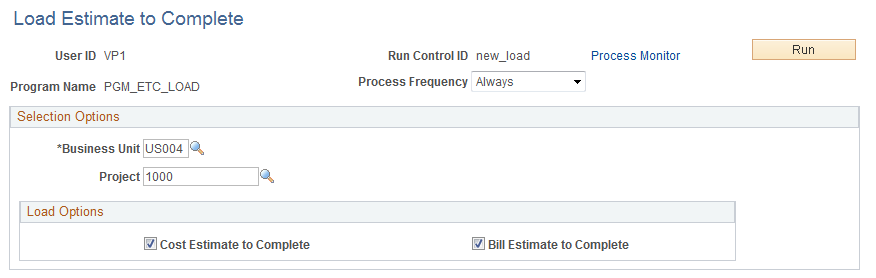
Use the Load Estimate to Complete page ( RUN_PGM_ETC_LOAD) to run the Load Estimate to Complete application engine to load the estimate to complete transactions into the Project Transactions table.
Image: Load Estimate to Complete page
This example illustrates the fields and controls on the Load Estimate to Complete page. You can find definitions for the fields and controls later on this page.
Project Valuation Page
Use the Project Valuation page (PC_PRJ_ANALYTICS ) to view the estimate to complete transactions at the project and activity level using the valuation template of your choice.
After estimate to complete transactions are loaded into the Project Transaction table, you can view them on the Project Valuation page using the appropriate valuation template that has been set up by the system administrator. The cost estimate to complete transactions appear as transactions with the analysis type that is specified on the Installation Options - Project Costing Integration. The default analysis type setting for cost estimate to complete is ETC and the default for bill estimate to complete is ETB.