
Specifying Staffing Workbench and Resource Utilization Options
To specify workbench and resource utilization options, use the Staffing Workbench Options component (RS_MYWKBNCH_OPT).
This section discusses how to:
Specify Staffing Workbench user options.
Specify resource utilization user options.
Pages Used to Specify Staffing Workbench and Resource Utilization Options
|
Page Name |
Definition Name |
Navigation |
Usage |
|---|---|---|---|
|
My Workbench Options - Workbench |
RS_MYWKBNCH_OPT |
Resource Management, Define User Options, My Workbench Options, Workbench |
Select the default resource group to appear on the Manage Utilization page. |
|
Resource Group Definition - Resource Groups |
RS_RESOURCE_GROUPS |
|
Add or modify resource groups and select active resource groups. |
|
My Workbench Options - Utilization |
RS_MYWKBNCHRSC_OPT |
|
Select options for the Staffing Workbench - Manage Utilization page such as the grid sort order, number of days before the end date that an assignment is treated as ending, minimum utilization percentage, optimal utilization ratio, and chart appearance. You can also specify whether to include your name on the workbench if you are a member of the selected resource group. The My Workbench Options - Orders options page is discussed in a previous topic. |
My Workbench Options - Workbench Page
Use the My Workbench Options - Workbench page (RS_MYWKBNCH_OPT) to select the default resource group to appear on the Manage Utilization page.
My Workbench Options - Utilization Page
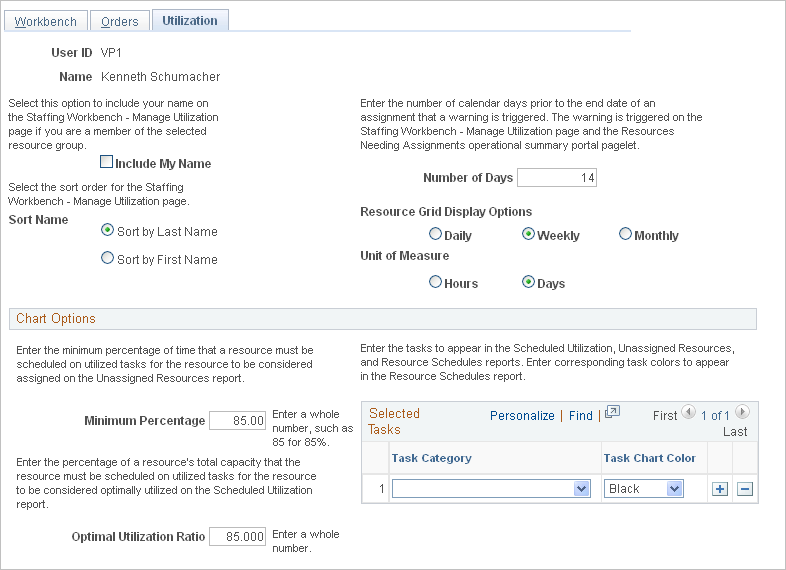
Use the My Workbench Options - Utilization page (RS_MYWKBNCHRSC_OPT) to select options for the Staffing Workbench - Manage Utilization page such as the grid sort order, number of days before the end date that an assignment is treated as ending, minimum utilization percentage, optimal utilization ratio, and chart appearance.
You can also specify whether to include your name on the workbench if you are a member of the selected resource group.
Image: My Workbench Options - Utilization page
This example illustrates the fields and controls on the My Workbench Options - Utilization page. You can find definitions for the fields and controls later on this page.
Note: The My Workbench Options - Orders options page is discussed in a previous topic.