
Specifying Staffing Workbench and Service Order Fulfillment Options
To specify workbench and service order fulfillment options, use the Staffing Workbench Options component (RS_MYWKBNCH_OPT).
This section discusses how to:
Specify Staffing Workbench options.
Specify order fulfillment options.
Pages Used to Specify Staffing Workbench and Service Order Fulfillment Options
|
Page Name |
Definition Name |
Navigation |
Usage |
|---|---|---|---|
|
My Workbench Options - Workbench |
RS_MYWKBNCH_OPT |
|
Select default resource groups from which you staff resources. |
|
Resource Group Definition - Resource Groups |
RS_RESOURCE_GROUPS |
|
Add or modify resource groups and select active resource groups. |
|
My Workbench Options - Orders |
RS_MYWKBNCHREQ_OPT |
|
Select the default search scope option for the Staffing Workbench - Fulfill Orders page. |
My Workbench Options - Workbench Page
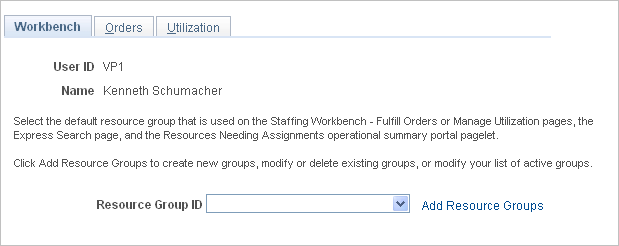
Use the My Workbench Options - Workbench page (RS_MYWKBNCH_OPT) to select default resource groups from which you staff resources.
Image: My Workbench Options - Workbench page
This example illustrates the fields and controls on the My Workbench Options - Workbench page. You can find definitions for the fields and controls later on this page.
My Workbench Options - Orders Page
Use the My Workbench Options - Orders page (RS_MYWKBNCHREQ_OPT) to select the default search scope option for the Staffing Workbench - Fulfill Orders page.
Image: My Workbench Options - Orders page
This example illustrates the fields and controls on the My Workbench Options - Orders page. You can find definitions for the fields and controls later on this page.
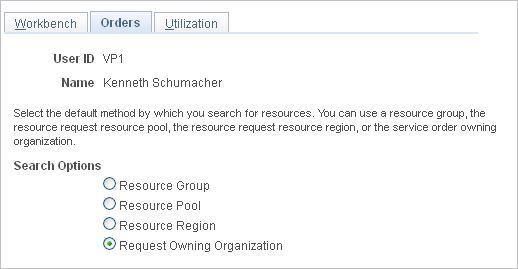
You can override these default search settings on the Staffing Workbench - Fulfill Orders page when you search for resources.
Note: The My Workbench Options - Utilization options page is discussed in a subsequent topic.