
Defining Reconciliation Options for Accounts
You specify which reconciliation method to use for each external account and additional reconciliation processing options for the account.
This section discusses how to:
Select the reconciliation method and reconciliation sources for an account.
Define reconciliation tolerances for matching bank and system transactions.
Pages Used to Reconcile Statements Automatically
|
Page Name |
Definition Name |
Navigation |
Usage |
|---|---|---|---|
|
External Accounts - Reconciliation |
BANK_PNLRECON |
|
Select a method of reconciliation, the reconciliation sources to match against the bank statement, and the sequence of execution. |
|
Reconciliation Options |
BANK_RCN_OPT_PNL |
Click Options on the External Accounts - Reconciliation page. |
Specify reconciliation options for the account. |
|
Reconciliation Tolerances |
BNK_LIMITS_SBP |
Click Tolerances on the External Accounts - Reconciliation page. |
Set reconciliation tolerance ranges on the bank side for matching bank and system transactions. |
Prerequisites
Before establishing reconciliation rules for bank accounts, you must set up the bank accounts and you must install all reconciliation rules (the DMS file that is loaded during installation).
External Accounts - Reconciliation Page
Use the External Accounts - Reconciliation page (BANK_PNLRECON) to select a method of reconciliation, the reconciliation sources to match against the bank statement, and the sequence of execution.
Image: External Accounts - Reconciliation page
This example illustrates the fields and controls on the External Accounts - Reconciliation page. You can find definitions for the fields and controls later on this page.

Reconciliation Sources
The source types that you select determine what system data (reconciled against the bank statement) appears on the different reconciliation pages (Automatic Reconciliation, Semi Manual Reconciliation, and Manual Reconciliation).
Reconciliation Tolerances Page
Use the Reconciliation Tolerances page (BNK_LIMITS_SBP) to set reconciliation tolerance ranges on the bank side for matching bank and system transactions.
Image: Reconciliation Tolerances page
This example illustrates the fields and controls on the Reconciliation Tolerances page. You can find definitions for the fields and controls later on this page.
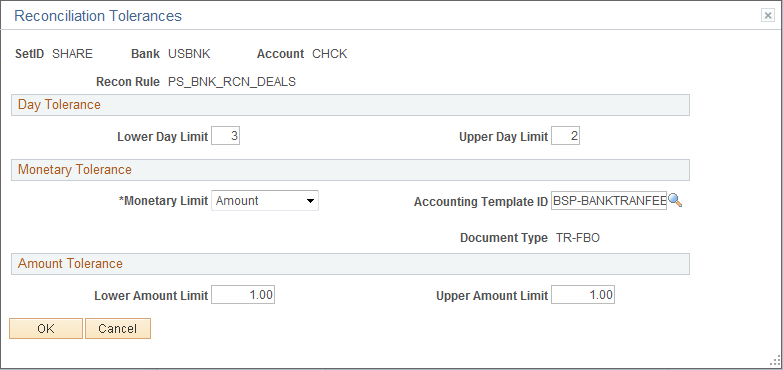
The Reconciliation Tolerances page focuses on the bank side as it reviews transactions on the statement side.
Day Tolerance
Monetary Tolerance
| Monetary Limit |
Indicates whether you use a specific dollar amount or a percentage to determine the limit. |
| Accounting Template ID |
Template that defines how the system generates accounting entries. |
Percentage Tolerance and Amount Tolerance
The system displays either the Percentage Tolerance or the Amount Tolerance group box depending on your selection for the monetary limit.