
Defining External Account Information
To define external accounts, use the External Bank Accounts component (BANK_EXTERNAL_GBL).
Use the TR_EXTERNAL_ACCOUNTS_CI component interface to load data into the External Bank Accounts tables.
To define bank cut-off times, use the Bank Cut-off Times component (CUTOFF_TIMES_GBL).
This section also describes how to:
Define external accounts information.
Define valid currencies.
Define ChartField inheritance options.
Define account signatories.
Review account contacts.
Define account information.
Define collection methods.
(Optional) Specify draft document types.
Define payment methods.
(Optional) Specify document sequence types.
(Optional) Define bank account draft ChartFields.
(Optional) Define EFT options for payment methods.
(USF) Define prenotification.
Define format properties.
Define account settlement information.
Understanding Nuances of External Bank Accounts
This section provides overviews on:
Bank account ChartField inheritance for Education and Government.
Bank account payment methods.
IBAN check digit validation.
Value date for bank accounts.
Pages Used to Define External Account Information
|
Page Name |
Definition Name |
Navigation |
Usage |
|---|---|---|---|
|
External Accounts |
BANK_PNL2 |
|
Set up external accounts. |
|
Bank Branch Information |
BANK_BRNCHPNL |
Click Bank Branch Information on the External Accounts page. |
Edit bank branch information associated with an external account. |
|
Bank Account Other Identification |
BANKACCT_PNL_OTHID |
Click the Other Identification link on the External Accounts page. |
Specify values used in SEPA formats based on Rulebook 6.0, including issuer or originating bank. |
|
Valid Currencies |
BANK_ACCT_CURR_SEC |
Click the Currencies icon on the External Accounts page. |
Enter valid default currencies for an external account. |
|
ChartField Options |
BNK_CF_OPTIONS_SEC |
Click Edit Inheritance Options on the External Accounts page. |
Specify inheritance rules for ChartFields for an account type. |
|
External Accounts - Signatories |
BANK_PNLSIGNATORYS |
|
Define account signatories. |
|
External Accounts - Contacts |
BANK_PNLCNTCT |
|
View the names and phone numbers of bank contacts. |
|
Bank Contact Notes |
BRANCH_CNT_DISP_SP |
Click Bank Contacts Notes on the Contacts page. |
Enter notes about the bank contact for an external account. |
|
External Accounts - Reconciliation |
BANK_PNLRECON |
Banking, Bank Accounts, External Accounts, Reconciliation |
|
|
External Accounts - Account Information |
BANK_PNL3 |
|
Specify additional information for each bank account. |
|
External Accounts - Collection Methods |
COLLECT_BANK |
|
Associate different payment methods and collection options (for your receipts) with multiple bank accounts that you established with a particular bank. |
|
Draft Document Types |
BANK_COLCT_SEC |
Click the Document Type link on the External Accounts - Collection Methods page. |
Specify a document type for document sequencing for each draft event. The Receivable Update process (AR_UPDATE) uses this to create document sequence numbers. The Document Type link appears only if Draft is selected in the Payment Method field. |
|
External Accounts - Payment Methods |
PYMNT_BANK |
|
Define the payment methods supported for an account, payment processing options, and EFT file attributes. For each account, you can enter multiple payment methods. |
|
Document Sequence |
PYMNT_BANK_DOC_SEC |
Click Document Sequencing on the External Accounts - Payment Methods page. |
Set up tracking of individual documents. To access this page, document sequencing must be enabled on the Treasury Options page at the business unit level. |
|
Bank Account Draft ChartFields |
BANK_ACCT_CFDR_SEC |
Click Draft Status on the External Accounts - Payment Methods page. |
Enter details about the draft account ChartFields. |
|
Prenotification |
BANK_PRENOTE |
Click Prenote on the External Accounts - Payment Methods page. |
Indicate whether prenotification files (used in Federal Schedule Reconciliation) must be generated. |
|
Define Layout Properties |
PMT_BANK_MTHD_PROP |
Click the Define Layout Properties icon on the External Accounts - Payment Methods page. |
Review and edit values defined for a specific electronic format. |
|
External Accounts - Account Settlement |
BANK_PNLSETTLE |
|
Associate settlement instructions with a bank account. |
Bank Account ChartField Inheritance for Education and Government
In education and government organizations, you can associate bank accounts with a single fund (non-pooled) or group of funds (pooled). Pooled accounts may contain funding from many different grants or endowments, and this pooled fund is represented as a fully configurable ChartField:
As nonpooled accounts are associated with a single fund, you may explicitly enter the fund as a ChartField on the bank account and use it like the other ChartFields.
For pooled bank accounts, the ChartField must be derived at the transaction that references the bank account, because all of the activity in the account must be tracked back to a particular fund (per governmental requirements).
To correctly process transactional ChartFields for pooled bank accounts, use the Bank Account ChartField Inheritance feature. This feature provides a balancing methodology at the ChartField level rather than at the business unit level, which in turn facilitates the interunit and intraunit accounting entry functionality. To enable ChartField inheritance, select one of four inheritance options for each fully configurable ChartField (plus Department and Project ChartFields) on the External Accounts - ChartField Options page. Automatic processes cross-validate whether the specific ChartField supports the inheritance option; the cross-validation is dependent on the PeopleSoft applications and options selected on the External Accounts page.
The following tables illustrate the valid inheritance option combinations:
Table labels (except for valid inheritance options) relate to page fields and check boxes that appear on the External Accounts page.
You specify inheritance option values (listed in italics in the following tables, next to valid inheritance options) on the External Accounts - ChartField Options page.
Inheritance Option Code Key
This table displays the codes for inheritance options:
|
Inheritance Option |
Code |
|---|---|
|
Always Inherit |
A |
|
Do Not Inherit |
N |
|
Inherit Within Unit |
I |
|
Use Unit Default |
D |
|
Option not applicable |
N/A |
Note: We define inheritance options in the Defining ChartField Inheritance Options section.
Receivables, Billing, and Cash
This table displays the inheritance options for Cash Management, Receivables, and Billing transactions:
|
Account Types |
Processing Options |
|||||||
|---|---|---|---|---|---|---|---|---|
|
Accounts Receivable (AR) or Billing (BI) |
Cash Clearing |
AR Draft Cash Control |
Dep in Transit |
|||||
|
Account Types |
Cash - AR |
Dep - AR |
AR OffSetDr. * |
AR OffsetCr. * |
Cntrl - AR |
Disc - AR |
Draft - AR |
Dit - AR |
|
Valid Inheritance Options |
N |
N |
N/A |
N/A |
N |
N |
N |
N |
|
D |
D |
N/A |
N/A |
D |
D |
D |
D |
|
|
I |
N |
I |
I |
I |
I |
I |
I |
|
|
I |
D |
I |
I |
I |
I |
I |
I |
|
|
A |
N |
A |
A |
A |
A |
A |
A |
|
|
A |
D |
A |
A |
A |
A |
A |
A |
|
*If any Cash - AR ChartField inheritance option is set to either A or I, and you select the Cash Clearing check box, these ChartFields appear on the External Accounts - ChartFields tab when you save.
Payables
This table displays the inheritance options for Payables (AP) transactions:
|
|
Account Types |
Processing Options |
||
|---|---|---|---|---|
|
|
AP |
Cash Clearing |
TRF Charge |
Drafts Payable |
|
Accountt Type |
Cash - AP |
Cntrl - AP |
Bank Charge |
Draft - AP |
|
Valid Inheritance Options |
N |
N |
N |
N |
|
D |
D |
D |
D |
|
|
I |
I |
I |
I |
|
|
A |
A |
A |
A |
|
Treasury
This table displays the inheritance options for Treasury (TR) transactions:
|
|
Account Types |
Processing Options |
||
|---|---|---|---|---|
|
|
TR |
Cash Clearing |
Stmt Accounting |
TR |
|
Account Type |
Cash |
Control |
Fees Interest |
Cash |
|
Valid Inheritance Options |
N |
N |
N |
N |
|
D |
D |
D |
D |
|
|
I |
I |
I |
I |
|
|
A |
A |
A |
A |
|
Expenses
This table displays the inheritance options for expense (EX) transactions:
|
|
Account Types |
Processing Options |
||
|---|---|---|---|---|
|
|
EX |
Cash Clearing * |
TRF Charge * |
Drafts Payable * |
|
Account Type |
Cash - AP |
Cntrl - AP |
Bank Charge |
Draft - AP |
|
Valid Inheritance Options |
N |
N |
N |
N |
|
D |
D |
D |
D |
|
|
I |
I |
I |
I |
|
|
A |
A |
A |
A |
|
* When you select the AP application check box on the External Accounts page, these ChartFields appear on the ChartFields tab. When you select only the EX application check box, no inheritance validation is enforced. However, when you select the EX and AP check boxes, the AP inheritance validation rules are enforced.
Bank Account Payment Methods
If you use Cash Management and Payables in your organization's banking processes, you can configure banking accounts to automatically process certain Cash Management settlements through either the Cash Management Payment Dispatch or Payables Pay Cycle Manager (PCM) functionality.
To enable this settlement integration, there are now two payment sources predefined in PCM:
TR: Payment source used for bank transfers, fees, and deal settlements.
TRET: Payment source used for EFT request transactions.
The following is a listing of supported and unsupported settlement options for Cash Management settlements:
You can settle ACH and EFT payment methods through either Treasury settlements pages or Pay Cycle Manager.
Checks are automatically configured to settle through Pay Cycle Manager.
As this is a system default value, you cannot access the External Accounts - Payment Methods settle through option.
You cannot settle direct debits through Pay Cycle Manager.
Note: All Cash Management settlements processed through PCM must use the same default currency of the account. For example, if a bank account has a default currency of USD, and you create a settlement from this account with a currency of JPY, PCM cannot process the settlement.
International Bank Account Number (IBAN) Functionality
International Bank Account Number (IBAN) provides an international standard account identifier in order to facilitate automated processing of cross-border transactions. IBAN standards are established by the European Committee for Banking Standards (ECBS) and the International Standards Organization (ISO).
PeopleSoft provides a function that validates an IBAN for new account information and stores the IBAN and its check digit in a record. Clicking the View IBAN button on either the Beneficiary Bank page or External Accounts page, as well as various other PeopleSoft Financials application pages, starts a function that validates the IBAN check digit entry, using processes and functions that conform to ISO 13616, 3166, and 7064. If the check digit is successfully validated, the system concatenates the two-digit country code, IBAN check digit and the existing Basic Bank Account Number (BBAN) to create the IBAN:
|
Calculation Page |
Related Record |
|---|---|
|
External Accounts |
BANK_ACCT_DEFN |
|
Settlement Instructions |
STL_INSTRUCTION |
|
EFT Request Entry |
TR_WR_DETAIL |
|
EFT Template |
TR_WR_TEMPLATE |
For electronic formats, the IBAN includes the two-letter country code, two-numeral check digit, and existing BBAN. For paper formats, the IBAN is the same as the electronic format, and also includes the tag IBAN followed by a space, with the number separated into groups of four characters. The last group may vary in length, up to four characters.
Note: Besides the IBAN check digit functionality, users have the option of entering the IBAN manually. Which method is used is determined on a country-by-country basis on the IBAN Formats page.
Single Euro Payments Area (SEPA) Requires IBAN and Bank Identifier Code (BIC)
The European Commission (EC), and the European Central Bank (ECB) working with the Eurosystem, with the support of the European Payments Council (EPC), which brings together the European payments industry, created the Single Euro Payments Area (SEPA). SEPA enables citizens, companies and other economic actors to make and receive payments in Euros between and within national boundaries in Europe with the same basic conditions, rights and obligations, regardless of their location.
SEPA requires the use of BIC and IBAN codes to uniquely identify the creditor's and debtor's banks and bank accounts in all Euro cross-border payments. It is imperative that the IBAN and BIC codes are correct to avoid repair fees that the bank charges due to processing errors. In addition, the validation of the IBAN and BIC codes avoids delays in processing payments and collections due to the time-consuming correction of these errors. The system only validates BIC codes when payments are being settled or settled and dispatched as long as the currency is EUR and the layout is a predefined SEPA credit transfer layout.
See Understanding SEPA.
See the product documentation for PeopleSoft HCM: Global Payroll.
Value Date for Bank Accounts
Value dating transactions is a common practice in Western European countries, similar to the banking practice of float in the United.States. The value date of a transaction is the date on which funds are available (either as a deposit or a settlement). Banks negotiate this date to be a specified number of days before or after the business date of a transaction. For payments or settlements, the value date is calculated as a number of days before the business date, which means that the check must clear the bank prior to settling with the individual beneficiary. For deposits, the value date is calculated as a specified number of days beyond the business date.
You specify a value date (expressed as a positive or negative number) for a selected payment method. This functionality is available to you depending on how you configure Treasury Management. If you do not enable the value date functionality for a business unit, automatic processes enable the accounting date (or business date) to appear by default in the Value Date field. Using the Value Date option in PeopleSoft is mainly a setup step. After you specify value date parameters for a specific bank account on the External Accounts - Payment Methods page, automatic processes populate the calculated value date in the system and on applicable PeopleSoft reports.
External Accounts Page
Use the External Accounts page (BANK_PNL2) to set up external accounts.
Image: External Accounts page
This example illustrates the fields and controls on the External Accounts page. You can find definitions for the fields and controls later on this page.
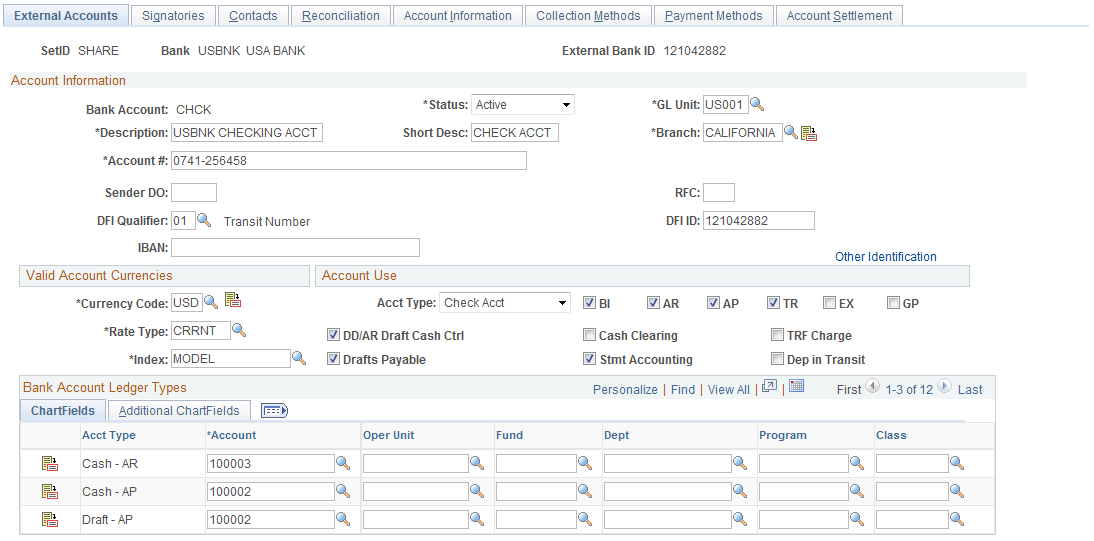
Bank Accounts
Important! For a specified setID and bank ID, no two accounts should have the same bank account number.
See Understanding IBAN.
See IBAN Formats Page.
Valid Account Currencies
Account Use
Associate the account either with one or more PeopleSoft Financials applications or with PeopleSoft Global Payroll.
BI: Billing
AP: Payables
AR: Receivables
TR: Treasury
EX: Expenses
GP: Global Payroll
Select the appropriate check boxes to indicate which PeopleSoft Financials applications use this account. This determines which Ledger Account ChartFields you must establish. In addition, select the appropriate check boxes for the type of bank balance accounting used by this account.
The GP option designates an account that is used by Global Payroll for a SEPA credit transfer (SEPA_CT).
Important! If you are setting up bank accounts for bank account transfer functionality, you must select the TR check box. Doing this creates a Cash ChartField for the bank account. The system requires a cash account ChartField active at the bank account level to display the account in the bank account transfer feature.
Bank Account Ledger Types
This table displays the Bank Account Ledger Types that you must establish, depending on your selections in the Account Use group box. Enter the ChartField values to use for each account type.
Note: ChartFields and bank account ledger types are not applicable if you are setting up bank accounts for Global Payroll to facilitate SEPA credit transfers.
|
BI |
AP |
AR |
TR |
EX |
|
|---|---|---|---|---|---|
|
Required ChartFields |
Cash − AR Deposit-AR DIT-AR |
Cash − AP DIT-AR |
Cash − AR Deposit-AR |
Cash |
Cash − AP |
|
Drafts Payable ChartFields |
NA |
Draft − AP |
NA |
NA |
NA |
|
Cash Clearing ChartFields |
NA |
Control - AP |
NA |
Control |
NA |
|
DD/AR Draft Cash Control |
NA |
NA |
Draft − AR Control − AR Discount - AR |
NA |
NA |
|
Stmt Accounting ChartFields |
NA |
NA |
NA |
Interest Fees |
NA |
|
TRF Charge |
NA |
Bank Charge |
NA |
NA |
NA |
|
Dep in Transit |
NA |
NA |
if selected |
NA |
NA |


Note: You must specify the correct ChartField inheritance option combination to save the account information, depending on the Account Type options selected. Refer to the tables of valid inheritance option combinations listed in the Bank Account ChartField Inheritance section.
Valid Currencies Page
Use the Valid Currencies page (BANK_ACCT_CURR_SEC) to enter valid default currencies for an external account.
ChartField Options Page
Use the ChartField Options page (BNK_CF_OPTIONS_SEC) to specify inheritance rules for ChartFields for an account type.
Click the Edit Inheritance Options icon in the Bank Account Ledger Types grid on the External Accounts page.
Select an inheritance option for each ChartField.
When you change inheritance from Do Not Inherit to another value, the specified ChartField appears as a read-only field on the External Accounts page. In the previous example, if you set the Department inheritance option to Always Inherit, the field is unavailable for entry on the External Accounts page.
External Accounts - Signatories Page
Use the External Accounts - Signatories page (BANK_PNLSIGNATORYS) to define account signatories.
Enter the name of the signatory and the monetary ceiling (the signatory limit) that the signatory can approve.
This page is for informational purposes only. The system does not generate a required activity for the signatory (for example, the signatory's electronic signature on a system-generated check). You can use this for reports or configurations that you want to add.
Contacts Page
Use the External Accounts - Contacts page (BANK_PNLCNTCT) to view the names and phone numbers of bank contacts.
| Contact ID |
Click a contact link to access that person's financial contacts page. |
 |
Click the Bank Contact Notes icon to enter notes for the contact on the Bank Contacts Notes page (BRANCH_CNT_DISP_SP). |
External Accounts - Account Information Page
Use the External Accounts - Account Information page (BANK_PNL3) to specify additional information for each bank account.
Image: External Accounts - Account Information page
This example illustrates the fields and controls on the External Accounts - Account Information page. You can find definitions for the fields and controls later on this page.
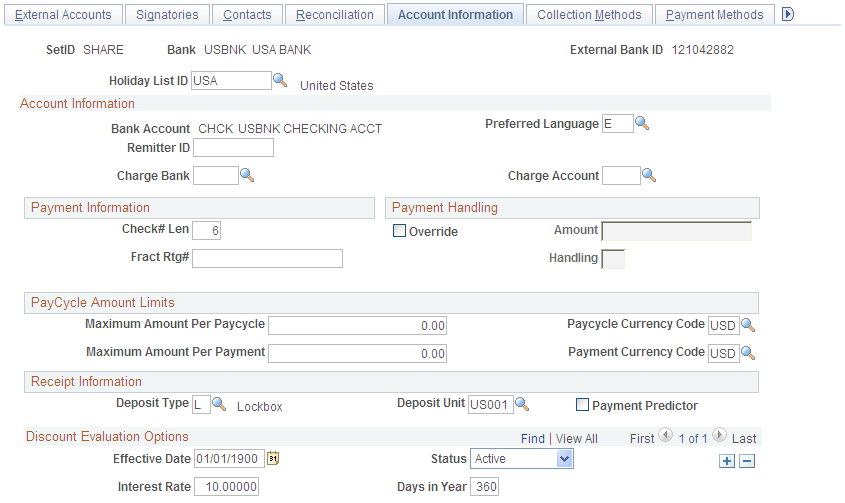
Account Information
Payment Information
Only Payables uses the information in the Payment Information group box.
Payment Handling
Only Payables uses the information in the Payment Handling group box.
You define handling codes on the Payment Handling Codes page. When adding new codes, leave gaps between numbers in the sort sequence so that you can easily add more codes as necessary. This table lists some handling codes that you may want to implement:
|
Handling Code |
Name |
Sort Sequence |
|---|---|---|
|
HD |
High Dollar Payment |
99 |
|
IN |
Internal Distribution |
10 |
|
PO |
Route to Purchasing |
50 |
|
RE |
Regular Payments |
1 |
PayCycle Amount Limits
This functionality is integrated with the Payables bank replacement functionality.
The system is not enabled for amount splitting. If a voucher amount exceeds the maximum amount per pay cycle or the maximum amount per payment, the entire voucher amount is derived from another account. For example, you establish that Bank Account 001 has a 50,000 USD maximum and Bank Account 002 has a 25,000 USD maximum. A 10-voucher group to be paid totals 51,000 USD. The first nine vouchers total 47,000 USD and are paid from Bank Account 001. The number 10 voucher totaling 4,000 USD is paid from Bank Account 002.
Note: You must first define valid currency codes for the account before you can define Paycycle Currency Code and Payment Currency Code values.
Receipt Information
Only Receivables uses the information in the Receipt Information group box.
Discount Evaluation Options
Payables uses the Discount Evaluation Rate feature. Processes (during pay cycle selection) on a federal invoice amount calculate money saved by taking an "early pay" supplier discount, versus money earned by interest accrued on the invoice amount to the full due date. You can specify the interest rate per account of a single bank. To enable interest accrual calculation, specify the interest rate and related information.
External Accounts - Collection Methods Page
Use the External Accounts - Collection Methods page (COLLECT_BANK) to associate different payment methods and collection options (for your receipts) with multiple bank accounts that you established with a particular bank.
Image: External Accounts - Collection Methods page
This example illustrates the fields and controls on the External Accounts - Collection Methods page. You can find definitions for the fields and controls later on this page.
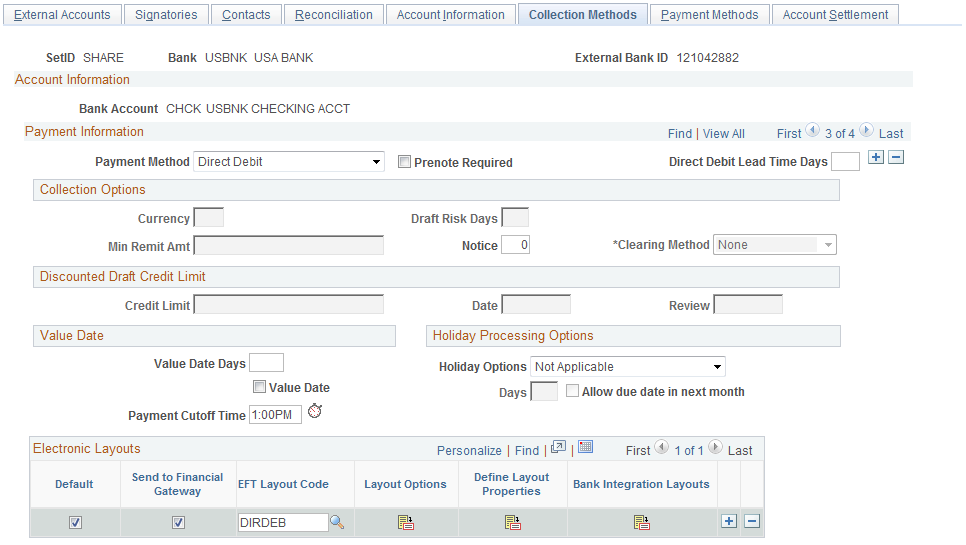
Payment Information
See Understanding the Set Up and Processing of Direct Debits with Prenotes.
Collection Options
The fields that are available vary based on the payment method that you select on this page.
Discounted Draft Credit Limit
These fields are available only if you selected the Draft payment method.
Value Date
A value date is a virtual date for a banking operation, generally not the real date for the operation. The practice of value date consists of recording a banking operation:
One or several days (two to five) before the operation date for a debit.
One or several days (two to five) after the operation date for a credit.
Holiday Processing Options
Electronic Layouts
This grid is available only if the payment method is Direct Debit or Draft. If draft is the specified payment method, then you can specify only one layout.
| Default Flag |
Select to make this layout the default layout for the specified payment method. |
| Send to Financial Gateway |
Select to send the settlement through Cash Management's Financial Gateway. Only direct debits can be settled through Financial Gateway. If left unchecked, Pay Cycle Manager is used as the settlement method. Note: Financial Gateway is a component of Cash Management. Therefore, you must have Cash Management installed on your system to make settlements using Financial Gateway. |
| EFT Layout Code (electronic file transfer layout) |
Select an EFT file format. Note: If you selected Direct Debit and the Required Prenote check box as the payment method, the system verifies that the EFT file format that you select here is valid for direct debit transactions with prenotes. See Understanding the Set Up and Processing of Direct Debits with Prenotes. |
| Last File Number |
Displays a sequence number used to uniquely identify payment files generated by the Receivables Collection Methods process. The system uses the last file number as part of the file name of the newly created payment file. It also automatically increases the last number by one to create the next file with a different file name. This prevents overwriting any other files. |
| Layout Options |
Click to access the EFT Layout Codes and Details page. This icon is enabled only for layouts being settled through Pay Cycle Manager. |
| Define Layout Properties |
Accesses a secondary page used for entering layout properties that are required by a particular bank. This field is available only if the settlement is processed through Cash Management's Financial Gateway. |
| Bank Integration Layouts |
Accesses the Bank Integration Layouts page if the settlement is processed through Financial Gateway. |
Draft Document Types Page
Use the Draft Document Types page (BANK_COLCT_SEC) to specify a document type for document sequencing for each draft event.
The Receivable Update process (AR_UPDATE) uses this to create document sequence numbers.
Note: The Document Type link appears only if Draft is selected in the Payment Method field.
External Accounts - Payment Methods Page
Use the External Accounts - Payment Methods page (PYMNT_BANK) to define the payment methods supported for an account, payment processing options, and EFT file attributes.
For each account, you can enter multiple payment methods.
Image: External Accounts - Payment Methods page
This example illustrates the fields and controls on the External Accounts - Payment Methods page. You can find definitions for the fields and controls later on this page.
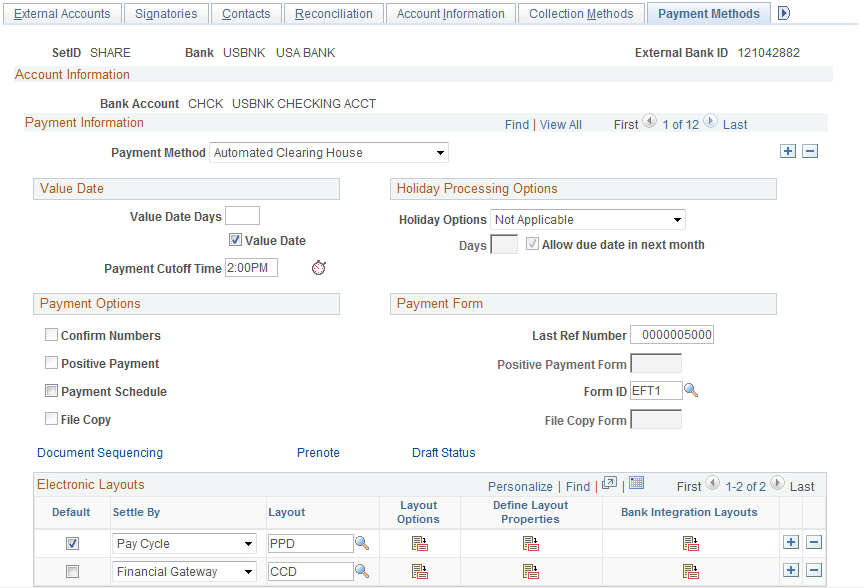
Payment Method
Select a payment method, which determines the additional attributes that you specify on the page. Also, the links available on this page change depending on the selection.
For most of the payment methods, you must specify a form ID and last reference number in the Payment Form group box. Values are:
Automated Clearing House
Direct Debit
Draft-Customer EFT
Draft-Customer Initiated: (Bill of Order) You must also specify a form ID and last reference number.
Draft-Supplier Initiated: (Bill of Exchange)
Electronic Funds Transfer
Giro - EFT (giro - electronic funds transfer
Giro - Manual
Letter of Credit
Manual Check
System Check
Wire Transfer
Important! If you are establishing a payment method of ACH, EFT, or IAT (International ACH Transactions) for U.S. federal payment formats for an employee, or a supplier , or both an employee and supplier, you must select specific ACH, EFT, or IAT layouts, depending on the specified payment method.
|
Format |
Layout Name |
|---|---|
|
CTX (Corporate Trade Exchange) flat file payment order |
CTX |
|
CTX ASC X12 820 payment order |
CTX820FED |
|
SPS vendor check payment |
SPSCHK |
|
SPS vendor ACH payment (CCD+) |
SPSVNDR |
|
SPS travel ACH payment (PPD+) |
SPSTRVL |
|
SPS Same Day Payment Request (SDPR) |
SDPR |
|
SPS Miscellaneous payment |
SPSMISC |
|
SPS IAT Travel |
SPSIATTRVL |
|
SPS IAT Vendor |
SPSIATVNDR |
|
SPS IAT Miscallaneous |
SPSIATMISC |
|
SPS Same day payment request |
SPSSDPR |
|
Bulk vendor check payment |
SF1166SCHK |
|
Bulk vendor ACH payment (CCD+) |
SF1166VNDR |
|
Bulk travel ACH payment (PPD+) |
SF1166TRVL |
|
IPAC (Intra-Governmental Payment and Collections) |
IPAC |
Refer to the following section for a discussion of delivered federal ACH, EFT, and IAT layouts and their uses.
Note: When defining multiple payment methods for one bank account, you cannot define multiple Electronic Funds Transfer payment methods with different EFT layouts.
Note: The ETEBAC and ITAPYMT EFT layouts must be associated with the Electronic Funds Transfer payment method, not the Giro - EFT method.
Value Date
A value date is a virtual date for a banking operation, generally not the real date for the operation. The practice of value date consists of recording a banking operation:
One or several days (two to five) before the operation date for a debit.
One or several days (two to five) after the operation date for a credit.
Holiday Processing Options
Payment Options
Select check boxes in the Payment Options group box, if you selected Manual Check or System Check as the payment method.
Payment Form
Electronic Layouts
This table lists the payment methods that can be used for making settlements using Pay Cycle Manager or Financial Gateway. The Electronic Layouts grid appears only for the payment methods listed in the table:
|
Payment Method |
Settle Through Method |
|---|---|
|
Automated Clearing House |
Both |
|
Direct Debit |
Financial Gateway only |
|
Electronic Funds Transfer |
Both |
|
Giro - EFT |
Pay Cycle Manager only |
|
Wire Transfer |
Both |
Note: Financial Gateway is a component of Cash Management. Therefore, you must have Cash Management installed on your system to make settlements using Financial Gateway.
Document Sequence Page
Use the Document Sequence page (PYMNT_BANK_DOC_SEC) to set up tracking of individual documents.
Bank Account Draft ChartFields Page
Use the Bank Account Draft ChartFields page (BANK_ACCT_CFDR_SEC) to enter details about the draft account ChartFields.
| Accounting Template |
To create balanced accounting entries, select one of the templates that you defined on the Accounting Entry Template page. |
Enter the appropriate ChartField values.
EFT Layout Codes and Details Page
Use the EFT Layout Codes and Details page (PYMNT_BANK_LYT) to review and update layout options.
Click the Layout Options icon in the Electronic Layouts grid on the External Accounts - Payment Methods page.
| Originating DFI ID (originating depository financial institution ID) |
(Optional) Displays the DFI ID of the bank issuing the specified payment method. |
Prenotification Page
Use the Prenotification page (BANK_PRENOTE) to indicate whether prenotification files (used in Federal Schedule Reconciliation) must be generated.
Select the Prenotification Required check box. This generates the correct prenotification files used in Federal Schedule ID reconciliation.
Define Layout Properties Page
Use the Define Layout Properties page (PMT_BANK_MTHD_PROP) to review and edit values defined for a specific electronic format.
Click the Define Layout Properties icon in the Electronic Layouts grid on the External Accounts - Payment Methods page.
Note: Contact your system administrator before editing any fields on this page. The system displays layout values defined on the Layout Catalog and Layouts pages that normally do not need to be changed.
Account Settlement Page