
Defining General Bank Setup
To define rating agencies and credit ratings, use the Credit Ratings/Rating Agency component (CREDIT_RTG_TBL_GBL).
To define bank identification qualifiers, use the Bank ID Qualifiers component (BANK_ID_QUALS_GBL).
To define payment forms, use the Payment Forms component (PYMNT_FORM_PYMNT_GBL).
To define IBAN formats, use the IBAN Formats component (IBAN_FORMAT_GBL).
Before you begin to define your banks, you must define the supporting data.
This section discusses how to establish:
Credit ratings.
Bank ID qualifiers.
IBAN formats.
Payment forms.
Payment sort fields.
Pages Used to Define General Bank Setup
|
Page Name |
Definition Name |
Navigation |
Usage |
|---|---|---|---|
|
Credit Ratings/Rating Agency |
CREDIT_RTG_TBL |
|
Define rating agencies and their associated credit ratings. |
|
Bank ID Qualifiers |
BNK_ID_QUAL_PNL |
|
View the ID qualifiers that the system uses to edit bank values. |
|
IBAN Formats |
IBAN_FORMAT_TBL |
|
View IBAN formats and generate sample IBANs. |
|
Form Information |
PYMNT_FORM |
|
Enter attributes related to your forms of payment. |
|
Sort Fields |
PYMNT_FORM_SORT |
|
Select the grouping of fields used to sort your forms of payment. |
Credit Ratings/Rating Agency Page
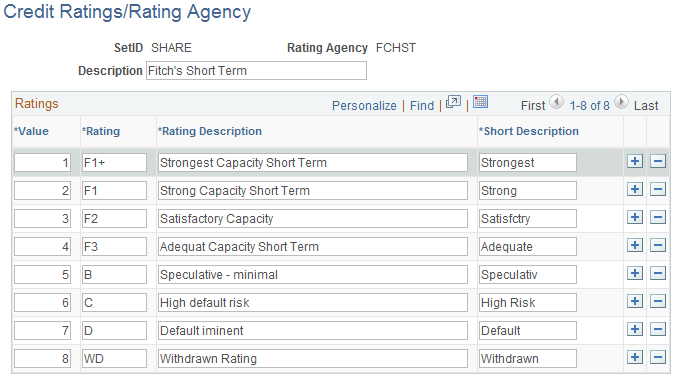
Use the Credit Ratings/Rating Agency page (CREDIT_RTG_TBL) to define rating agencies and their associated credit ratings.
Image: Credit Ratings/Rating Agency page
This example illustrates the fields and controls on the Credit Ratings/Rating Agency page. You can find definitions for the fields and controls later on this page.
Bank ID Qualifiers Page
Use the Bank ID Qualifiers page (BNK_ID_QUAL_PNL) to view the ID qualifiers that the system uses to edit bank values.
Image: Bank ID Qualifiers page
This example illustrates the fields and controls on the Bank ID Qualifiers page. You can find definitions for the fields and controls later on this page.
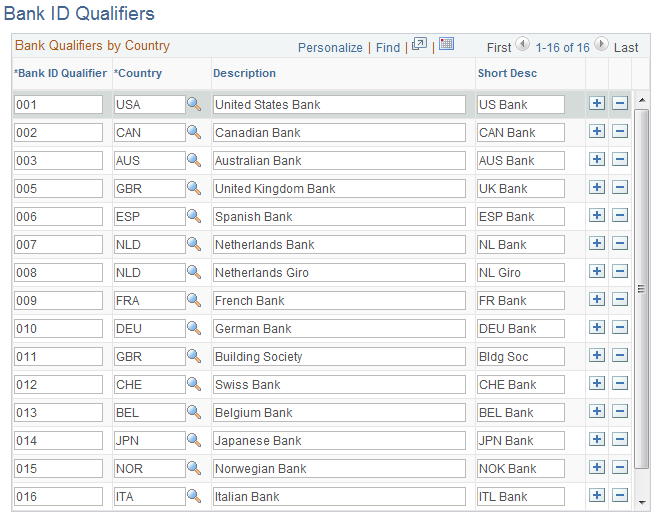
PeopleSoft delivers predefined bank ID qualifiers, which you should typically not modify.
This table describes the system-delivered data.
Note: Qualifiers marked with (no field validation) have no rule validation. If you want the system to automatically perform rule validation routines, you must write the appropriate PeopleCode. For more information, refer to the European Committee for Banking Standards website at http://www.ecbs.org. You can access various countries' bank account numbering conventions and specifications at http://www.ecbs.org/tr201country.htm.
|
Bank ID Qualifier |
Bank ID (Defining Banks) |
Bank Account Number (Bank Accounts) |
Branch |
Check Digit |
|---|---|---|---|---|
|
001 U.S. Bank |
9-digit transit routing number. Exactly 9 numerics with check digit calculation. |
NA |
NA |
NA |
|
002 Canadian Bank |
Exactly 4 numerics. |
Between 7 and 12 numerics. |
Branch routing number Exactly 5 numerics. |
NA |
|
003 Australian Bank |
Exactly 3 numerics. |
Max 9 numerics. |
Exactly 3 numerics. |
NA |
|
005 Great Britain Bank |
Exactly 6 numerics. (Sort Code) |
Max 10 numerics. |
NA |
NA |
|
006 Spanish Bank |
Exactly 4 numerics. |
Exactly 10 numerics. |
Exactly 4 numerics. |
Exactly 2 digits with check digit algorithm. |
|
007 Netherlands Bank |
NA* |
Exactly 10 numerics with modulus 11 check. |
NA |
NA |
|
008 Netherlands Giro |
NA* |
Max 7 numerics. |
NA |
NA |
|
009 French bank |
Exactly 5 numerics. |
Max 11 characters. |
Exactly 5 numerics. |
Check digit algorithm. |
|
010 German Bank |
Exactly 8 numerics. |
Max 10 numerics. |
NA |
NA |
|
011 Great Britain Building Society |
Exactly 6 numerics. (Sort Code) |
Max 10 numerics. |
NA |
NA |
|
012 Swiss Bank |
Between 3 and 5 digits. |
Max 16 characters. |
NA |
NA |
|
013 Belgian Bank |
Exactly 3 numerics. |
Max 7 numerics. |
NA |
2 numerics with 97 modulus check. |
|
014 Japan Bank |
Exactly 4 numerics. |
Max 7 numerics. |
Exactly 3 numerics. |
NA |
|
015 Norwegian Bank (no field validation) |
NA |
NA |
NA |
NA |
|
016 Italian Bank |
Exactly 5 numerics. |
Max 12 alphanumerics. |
Exactly 5 numerics. |
1 alpha with check digit algorithm. |
|
020 Swiss PPT(no field validation) |
NA |
NA |
NA |
NA |
See the product documentation for PeopleTools: Security Administration.
IBAN Formats Page
Use the IBAN Formats page (IBAN_FORMAT_TBL) to view IBAN formats and generate sample IBANs.
Image: IBAN Formats page
This example illustrates the fields and controls on the IBAN Formats page.
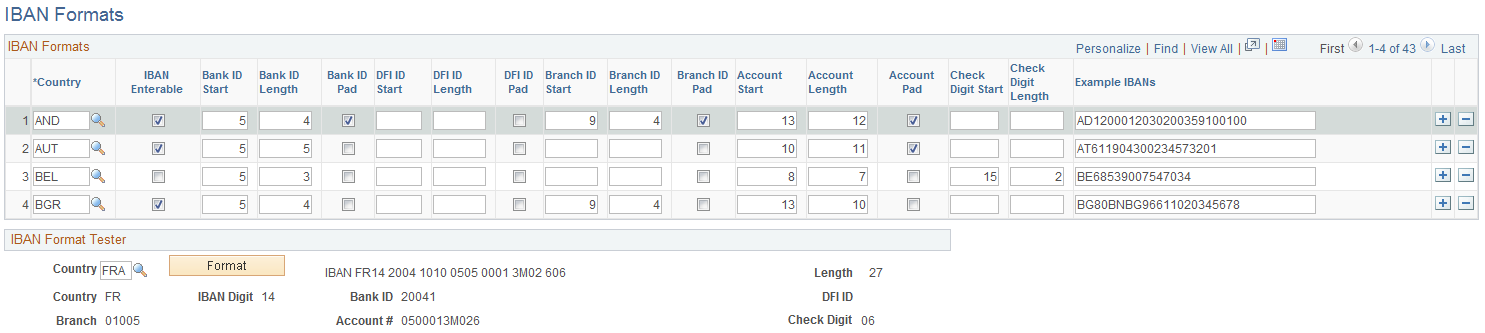
This page displays the formatted components of the International Bank Account Number (IBAN) based on the three-character, European country code selected in the first column. The IBAN is composed of a country code, IBAN check digits, and the Basic Bank Account Number (BBAN)—all the information needed to route a payment through any national clearing house. PeopleSoft supports and provides sample data for 38 countries.
Note: Because the two-character, country code and IBAN check digits are always the first four characters of an IBAN, it is not necessary to include columns defining their position and length on this page.
IBAN Format Tester
Select a country code and click Format to generate a sample IBAN for any of the PeopleSoft-supported countries.
Note: PeopleSoft is not responsible for the validity of IBANs manually keyed in any of the bank-account related pages. The IBAN should be provided by a financial institution.
See EFT Request - Destination Page.
Form Information Page
Use the Form Information page (PYMNT_FORM) to enter attributes related to your forms of payment.
For the form ID that you select, the system displays a payment form image in the Preview group box.
Form Attributes
Advice Attributes
Sort Fields Page
Use the Sort Fields page (PYMNT_FORM_SORT) to select the grouping of fields used to sort your forms of payment.
Image: Sort Fields page
This example illustrates the fields and controls on the Sort Fields page.
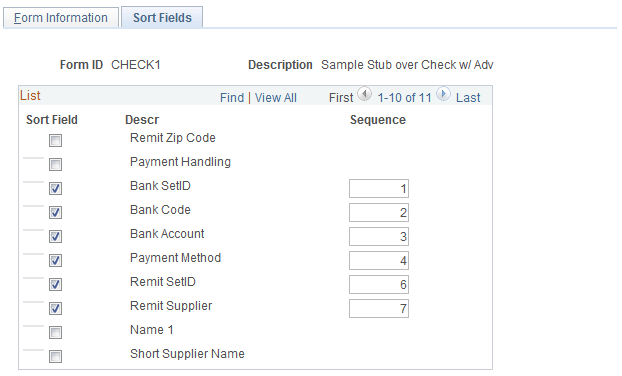
Select the fields that you want to use to sort your check output. Enter sequence numbers for sorting priority.