
Creating EFT Requests
This section discusses how to:
Enter transfer origin information.
Specify destination information.
(Optional) Configure EFT handling options.
(Optional) Define intermediary bank routings.
(Optional) Enter transfer addenda.
(Optional) Add internal notes.
Record beneficiary address information.
You can use the pages in this section to create an EFT request, whether your request is for a regular EFT request, or an EFT request involving repetitive transfer or drawdown transfer information.
Pages Used to Create an EFT Request
|
Page Name |
Definition Name |
Navigation |
Usage |
|---|---|---|---|
|
EFT Request - Origin |
TR_WIRE_PNL |
|
Enter transfer origin information. Capture data on the account from which funds will be furnished for the transfer |
|
Category Purpose |
CAT_PURP_EFT |
Click the Category Purpose link on the EFT Request - Origin page. |
Identify the high-level purpose of the payment instruction based on a set of predefined categories as per ISO 20022 external code list or a proprietary scheme name. |
|
EFT Request - Destination |
TR_WIRE_TO_PNL |
|
Specify destination information by entering recipient information for a funds transfer. |
|
Identification Information |
TR_WR_OTHID_SP |
Click the Identification Information icon on the EFT Request - Destination page. |
Provide other identification for Name1, Bank, and/or Bank Account values, respectively. |
|
EFT Options |
TR_EFT_OPT_SEC |
Click the EFT Options link on the EFT Request - Destination page. |
Configure EFT handling options. |
|
Routings |
TR_INTR_TBL_SEC |
Click the Routings link on the EFT Request - Destination page. |
Set up multiple routing information for a funds transfer. |
|
EFT Request - Detailed Description |
TR_WR_DESC_SEC |
Click the View Description icon on the EFT Request - Destination page. |
Enter any of your in-house notes for the funds transfer. This information is not transmitted to the recipient. |
|
EFT Request - Addenda |
STL_ADDENDA2_SP |
Click the Addenda link on the EFT Request - Destination page. |
Enter addenda information. The system transmits this information to the recipient. For funds transfers, direct debits, and treasury wires, this page consists of four 35-character lines. For ACH transactions, this page is a freeform, 80-character field. |
|
EFT Request - Beneficiary Address |
TR_WIRE_ADDRESS |
|
Capture the address and telephone information for the recipient of your funds transfers. |
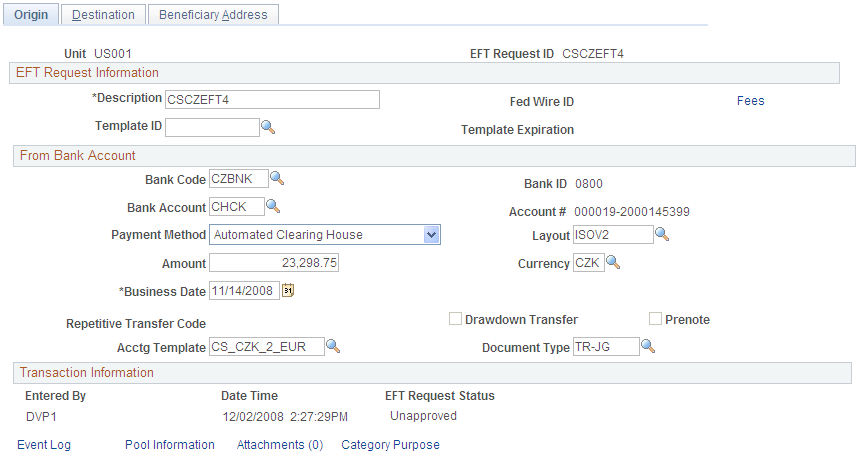
EFT Request - Origin Page
Use the EFT Request - Origin page (TR_WIRE_PNL) to enter transfer origin information.
Capture data on the account from which funds will be furnished for the transfer
Image: EFT Request - Origin page
This example illustrates the fields and controls on the EFT Request - Origin page. You can find definitions for the fields and controls later on this page.
Transaction Information
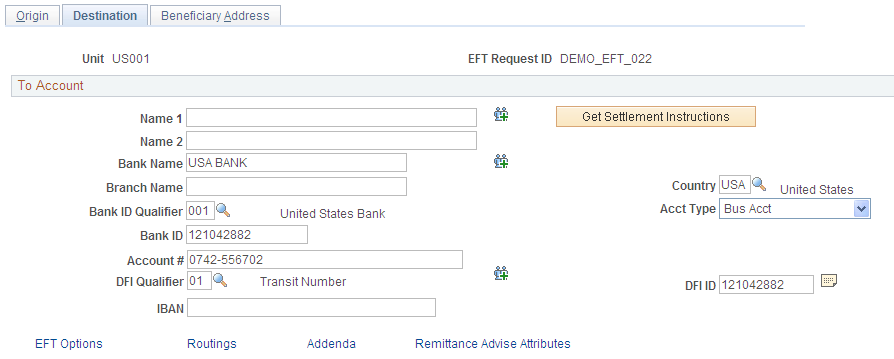
EFT Request - Destination Page
Use the EFT Request - Destination page (TR_WIRE_TO_PNL) to specify destination information by entering recipient information for a funds transfer.
Image: EFT Request - Destination page
This example illustrates the fields and controls on the EFT Request - Destination page. You can find definitions for the fields and controls later on this page.


Validating DFI Field Requirements for EFT Requests
The DFI Qualifier and DFI ID fields on the EFT Request - Destination page are by default not required fields, however, you can configure the system to return an error or warning in case these fields are not populated. PeopleSoft Cash Management provides two message numbers (9450, 3007 and 9450, 3008) for this purpose, where you can change the message severity to error or warning to get the following behavior:
Error - An error message is displayed, processing terminates, and data cannot be saved until the DFI Qualifier and DFI ID values have been entered.
Warning - A warning message is displayed. You can decide to either stop processing or continue processing without the DFI Qualifier and DFI ID values.