
Viewing Budget Details and Transaction Activity
To inquire about a specific control budget, use the Commitment Control Budget Details page or the Budgets Overview - Budget Details page. These pages enable you to drill down to view budget journal lines, ledger entries, source transaction activities, budget exceptions, associated budgets, parent-child relationships, and budget attributes. Some of these pages are also accessible directly from the Budgets Overview - Inquiry Results page.
This section discusses how to:
View budget details.
View parent and child budget relationships.
View budget forecasts.
Note: You can also access all of this detail information from the Budget Overview page.
Pages Used to View Budget Details and Transaction Activity
|
Page Name |
Definition Name |
Navigation |
Usage |
|---|---|---|---|
|
Commitment Control Budget Details |
KK_INQ_BDT_STATUS |
|
Specify budget detail search criteria and select a row to view specific budget detail for a control budget. |
|
Ledger |
KK_DRL_LDGR_SEC |
Click Drill to Ledger on the Commitment Control Budget Details page to access the Ledger page. |
View ledger information associated with the expense, budget, and encumbrance ledgers that appear on the Commitment Control Budget Details page. |
|
Activity Log |
KK_DRL_ALOG_SEC |
ClickDrill to Activity Log on the Commitment Control Budget Details page to access the Activity Log page. |
View all transaction lines for a Commitment Control ledger (except budget ledger) in a budget. You can also drill down from this page to view source transaction line details and access the activity log inquiry. Be aware that the similarly named Activity Log page (KK_ACT_LOG_INQURY) differs from this page in that the Activity Log page provides a view of all commitment control ledgers for a single commitment control transaction—in essence, the reverse of the Budget Details - Activity Log page. ChartField values appear at both the translated and untranslated levels. |
|
Associated Revenue Budgets Associated Expense Budget |
KK_INQ_ASC_BD_SEC |
Click the Associated Budgets link to access associated revenue amounts on the Commitment Control Budget Details page. |
The name of this page varies, depending on whether the budget on the Budget Details page is an expense or revenue budget. Use the Associated Revenue Budgets page to display information about revenue budgets associated with an expense budget, including the ChartFields and the budget amount. Use the Associated Expense Budget page to display information about expense budgets associated with a revenue budget, including the ChartFields and the budget amount. |
|
Budget Detail Attributes |
KK_INQ_BD_DTL_SEC |
Click the Attributes link on the Commitment Control Budget Details page. |
View control option, tolerance, budget status, and budget date range for the control budget you are viewing on the Commitment Control Budget Details page. |
|
Parent & Children Budgets |
KK_INQ_PR_CH_SEC |
Click the Parent/Children link on the Commitment Control Budget Details page. |
View ledger information about child and parent budgets for a control budget that you are viewing on the Commitment Control Budget Details page. |
|
Budget Forecasts Amounts |
KK_INQ_FORECST_SEC |
Click the Forecasts link on the Commitment Control Budget Details page. |
View forecast amounts for the selected budget that you are viewing on the Commitment Control Budget Details page. |
Commitment Control Budget Details Page
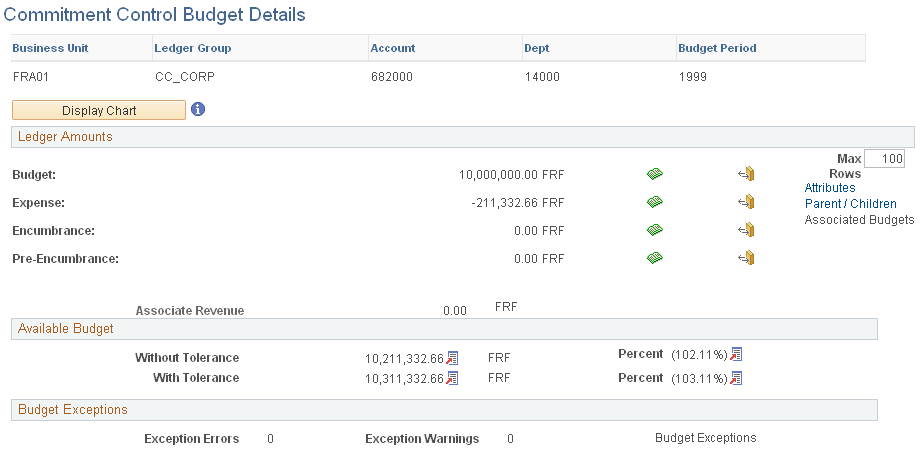
Use the Commitment Control Budget Details page (KK_INQ_BDT_STATUS) to specify budget detail search criteria and select a row to view specific budget detail for a control budget.
You can also ccess the Commitment Control Budget Details page (Click the Show Budget Details button for a ledger row on the Budgets Overview - Inquiry Results page or the Individual Budgets page).
Image: Commitment control Budget Details page
This example illustrates the fields and controls on the Commitment control Budget Details page. You can find definitions for the fields and controls later on this page.
 |
Click this button to display a two-dimensional bar chart graph if the budgeted amount is not equal to zero, or a pie chart if the budgeted amount is equal to zero or a budget does not exist. |
Ledger Amounts


Available Budget
This group box indicates the amount of the budget that is still available, including associated revenue. The ledger group definition specifies which ledgers affect spending or the available budget.

Budget Exceptions
This group box lists the number of errors and warnings that exist for the budget. Click the Budget Exceptions link to open the Budget Exceptions page, where you can view and override exceptions.
Parent & Children Budgets Inquiry Page
Use the Parent & Children Budgets page (KK_INQ_PR_CH_SEC) to view ledger information about child and parent budgets for a control budget that you are viewing on the Commitment Control Budget Details page.
Common Page Information
If the budget you are reviewing is a parent budget, the Children scroll area displays information about those of its child budgets that are associated with the control budget. A parent budget can have multiple child budgets. If the budget has no child budgets, the Children field displays None.
If the budget you are reviewing is a child budget, the Parent scroll area displays information about its parent budget. A child budget can have only one parent budget. If the budget has no parent budgets, the Parent field displays None.
If the budget you are reviewing is both a child budget and a parent budget, both Parent and Children scroll areas appear.
Children Scroll Area
The Budget ChartField tab displays the Commitment Control ledger group and ChartField values for the ledger row. The ChartFields that appear depend on the budget definition.
The Budget Amounts tab displays the ledger amounts and available budget for each child budget. The ledgers that appear vary, depending on whether you are viewing an expense or revenue budget and if there are associated budgets for the control budget.
Click an amount link to access either the ledger drill down page or the - Activity Log drill down page, where you view the transaction lines for the ledger.
Click Available Budget or Percent to display the formula that the system uses to calculate the amount or percentage.
Parent Scroll Area
The Parent scroll area displays the ledger group, ChartField values in the same manner as the Children scroll area displays these elements for child budgets. The parent scroll does not display the amounts associated with the parent budget.
Budget Forecasts Amounts Page
Use the Budget Forecasts Amounts page (KK_INQ_FORECST_SEC) to view forecast amounts for the selected budget that you are viewing on the Commitment Control Budget Details page.