Viewing and Handling Budget Transaction Exceptions
This section provides an overview and discusses how to:
View and handle budgets with exceptions.
View generic transaction exceptions.
(Generic (third-party) transactions cannot be added on line.)
View payroll transaction header exceptions.
View payroll transaction line exceptions.
View the budget checking status for a budget processor process instance.
Pages Used to View and Handle Budget Transaction Exceptions
|
Page Name |
Definition Name |
Navigation |
Usage |
|---|---|---|---|
|
Commitment Control Budget Exceptions |
KK_XCP_BUDGET |
Commitment Control, Review Budget Check Exceptions, Budget Exceptions, Commitment Control Budget Exceptions Click the View Related Links button on a transaction exception header page or Exceptions Details page. Click the Budget Exceptions link on the Budget Details page. |
View and override control budget exceptions on a budget-by-budget basis. The page includes only budgets that have transactions with exceptions. |
|
Refine Inquiry Criteria |
KK_XCP_BD_ADV_SEC |
Click the Advanced Transaction Criteria link on the Commitment Control Budget Exceptions page for budget exceptions. |
Refine selection criteria for transactions to be viewed. |
|
Generic Exceptions |
KK_XCP_HDR_GEN |
Commitment Control, Third Party Transactions, Generic Transaction Entry, Generic Exceptions Click View Related Links, Go to Transaction Exceptions on the Commitment Control, Budget Exceptions, and Budget Checking Status pages. |
View budget checking errors or warning messages for third-party transactions. Users who have authority can override the budget exceptions on this page. |
|
Refine Inquiry Criteria |
KK_XCP_TR_ADV_SEC |
Click the Advanced Budget Criteria link on a transaction exceptions (pages exist for various applications) header page for transaction exceptions. |
Refine selection criteria for budgets to be viewed. |
|
Commitment Control |
KK_XCP_TRAN_SEC |
Click the Budget Check Details button on the Commitment Control Budget Exceptions page or on a transaction exceptions header page. |
View details about a source transaction with exceptions, including the amount type and override information. |
|
Exception Details (header) |
KK_XCP_TRAN_SEC2 |
Click the View Exception Details button on the Commitment Control Budget Exceptions page or on a transaction exceptions header page. |
View budget exception details and drill down to transaction lines. |
|
Generic Line Drill Down |
KK_DRL_GEN_SEC |
Click the Drill Down to Transaction Line button on the Exception Details page for a specific transaction line. |
View line details for generic source transactions with budget exceptions. |
|
Generic Transaction − Line Exceptions |
KK_XCP_LN_GEN |
Commitment Control, Third Party Transactions, Generic Transaction Entry, click in search results grid Click View Related Links, Go to Transaction Exceptions on the Commitment Control, Budget Exceptions, and Budget Checking Status pages. |
View individual transaction lines in a generic source transaction with budget exceptions and view the budgets that caused the exceptions. |
|
Exception Details (lines) |
KK_XCP_TRAN_SEC3 |
Click the View Exception Details button on the Line Exceptions page for the source transaction. |
View budget and exception details for a transaction line. |
|
HR Payroll Exceptions |
KK_XCP_HDR_HR1 |
Commitment Control, Review Budget Check Exceptions, General Ledger, Payroll, HR Payroll Exceptions Click View Related Links, Go to Transaction Exceptions on the Commitment Control Budget Exceptions page or the Budget Checking Status page |
View budget-checking warning messages for Payroll transactions. |
|
HR Payroll Line Drill Down |
KK_DRL_HR1_SEC |
Click the Drill Down to Transaction Line button on the (Payroll) Exception Details page for a specific transaction line. |
View line details for Payroll source transactions with budget exceptions. |
|
Payroll − Line Exceptions |
KK_XCP_LN_HR1 |
Commitment Control, Review Budget Check Exceptions, General Ledger, Payroll, Line Exceptions Click View Related Links, Go to Transaction Exceptions on the Budget Exceptions page or the Budget Checking Status page. |
View individual transaction lines in a Payroll source transaction with budget checking warning messages and all the budgets that caused the exceptions. |
|
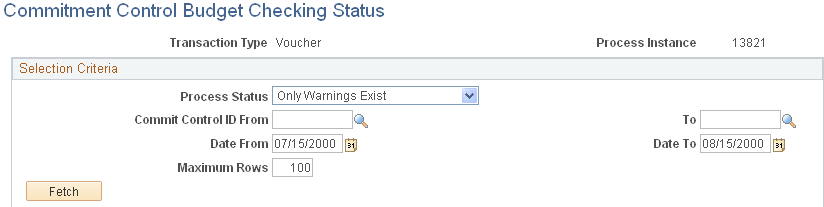
Commitment Control Budget Checking Status |
KK_XCP_INQ_INSTANC |
Commitment Control, Review Budget Check Exceptions, Budget Checking Status, Commitment Control Budget Checking Status |
Review the budget checking status of source transactions for a single run of the Budget Processor. You can access the Transaction Header Exceptions page for the transaction, as well as transaction inquiry, entry, and adjustment pages where you can view and change the transaction. |
Understanding Viewing and Handling of Budget Transaction Exceptions
You can inquire on exceptions by budget or by transaction:
Use the Budget Exceptions component to view budgets with exceptions.
This component enables user with security access to override specific budgets for a failed transaction.
Use the transaction exception components to view source transactions with budget exceptions.
These components enable users with security access to override specific budgets for a failed transaction, as well as all budgets for a failed transaction.
Note: An override is applicable only to the original entry. After the override, any change or additions to the original journal lines causes the system to cancel the override and reset the header status to (N) not checked. This is to prevent the adding of lines using the same overridden ChartField combination to create unauthorized overrides for different or larger amounts.
Separate exception pages for each type of source transaction are provided. These pages are documented in their respective application documentation. The following table provides a list of transaction exception components that are not covered in this topic and the corresponding documentation in which each is discussed:
|
Transaction Exception Component |
Documentation |
|---|---|
|
|
|
|
|
Billing Invoice |
|
|
CM Transaction (Cost Management Transaction) |
|
|
See Understanding PeopleSoft Commitment Control in PeopleSoft Expenses. |
|
See Understanding Commitment Control and General Ledger Journals. |
|
Facilities Administration |
|
|
See Setting Up PeopleSoft Project Costing for PeopleSoft Commitment Control. |
|
See Understanding Commitment Control in PeopleSoft PurchasingUnderstanding Receipt Accrual. |
Common Elements Used in This Section


Commitment Control Budget Exceptions Page
Use the Commitment Control Budget Exceptions page (KK_XCP_BUDGET) to view and override control budget exceptions on a budget-by-budget basis.
The page includes only budgets that have transactions with exceptions.
Commitment Control, Review Budget Check Exceptions, Budget Exceptions, Commitment Control Budget Exceptions
Click the View Related Links button on a transaction exception header page or Exceptions Details page.
Click the Budget Exceptions link on the Budget Details page.
Image: Commitment Control Budget Exceptions page (1 of 2)
This example illustrates the fields and controls on the Commitment Control Budget Exceptions page (1 of 2). You can find definitions for the fields and controls later on this page.

Image: Commitment Control Budget Exceptions page (2 of 2)
This example illustrates the fields and controls on the Commitment Control Budget Exceptions page (2 of 2). You can find definitions for the fields and controls later on this page.
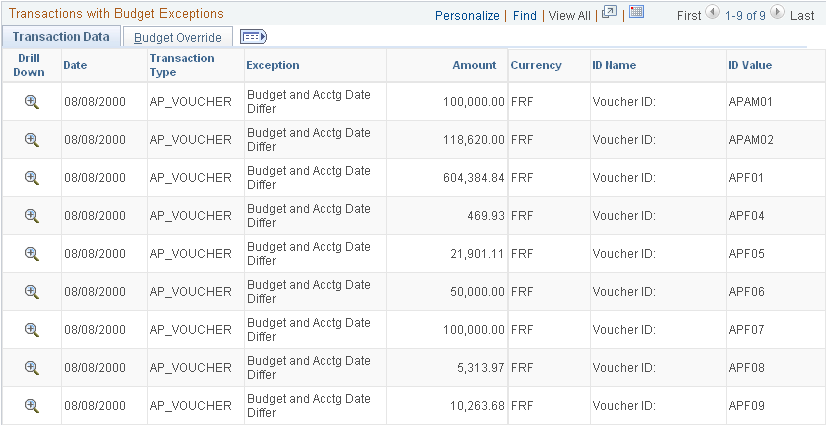
The Business Unit and Ledger Group fields are required when entering search criteria on the Budget Exceptions search dialog page. The remaining fields can be left blank to return all values or you can enter values to further refine your search.
Click the Search button on the search dialog page and any exceptions are displayed in the Search Results scroll at the bottom of the search page. The scroll becomes available only if there are transaction exceptions for a budget. The scroll also returns both error and warning exceptions in the same search.
When you select a row from the Search Results scroll and no transaction exceptions are returned in the Transactions with Budget Exceptions group box at the bottom of the Commitment Control Budget Exceptions page, click the Advanced Transaction Criteria link to refine the criteria so that you can review the details of the exception. For example, if exception type and the from and to dates for the Commitment Control Budget Exceptions page do not match the exception type and dates of the exception you selected in the Search Results scroll, no transactions are returned in the Transactions with Budget Exceptions group box.
Generic Exceptions Page
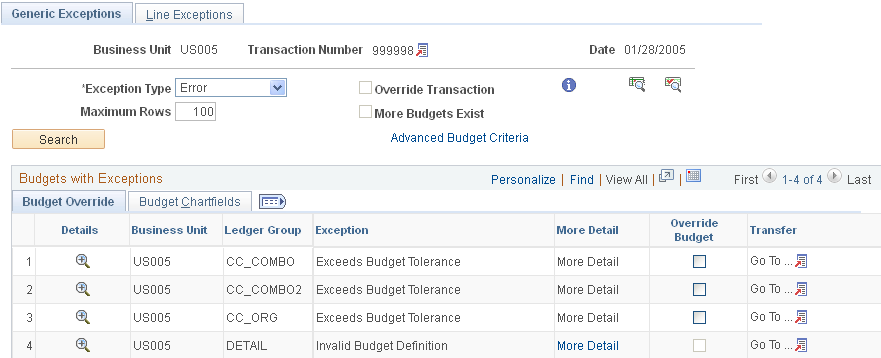
Use the Generic Exceptions page (KK_XCP_HDR_GEN) to view budget checking errors or warning messages for third-party transactions.
Users who have authority can override the budget exceptions on this page.
Commitment Control, Third Party Transactions, Generic Transaction Entry, Generic Exceptions
Click View Related Links, Go to Transaction Exceptions on the Commitment Control, Budget Exceptions, and Budget Checking Status pages.
Image: Generic Exceptions page
This example illustrates the fields and controls on the Generic Exceptions page. You can find definitions for the fields and controls later on this page.
Viewing Payroll Transaction Header Exceptions
Access the HR Payroll Exceptions page (Commitment Control, Review Budget Check Exceptions, General Ledger, Payroll, HR Payroll Exceptions and click View Related Links, Go to Transaction Exceptions on the Commitment Control Budget Exceptions page or the Budget Checking Status page).
| Run Date |
Displays the date that the payroll batch process was run for the transaction. |
| Accounting Date |
Displays the accounting date of the payroll transaction. |
Viewing Payroll Transaction Line Exceptions
Access the HR Payroll - Line Exceptions page (Commitment Control, Review Budget Check Exceptions, General Ledger, Payroll, Line Exceptions).
| Run Date |
Displays the date that the payroll batch process was run for the transaction. |
| Accounting Date |
Displays the accounting date of the payroll transaction. |
Note: There should be no error exceptions—only warnings—since you budget-check payroll transactions in Payroll prior to loading them to Commitment Control.
Commitment Control Budget Checking Status Page
Use the Commitment Control Budget Checking Status page (KK_XCP_INQ_INSTANC) to review the budget checking status of source transactions for a single run of the Budget Processor.
You can access the Transaction Header Exceptions page for the transaction, as well as transaction inquiry, entry, and adjustment pages where you can view and change the transaction.
Commitment Control, Review Budget Check Exceptions, Budget Checking Status, Commitment Control Budget Checking Status
Image: Commitment Control Budget Checking Status page
This example illustrates the fields and controls on the Commitment Control Budget Checking Status page. You can find definitions for the fields and controls later on this page.