
Defining Cross-Application User Preferences
Use the User Preferences component (OPR_DEFAULT) to define cross-application user preferences. Use the OPR_DEFAULT_FIN component interface to load data into the tables for this component.
This topic discusses how to:
Define overall user preferences.
Define object linking and embedding (OLE) information.
Define process group preferences.
Pages Used to Define Cross-Application User Preferences
|
Page Name |
Definition Name |
Navigation |
Usage |
|---|---|---|---|
|
Overall Preferences |
OPR_DEF_TABLE_FS1 |
|
Define overall default user preferences for specific PeopleSoft system users. |
|
OLE Information (object linking and embedding information) |
OPR_DEF_TABLE_OLE1 |
|
Identify the client operating system and the user's web browser. |
|
User Preferences - Process Group |
OPR_DEF_TBL_RTM |
|
Specify by source transaction the process groups that a user can use for on-demand processing. |
User Preferences - Overall Preferences Page
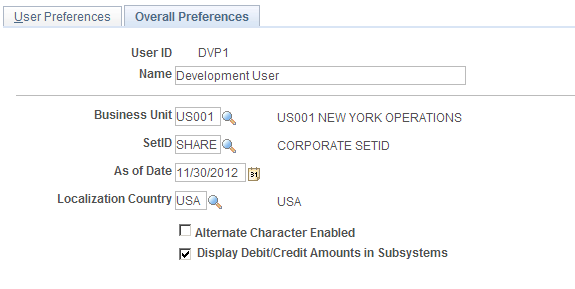
Use the Overall Preferences page (OPR_DEF_TABLE_FS1) to define overall default user preferences for specific PeopleSoft system users.
Image: User Preferences - Overall Preferences page
This example illustrates the fields and controls on the User Preferences - Overall Preferences page. You can find definitions for the fields and controls later on this page.
OLE Information Page
Use the OLE Information (object linking and embedding information) page (OPR_DEF_TABLE_OLE1) to identify the client operating system and the user's web browser.
OLE functionality enables you to store internet addresses with vendor identification information. When using a page that offers web access (such as the Location page in the Vendor Information component (VNDR_ID), users can click a button or link that activates a web browser to access the vendor's website.
| Client Operating System |
Select the user's operating system. |
| WWW Browser (World Wide Web browser) |
Select the user's web browser. |
Note: Some browsers do not support an OLE interface that enables this function.
User Preferences - Process Group Page
Use the User Preferences - Process Group page (OPR_DEF_TBL_RTM) to specify by source transaction the process groups that a user can use for on-demand processing.