
Generating Journal Entries
To generate journal entries, use the Generate Journals Request (JRNLGEN_REQUEST).
Selecting journals for Journal Generator processing is the final step required to process accounting entries. In this step, Journal Generator extracts accounting entries from the accounting entry tables to generate the actual journal entries for editing and posting.
Each time that you run Journal Generator, it creates journals for all or one application business unit or units as well as all or one ledger group or groups, and all or one Journal Generator template or templates set up for those business units, depending on the options that you define on the Journal Generator Request page.
This topic discusses how to:
Run Journal Generator processing.
Change journals created by Journal Generator.
Delete journals created by Journal Generator.
Page Used to Generate Journal Entries
|
Page Name |
Definition Name |
Navigation |
Usage |
|---|---|---|---|
|
Generate Journals Request |
JRNL_GEN_REQUEST |
|
Initiate Journal Generator processing. |
Generate Journals Request Page
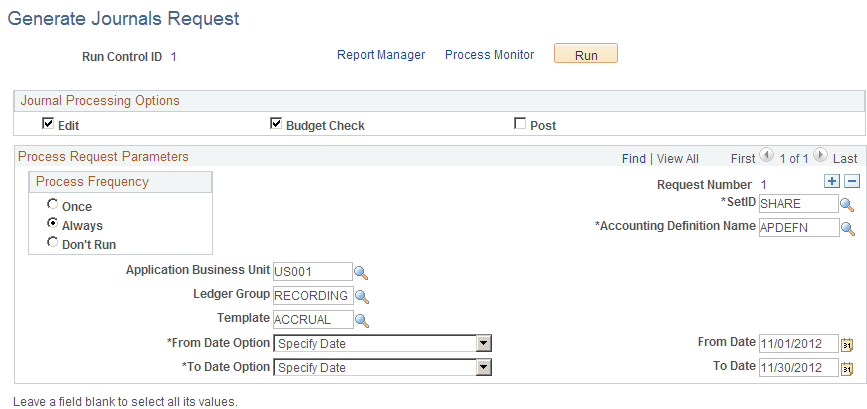
Use the Generate Journals Request page (JRNL_GEN_REQUEST) to initiate Journal Generator processing.
Image: Generate Journals Request page
This example illustrates the fields and controls on the Generate Journals Request page. You can find definitions for the fields and controls later on this page.
Journal Processing Options Group Box
Note: If you select none of these check boxes, no additional processes are run.
Process Request Parameters
Note: The application business unit and general ledger business unit that exist in the Accounting Entry table can differ. One business unit must be designated to derive the setIDs for the control records during the batch processing. The control records are ledger group and ledger definition tables, calendar tables, journal source table, and journal generator template table. The general ledger business unit is the business unit to derive the setIDs for these control records. In one particular request, whether all or one business unit is selected, Journal Generator might have multiple general ledger business units to process and cannot determine the associated setID at the point at which the request is defined. Therefore, the prompt setID that you see in the Ledger Group field and Journal Generator template may not necessarily be the same as the setIDs used by the batch programs.
Changing Journals Created by Journal Generator
When a journal comes from a subsystem, you can enable a specific user to change a journal that the Journal Generator process creates. On the Define User Preferences - General Ledger page, select this option, which allows a specific user to update the ChartField and amounts on the Journal Entry page for a journal that was created by the Journal Generator process. The ChartFields can be changed, even though the budget status is valid for the journal. Otherwise, all the fields are unavailable and the user can only edit and post the journal.
However, the business unit field is unavailable and cannot be changed on journal lines created from Journal Generator.
Warning! If you select Change Journal from Journal Generator and then change the ChartField values and re-edit the journal, you can create inconsistencies between the subsystem data and the general ledger data. Also, for journals that are generated for a subsystem that supported Commitment Control, the journal does not budget check again even though the ChartField values or the amount are changed.
For example, if the ChartField entered in the subsystem is Account 5011, Fund 100, Dept ID 200, and you change the ChartField to Account 5011, Fund 100, Dept ID 300, the accounting entry created in the subsystem is different from the one posted in the ledger. If the transaction is impacting the budget for department 200 initially, after the modification, it still impacts department 200 instead of 300 because it was budget checked in the feeder application, or subsystem.
The Journal Generator process always skips budget checking under the following circumstances:
When journals are generated by a subsystem that supports commitment control.
When you select the Skip Commitment Control in GL check box on the Accounting Entry Definition page.
The system does not budget check again an altered journal generated journal, whether or not you select Change Journal from Journal Generator on the Define User Preferences - General Ledger page.
For subsystems that do not support commitment control, including external source non-PeopleSoft applications, you can select Skip Commitment Control in GL on the accounting entry definition page. In this case, the journal-generated journals must be budget checked in General Ledger.
Deleting Journals Created by Journal Generator
The Journal Generator process gets rows from the Accounting Entry table when the value in the GL_DISTRIB_STATUS field is N. The process changes this value to D when it distributes the accounting entry to a general ledger journal. When a journal that was created from Journal Generator has an error, you can delete the journal on the journal entry page, and the system changes the value in the GL_DISTRIB_STATUS field in the Accounting Entry table to N. Then you can correct the error at the accounting entry level and rerun the Journal Generator process to create a new journal.