
Setting Up On-Demand Processing Options
To set up on-demand processing options, use the On-Demand Processing Options component (RTM_OPTIONS).
Before you can use on-demand processing, you must specify the accounting entry definitions that are used by each source transaction-process group combination, along with other options. Accounting entry definitions define the record and fields that the Journal Generator process uses to extract accounting entries from the system source.
This topic discusses how to set up on-demand processing options.
Page Used to Set Up On-Demand Processing Options
|
Page Name |
Definition Name |
Navigation |
Usage |
|---|---|---|---|
|
On-Demand Processing Options |
RTM_OPTIONS |
|
Specify Journal Generator accounting entry definitions and other processing options for on-demand process groups. |
On-Demand Processing Options Page
Use the On-Demand Processing Options page (RTM_OPTIONS) to specify Journal Generator accounting entry definitions and other processing options for on-demand process groups.
Image: On-Demand Processing Options page
This example illustrates the fields and controls on the On-Demand Processing Options page. You can find definitions for the fields and controls later on this page.
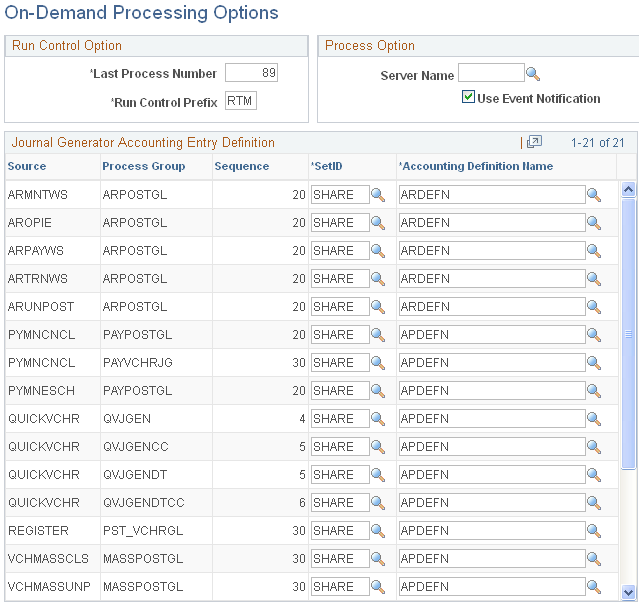
Run Control Option
| Last Process Number |
Enter any three digits to define the number at which the system will begin numbering the run controls. |
| Run Control Prefix |
Enter any three letters to identify the run control ID. |
Process Option
Journal Generator Accounting Entry Definition
For each combination of source transaction and process group that includes the Journal Generator process, specify the SetID of the accounting entry definition and the Accounting Definition Name.