
Setting Up PeopleSoft Maintenance Management Work Order Parameters
To set up:
Work order types use the Work Order Type (WM_WO_TYPE) component.
Service groups use the Service Group (WM_SRVC_GRP) component.
Work order priorities use the Work Order Priority (WM_PRIORITY) component.
Maintenance types use the Maintenance Type (WM_MAINT_TYPE) component.
Downtime reasons use the Downtime Reason (WM_DWNTIME_RSN) component
Failure impact codes use the Failure Impact (WM_FAILURE_IMPACT) component.
Failure severity codes use the Failure Severity (WM_FAILURE_SEVRTY) component.
Work order alert uses the Work Order Alert (WM_WO_ALERT) component.
This section provides an overview of work order types, service groups, priorities, maintenance types, and downtime reasons and discusses how to:
Create work order types.
Create work order service groups.
Establish work order priority codes.
Set up asset maintenance types.
Define asset downtime reasons.
Define failure impact codes.
Set up failure severity codes.
Set up work order alert.
Pages Used to Set Up Work Order Types, Service Groups, and Priorities
|
Page Name |
Definition Name |
Navigation |
Usage |
|---|---|---|---|
|
Work Order Type |
WM_WO_TYPE |
|
Defines the basic kinds of work that performed in a work order. |
|
Work Order Service Group |
WM_SRVC_GRP |
|
Identifies specific behaviors in a work order. |
|
Work Order Priority |
WM_PRIORITY |
|
Indicates the urgency for completing a specific work order. |
|
Associate Maintenance Type with Asset Subtype |
WM_MAINT_TYPE |
Set Up Financials/Supply Chain, Product Related, Maintenance Management, Setup, Maintenance Type |
Defines the category of maintenance needed for a selected asset type and subtype. |
|
Downtime Reason |
WM_DWNTIME_RSN |
Set Up Financials/Supply Chain, Product Related, Maintenance Management, Setup, Downtime Reason |
Describes the reason that an asset is not available for use. |
|
Failure Severity |
WM_FAILURE_SEVRTY |
Set Up Finanicals/Supply Chain, Product Related, Maintenance Management, Setup, Failure Severity, Failure Severity |
Describes the seriousness of the asset failure to an organization and is required in order to track failure events. |
|
Failure Impact |
WM_FAILURE_IMPACT |
Set Up Finanicals/Supply Chain, Product Related, Maintenance Management, Setup, Failure Impact, Failure Impact |
Identifies how the failure of an asset will affect specific organization circumstances or requirements such as hazardous conditions or materials, health issues, safety issues, and more. |
|
Work Order Alert |
WM_WO_ALERT_STS |
Maintenance Management, Maintenance Management Center, Setup, Work Order Alert |
Configures work order alert setup, such as the list of statuses of the WO for the alert and the group of people that are interested in the alert notification. |
Understanding PeopleSoft Maintenance Management Work Order Parameters
Work order types and service groups are used to categorize work orders, work order data, and work order behavior. Maintenance types and downtime reasons are attributes describing the selected asset.
Work Order Types
Work order types are user-defined and specify in general terms the kind of work performed within the work order. Work order type is an element in each of the default hierarchies defined in the work order business unit. It is used to identify some of the basic functionality of the work order, which includes:
The distribution accounting template that the work order uses.
The distribution template rules setup.
The associate projects setup.
The grace period for closing a work order and work order task.
The use or nonuse of chargebacks in a work order.
The default commitment rule for inventoried materials.
The display of project-related fields in the work order.
The work order workflow approval options.
Service Groups
Service groups are used to group work orders by major categories such as Fleet, IT, and Facilities. A service group is required when you create a work order. While a work order business unit is not specifically associated with a service group, it may be used in conjunction with several service groups. A default service group may be set up in a work order business unit. Service groups help define certain work order behaviors, such as:
Triggering the relevant data that displays in the work order at both the task level and the asset lookup level.
Identifying the defaulting ChartField distribution templates in the work order for each of the resource types: labor, parts, materials, and tools.
Note: You set up ChartField distributions to enable you to perform manual allocations to GL to generate accounting entries.
Applying the ChartField distribution template rules to the work order.
Enabling the Project ID default value in the work order based on the setup of the Associate Projects component.
Priorities
You set up priorities for work orders to identify each work order's level of urgency or importance to a scheduler or technician. Examples of priorities are high, medium, and low.
Note: Service request priorities are system-defined values (Critical, Urgent, Standard, and Low). Users cannot define them.
Maintenance Types
Maintenance types are defined in PeopleSoft Asset Management. They identify the type of maintenance and maintenance procedures that should be followed for a particular asset. For example, you might establish a Tune Up maintenance code that specifies routine maintenance for an automobile. In PeopleSoft Maintenance Management, you must associate one or more maintenance types with an asset type and subtype in order to define a preventive maintenance loop. You can set up a maintenance type as a default value in the work order business unit, which displays in the Maintenance Type field on the Miscellaneous page of the work order. This field must be entered before you can close preventive maintenance work orders.
Downtime Reasons
You can enter the downtime for an asset and select a reason for the asset downtime for each work order task. When a work order is closed, the Work Order Close process updates the total of downtime hours in the asset maintenance history using the data that you entered on the work order. Work order close does not, however, update the start and end downtimes in PeopleSoft Asset Management.
Note: There is a link to enter downtime on the Actual Task Dates tab of the Technician Workbench.
Failure Tracking Setup
You define failure severity and failure impact codes based on the requirements of your organization. When you perform a failure analysis, you can select failure severity and failure impact codes to search for specific failure events to analyze on the Failure Analysis page. PeopleSoft Maintenance Management delivers sample data that contains examples of these two types of failure codes. You can use this sample data to help you define your own failure codes.
You must set up failure severity codes for your organization before you can track failure events in PeopleSoft Maintenance Management. Each code describes the seriousness of the asset failure to your organization. For example, you could define failure severity codes as critical, high, medium, low, or none or with numerical values. You are required to select a failure severity code on the Work Order Failure Tracking page.
Failure impact codes are useful for identifying how the failure of an asset will affect specific organization circumstances or requirements such as hazardous conditions or materials, health issues, safety issues, and more. You can assign more than one failure impact code to a failure event on the Work Order Failure Tracking page. However, you are not required to set up failure impact codes to complete the Work Order Failure Tracking page.
Work Order Alert Setup
Work Order Alert set up is useful to configure work order alert setup, such as the list of statuses of the WO for the alert and the group of people that are interested in the alert notification depending on the work order type, maintenance type, asset type and sub type, wo priority, asset criticality, problem group and code.
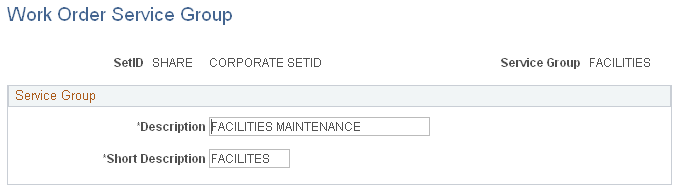
Work Order Service Group Page
Use the Work Order Service Group page (WM_SRVC_GRP) to identifies specific behaviors in a work order.
Image: Work Order Service Group page
This example illustrates the fields and controls on the Work Order Service Group page. You can find definitions for the fields and controls later on this page.
| Service Group |
Enter and describe each type of service group, such as IT and Facilities, to use for defining specific work order behaviors. |
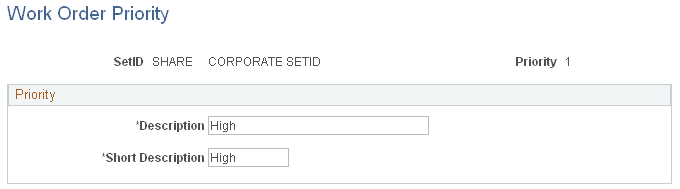
Work Order Priority Page
Use the Work Order Priority page (WM_PRIORITY) to indicates the urgency for completing a specific work order.
Image: Work Order Priority page
This example illustrates the fields and controls on the Work Order Priority page. You can find definitions for the fields and controls later on this page.
Maintenance Type Page
Use the Associate Maintenance Type with Asset Subtype page (WM_MAINT_TYPE) to defines the category of maintenance needed for a selected asset type and subtype.
Set Up Financials/Supply Chain, Product Related, Maintenance Management, Setup, Maintenance Type
Image: Associated Maintenance Type with Asset Subtype page
This example illustrates the fields and controls on the Associated Maintenance Type with Asset Subtype page. You can find definitions for the fields and controls later on this page.

Downtime Reason Page
Use the Downtime Reason page (WM_DWNTIME_RSN) to describes the reason that an asset is not available for use.
Set Up Financials/Supply Chain, Product Related, Maintenance Management, Setup, Downtime Reason
Image: Downtime Reason page
This example illustrates the fields and controls on the Downtime Reason page. You can find definitions for the fields and controls later on this page.

| Downtime Reason |
Enter the abbreviated reason that an asset is unavailable for use. |
| Description |
Provide a longer description of the reason for the asset downtime. |
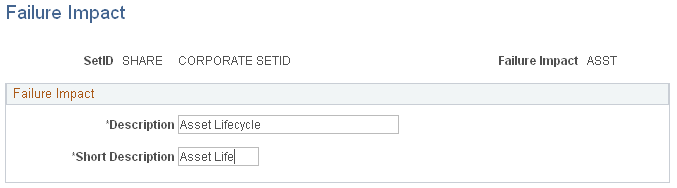
Failure Impact Page
Use the Failure Impact page (WM_FAILURE_IMPACT) to identifies how the failure of an asset will affect specific organization circumstances or requirements such as hazardous conditions or materials, health issues, safety issues, and more.
Set Up Finanicals/Supply Chain, Product Related, Maintenance Management, Setup, Failure Impact, Failure Impact
Image: Failure Impact page
This example illustrates the fields and controls on the Failure Impact page. You can find definitions for the fields and controls later on this page.
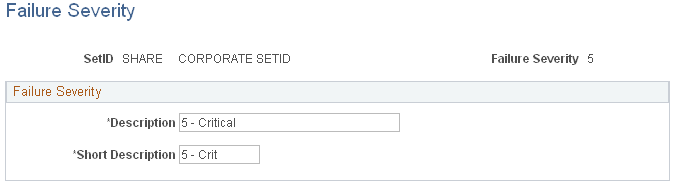
Failure Severity Page
Use the Failure Severity page (WM_FAILURE_SEVRTY) to describes the seriousness of the asset failure to an organization and is required in order to track failure events.
Set Up Finanicals/Supply Chain, Product Related, Maintenance Management, Setup, Failure Severity, Failure Severity
Image: Failure Severity page
This example illustrates the fields and controls on the Failure Severity page. You can find definitions for the fields and controls later on this page.
Work Order Alert Page
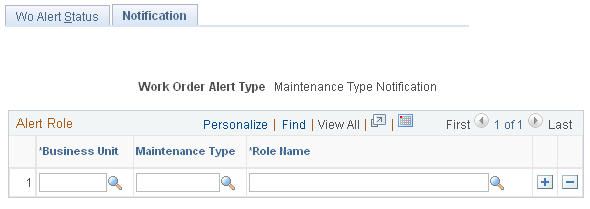
Use the Work Order Alert page (WM_WO_ALERT_STS) to configures work order alert setup, such as the list of statuses of the WO for the alert and the group of people that are interested in the alert notification.
Image: Work Order Alert page: WO Alert Status tab.
This example illustrates the fields and controls on the Work Order Alert page: WO Alert Status tab.. You can find definitions for the fields and controls later on this page.
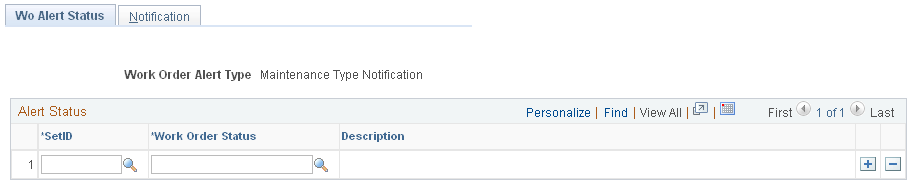
Image: Work Order Alert page: Alert Notification tab.
This example illustrates the fields and controls on the Work Order Alert page: Alert Notification tab.. You can find definitions for the fields and controls later on this page.
| Set ID |
Select the desired ID to set the work order alert status. |
| Work Order Status |
Select the desired work order status. If WO Status is present, it means the WO Alert type = Maintenance Type. For the other alert types you see the WO task status. |
| Role Name |
View list of users that are interested in receiving the e-mail notification. |
| Maintenance Type |
Select the desired type of maintenance. This selection is only available when alert type is Maintenance type. |
| Business unit |
Select the desired business unit for the required work order alert's notification. This is the business unit in the work order which the user is an interested party. |
| WO Type |
Select the desired work order type. This field is only available when alert type is WO type. |
| Asset Type |
Select the desired asset type. This field is only available when alert type is WO type. |
| Asset SubType |
Select the desired asset sub type. This field is only available when alert type is WO type. |
| Asset Criticality |
Select the desired asset criticality. This field is only available when alert type is Priority. |
| Priority |
Select the desired priority of work orders. This field is only available when alert type is Priority. |
| Problem Group and Code |
Select the desired problem group and code. These fields are only available when alert type is Problem. |
Note: The warranty alert query is run automatically, by the time you save the work order, to notify the proper users (defined in the setup) if the asset is under warranty.