BDD uses a single script, called the orchestration script, to install and deploy its components all at once. When the script finishes, BDD will be completely installed and your cluster will be up and running.
The orchestration script is contained in one of the BDD installation packages, which you will download to a single directory on the Admin Server. You must perform the entire installation process, including running the orchestration script, from this location.
The same installation package also contains the script's configuration file, bdd.conf, which defines the configuration of your cluster and provides the script with information it requires at runtime. You must update this file with information specific to your system and BDD cluster configuration before you run the orchestration script.
Silent installation
- The username and password for Cloudera Manager, which it uses to query Cloudera Manager for information related to your CDH cluster.
- The username and password for the WebLogic Server administrator. The script will create this user when it deploys WebLogic.
- The username and password for your Studio database, which it requires to connect Studio to the database.
You can avoid these steps by running the script in silent mode. To do this, you must add the following environment variables to your system before running the script. When the script runs, it checks for these environment variables and executes silently if it finds them.
This table describes the environment variables required to run the orchestration script in silent mode.
| Environment variable | Value |
|---|---|
| CM_USER | The username for Cloudera Manager. |
| CM_PASSWORD | The password for Cloudera Manager. |
| WLS_USERNAME | The username for the WebLogic Server administrator. |
| WLS_PASSWORD | The password for the WebLogic Server administrator. Remember that this must contain at least 8 characters, one of which must be a number, and cannot start with a number. |
| STUDIO_JDBC_USERNAME | The username for your Studio database. |
| STUDIO_JDBC_PASSWORD | The password for your Studio database. |
Orchestration script behavior
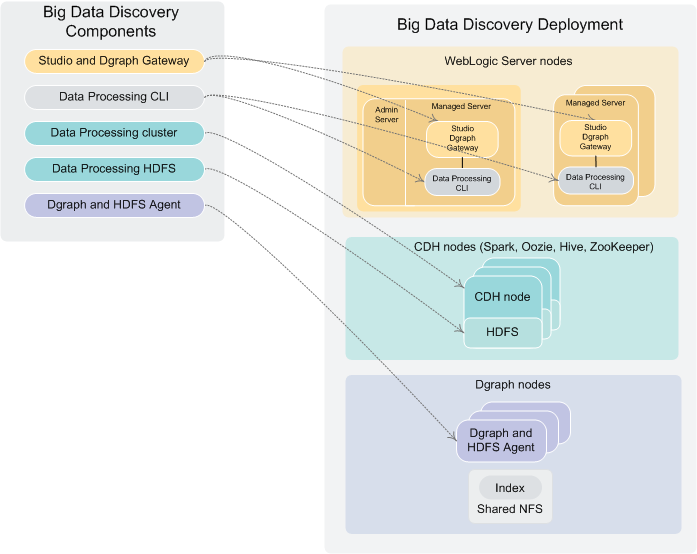
The following diagram illustrates the behavior of the orchestration script.
- Reads and validates bdd.conf.
- Prompts you for the user names and passwords for Cloudera Manager, the WebLogic Server administrator, and your database.
- Queries Cloudera Manager for CDH-related information, including the hostnames and port numbers of specific CDH nodes.
- Verifies that the Managed Servers nodes and Dgraph nodes meet the minimum CPU and RAM requirements defined in bdd.conf.
- Verifies that the COORDINATOR_INDEX defined in bdd.conf does not exist.
- Verifies that the Hive database defined in bdd.conf exists.
- Distributes the installation packages to each node in the cluster according to the configuration defined in bdd.conf.
- Verifies that each node meets all other requirements, including the operating system, and the JDK.
- If the FORCE property in bdd.conf is set to TRUE, deletes the ORACLE_HOME directory from each node.
- Installs the components:
- Installs WebLogic Server (including Studio and the Dgraph Gateway) on the Admin Server node and all Managed Server nodes.
- Installs the Dgraph and HDFS Agent on all nodes that will host Dgraph instances.
- Installs Data Processing on the HDFS node and all Spark servers.
- Installs the Data Processing CLI on all Managed Server nodes.
- Installs the bdd-admin script on all Managed Server nodes, Dgraph nodes, Spark worker nodes, and YARN node manager servers (not shown in the diagram).
- Deploys Data Processing:
- Deploys Data Processing to the HDFS node and all Spark nodes.
- Deploys the CLI to all Managed Server nodes.
- If configured to do so, deploys the Hive Table Detector to the specified node and starts it.
- Deploys WebLogic Server:
- Creates the WebLogic domain and the Managed Servers.
- Deploys the Dgraph Gateway and Studio as applications within the WebLogic domain.
- Deploys WebLogic as a service on all Managed Servers.
- Starts all Managed Servers.
- Deploys the Dgraph and
HDFS Agent:
- Deploys both components as services to all Dgraph nodes.
- If configured to do so, creates the empty Dgraph index files on the NFS.
- Starts the Dgraph and HDFS Agent.
- Verifies that the entire BDD deployment cluster is running.
