Big Data Discovery supports many different deployment configurations. Before installing, you can configure your deployment to have one that best supports your needs. This topic describes three types of deployments suitable for demonstration purposes, development, and production.
While this topic illustrates three types of deployments and lists their possible variations, you can deploy BDD into any configuration that meets your data processing needs; you are not limited to the configurations described in this topic.
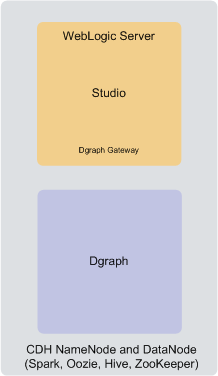
Single-node deployment for a demo environment
You can deploy BDD to a demo environment running on a single physical or virtual machine. This configuration can only handle a limited amount of data, so it is recommended solely for demonstrating the product's functionality with a small sample index.
In a single-node deployment, CDH (including the NameNode and one DataNode), the WebLogic Server with Studio and Dgraph Gateway, and the Dgraph instance are all hosted on the same node.
Two-node deployment for a development environment
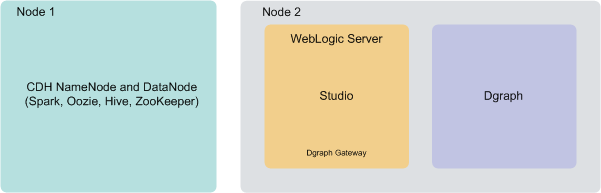
You can deploy BDD to two nodes for a development environment. This configuration can handle a slightly larger index than a single-node configuration, but is not recommended for production as it does not provide high availability of Dgraph or Studio services and also has limited capacity for processing queries on high volumes of data.
In a two-node configuration, CDH (including the NameNode and one DataNode) is hosted on the first node. The WebLogic Server with Studio and Dgraph Gateway, and the Dgraph instance are hosted on the second node.
Six-node deployment for a production environment
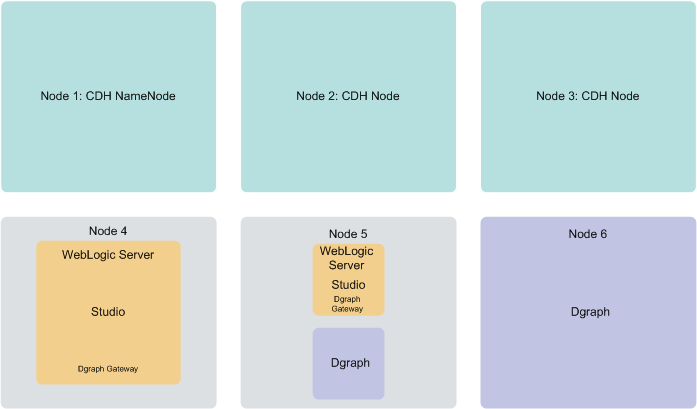
A production environment can consist of any number of nodes required for scale; however, a cluster of six nodes, with at least three CDH nodes on which Big Data Discovery is deployed, provides minimum availability guarantees.
- Nodes 1, 2 and 3 are running CDH software. Note that the Big Data Discovery software is also deployed on these nodes. After the installation, Data Processing jobs are launched from these nodes, and run on other BDD nodes. Having three nodes with CDH ensures enhanced availability of services (including query processing performed by the Dgraph), provided by the Big Data Discovery.
- Nodes 4 and 5 are running WebLogic Server with Studio. This ensures minimal redundancy of the Studio instances. (Node 5 is also hosting the Dgraph).
- Nodes 5 and 6 are running the Dgraph instances. This creates a Dgraph cluster within Big Data Discovery cluster, which, in turn, increases the availability of query processing.
About the number of nodes
This documentation does not provide sizing recommendations. To determine an appropriate size for your deployment, use the following guidelines along with your site's specific requirements.
- CDH nodes. The minimum requirement is to have one CDH node in the BDD deployment. For high availability considerations, Oracle recommends having at least three CDH nodes in the BDD deployment. (Note: your pre-existing CDH cluster may have more than three nodes. The CDH nodes that are discussed in this topic are those nodes running CDH on which BDD has also been deployed). The installer will automatically deploy Data Processing to all qualified CDH nodes in the cluster.
- WebLogic Server nodes. The minimum requirement is to have one WebLogic Server node running Studio and Dgraph Gateway. There is no recommended number of Studio instances, but if you expect to have a large number of end users generating concurrent query requests to Big Data Discovery, it may be desirable to run two Studio instances (and thus configure two WebLogic Server nodes). If you have more than one WebLogic Server node, Oracle recommends configuring an external load balancer that is connected to the Studio instances running on these nodes. You must specify the number of WebLogic Server nodes in the installer's configuration file before installing.
- Dgraph nodes. The minimum requirement is to have one Dgraph instance for each Big Data Discovery cluster deployment. Having more than one Dgraph instance turns the Dgraph instances into a Dgraph cluster, running within the Big Data Discovery cluster. Having a cluster of Dgraphs is desirable as it enhances high availability of query processing. You must specify the number of Dgraph nodes in the installer's configuration file before installing.
About co-locating CDH, WebLogic Server, and the Dgraph
One way to configure your cluster is to co-locate different components on the same nodes. For example, a single node in your BDD cluster deployment can host any combination of CDH, the Weblogic Server, and the Dgraph, including all three components together.
Co-locating enables you to use your hardware more efficiently, since you don't have to devote an entire server to any specific component of Big Data Discovery. However, it also means that the co-located components must compete for memory, which can have a negative impact on performance.
The decision to co-locate different components of Big Data Discovery on the same nodes depends on your site's production requirements and the capacity of the machines running each component.
Here are possible co-location options:
- Co-location of Dgraph and CDH. For best performance, Oracle recommends dedicating specific servers to running just the Dgraph process (one Dgraph per machine). You can also co-locate Dgraph instances on the CDH DataNodes, although it is recommended that you use a node that is not running Spark. If you decide to co-locate the Dgraph with CDH, you should allocate a specific amount of memory to the Dgraph process using Linux cgroups (control groups) and Dgraph flags; this will prevent it from crashing. Cgroups enable you to control the amount of memory used by the Dgraph at the operating system level, and the Dgraph flags allow you to control it from within the Dgraph. For more information, see the Administrator's Guide.
- Co-location of Dgraph and WebLogic Server instances. You can co-locate Dgraph instances on the same nodes on which WebLogic Server is deployed. If you use this option, you should configure the WebLogic Server to consume a limited amount of memory to ensure that the Dgraph process has access to sufficient resources for its query processing.
- Co-location of WebLogic Server and CDH. You can co-locate WebLogic Server instances on the same nodes on which CDH is deployed. If you use this option, you should configure the WebLogic Server to consume a limited amount of memory to ensure that CDH has access to enough resources for processing.
