This section contains the pre-installation requirements to install the OIPI Pack.
Topics:
· Hardware and Software Requirements and Specifications
You can use this checklist to have a quick glance at everything that you will be doing before installing this application. The link provided in each step takes you to a section either within this document or to another referenced document.
Sl. No. |
Pre-installation Activity |
|---|---|
1 |
Install all the prerequisite hardware and software given in the Tech Stack. |
2 |
Verify the System Environment using the Environment Check Utility. |
3 |
Configure the Database Instance settings. |
4 |
Install and configure the web application server. |
5 |
Configure the HTTP settings on the webserver. |
6 |
Create the Installation, Download, and Metadata Repository Directories: · Installation directory · Temporary directory · Staging Area/Metadata Repository · Download directory |
7 |
Configure the following Operating System and File System settings: · File Descriptor · Total number of processes · Port(s) · .profile file permissions · Add FTP/SFTP configuration for file transfer |
8 |
Update the following Environment Settings required for the installation in the .profile file: · Java Settings · Oracle Database Server and Client Settings · Add TNS entries in the tnsnames.ora file · Oracle Essbase Settings · Time Zone Settings |
9 |
Download the installer kit and erwin data models. |
10 |
Perform prerequisites for installation. |
This section describes how to download the installer and the mandatory prerequisites you must ensure installing the OIPI Pack.
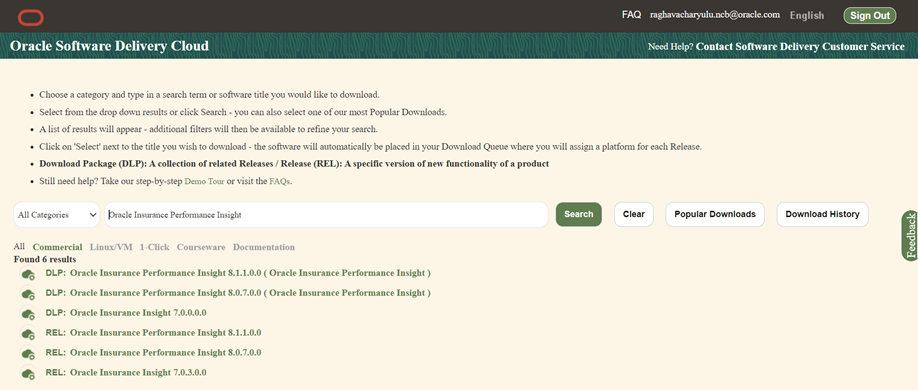
To download the OIPI Pack Installer Release v8.1.1.0.0, follow these steps:
1. Log in to the Oracle Software Delivery Cloud with a valid Oracle account.
2. Search for the full product name Oracle Insurance Performance Insight Applications Pack and download the installer archive.
3. Download the following erwin data models from My Oracle Support:
§ OIPI erwin data model: Patch ID 32749964
You can search for the patch number in the Patches and Updates tab and download it.
NOTE:
Data model patches are released at the granularity of each application. Customers must download the data models as per the application licenses they hold and merge them with the custom data model.
Before beginning the installation, ensure that:
· You have executed the .profile file.
· The FICServer is up and running. For information on restarting the services, see the Start the Infrastructure Services section in the OFS Advanced Analytical Applications Infrastructure Release 8.1.1.0.0 Installation and Configuration Guide.
NOTE:
If you are upgrading the OFSAA Application Pack to release v8.1.1.0.0, you must upgrade the other packs installed in the same environment to release v8.1.1.0.0, to ensure successful deployment.
For example, If you are upgrading the OIPI Applications Pack to release v8.1.1.0.0, you must upgrade the other packs installed in the same environment to release v8.1.1.0.0, to ensure successful deployment.