Use this procedure to define the properties of new journals and edit properties of existing journals.
 To edit a journal:
To edit the properties of the journal you just created, as described in Creating Journals (assumes the journal is still open), click Edit in the Oracle Journals ribbon.
To edit an existing journal, open the journal (see Opening Journals), and then click Edit in the Oracle Journals ribbon.
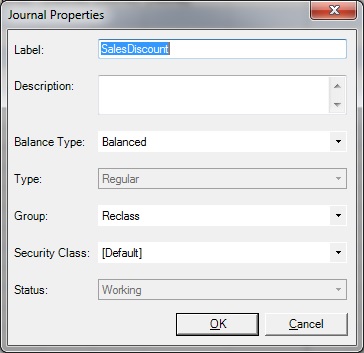
The Journal Properties dialog box is displayed (Figure 61, Journal Properties Dialog Box—Example).
Label—Enter a journal label.
The label can contain a maximum of 20 characters. These characters are not allowed:
. + - */ # {} ; , @ ”
Description—Enter an optional journal description.
Balance Type—Select a type:
Balanced
Unbalanced
Balanced by Entity
Type—Non-editable. Type is the journal type, which was set when you created the journal (see Creating Journals). Once the journal type is set during the journal creation process, it cannot be changed.
Group—Select a group for the journal.
Use the Group property to help to classify journals by type. Examples of journal groups are Allocation or Overhead.
Class—Select a class or use the Default class.
Status—Non editable. The Status field changes when you perform an action in the Deployment group. Status types are:
Working
Submitted
Approved
Rejected
Posted
When you have finished updating the journal properties, click OK.
In the Oracle Journals ribbon, click the Save button to save the changes to the journal properties.