You are asked to specify style sample attributes to override during the doclet upload or check-in process.
When a report package is created in Oracle Enterprise Performance Reporting Cloud Service, a style sample document is uploaded. It contains the page attributes that the report package owner wants the final report to have. These attributes include the page header and footer, orientation and size, margins, numbering, and alignment.
When you upload a doclet, the system checks the doclet against the style sample document to compare the attributes. An alert is displayed next to the attributes that differ from the style sample.
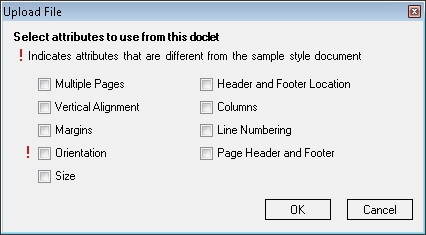
By default, the system overrides the doclet attributes with the style sample attributes when the doclet is uploaded. For example, if the style sample orientation is portrait mode and the doclet is in landscape mode, then the doclet’s orientation will be changed to portrait mode to match the style sample. Figure 72, Upload File Dialog Box shows the Upload File dialog box with an alert next to the Orientation attribute.
To keep the doclet in landscape mode, select the Orientation check box. When you select an attribute, the system uses the attribute from the doclet rather than the attribute from the style sample.
 To upload a doclet and select style attributes to override:
If the doclet is not already open, in the Smart View Panel, navigate to the doclet and double-click the doclet name.
To upload changes, you must have the doclet checked out.
In the Performance Reporting ribbon, click Upload.

In the Upload File dialog box (see Figure 72, Upload File Dialog Box), select the style attributes that you want to override, and then click OK.
Style attributes in the doclet that differ from the style sample for the report package are noted with an exclamation point.
Proceed to Checking In Doclets.
Alternatively, you can continue working on the checked-out doclet and repeat the upload procedure in this topic as many times as you require, and then proceed to Checking In Doclets.