| Oracle® Agile Engineering Data Management Administration Guide Release e6.2.0.0 E52550-02 |
|

 Previous |
 Next |
| Oracle® Agile Engineering Data Management Administration Guide Release e6.2.0.0 E52550-02 |
|
Previous |
Next |
To use a new database for an application, the following components are required:
Valid database connection string.
Valid definition of a database used by a database connection.
Running SQL Net.
To create a new database connection:
In the left pane, under References > Database Connection click Create.
The Create new database connection screen is opened:
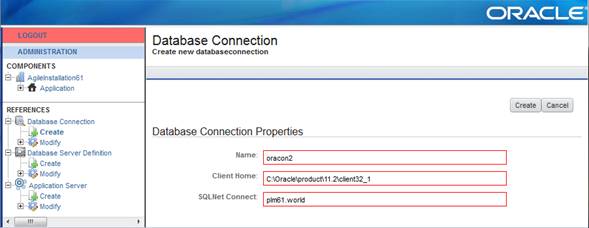
Create a new database connection with the following parameters:
| Setting | Description |
|---|---|
| Name | The new name which identifies the connection. |
| Client Home | The Oracle Client Home directory. |
| SQLNet Connect | The SQLNet connect string as defined, e.g. tnsnames.ora. |
Click Create in the upper right corner.
To define a new database server:
In the left pane, under References > Database Connection, click Create.
The Create new database definition screen is opened:
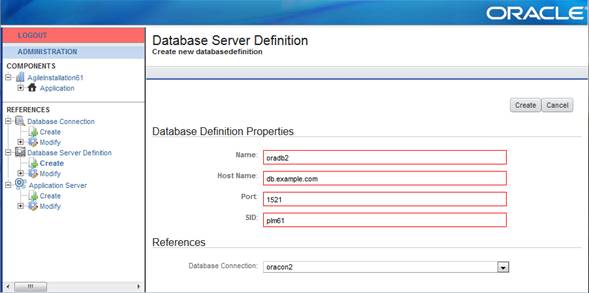
2. Create a new database server with the following parameters:
| Setting | Description |
|---|---|
| Name | The new name which identifies the database definition. |
| Host Name | The host name of your database server. |
| SID | The SID of the database you want to connect to. |
| Port | The port where the listener listens on the database server. |
Under References, define a database connection.
The database connection, which is used to connect to the database in reference section.
Click Create in the upper right corner.
In the left pane, under References > Application Server click Create.
The Create new application server definition screen is opened:
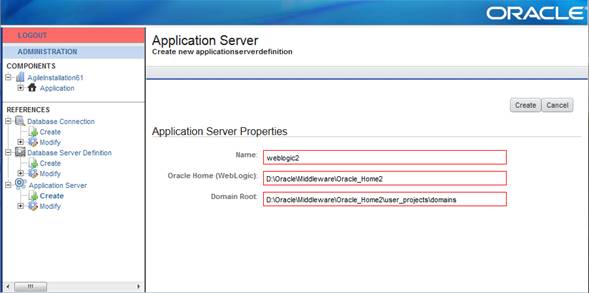
Define a new application server with the following parameters:
| Setting | Description |
|---|---|
| Name | The new name which identifies the Oracle WebLogic server definition. |
| Oracle Home (WebLogic) | The Oracle Home directory where WebLogic is installed (e.g.: D:\Oracle\Middleware\Oracle_Home). |
| Domain Root | The root directory where the Agile e6 WebLogic domains should be created (e.g.: D:\Oracle\Middleware\Oracle_Home\user_projects\domains).
In this directory the installer will create all domains used by the Agile e6 J2EE components. |
Click "Create" in the upper right corner.
In the left pane, expand the "Modify" node of either:
Reference > Database Connection
Reference > Database Server Definition
Reference > Application Server
Select the name of the reference.
Click "Delete" in the upper left corner.
|
Note: This will only delete the reference in the "installation_prop.xml" file if the reference is not in use. If it is in use, an error message is displayed.Nothing else will be deleted. |
