OAuth is an open standard for authorization that enables client applications to access server resources on behalf of a specific resource owner. OAuth also enables resource owners (end users) to authorize limited third-party access to their server resources without sharing their credentials.
API Gateway can act as the client application in an OAuth 2.0 scenario, and as such API Gateway can instigate the authorization process, handle redirects, and request OAuth tokens from an authorization server. Received tokens are stored securely and subsequently used to access protected resources on behalf of users. This provides the following benefits:
- The OAuth client burden is moved to API Gateway
- The resource owner's credentials are never shared with the client application
- The access token is never shared with the resource owner's user agent
API Gateway OAuth client features
API Gateway provides the following features to support OAuth 2.0 client functionality:
- Provider profiles for defining OAuth service providers and the applications registered with them.
- A set of preconfigured sample provider profiles for use with Oracle, Google, and Salesforce OAuth services.
- Storage of received tokens.
- Support for the following OAuth flows:
- Authorization code grant
- Resource owner password credentials
- Client credentials grant
- JWT
- SAML assertion
|
Note
|
The implicit grant type is not supported as it is designed to support client applications that do not have a secure server component, and as such it is not applicable for API Gateway acting as an OAuth client. |
The following diagram shows the role of API Gateway as an OAuth 2.0 client application accessing OAuth services provided by Oracle API Gateway, Google, and Salesforce:

For more information on how to integrate your application with Google or Salesforce APIs using API Gateway and OAuth 2.0, see the API Gateway Google OAuth 2.0 Integration Guide and the API Gateway Salesforce OAuth 2.0 Integration Guide.
OAuth 2.0 example client workflow
This example is similar to the OAuth 2.0 example workflow, but in this context API Gateway acts as a client, and the service provider is Google.
Assume that you, as a resource owner, are using a service that wants to access your Google calendar (a protected resource). The service is defined on API Gateway (API Gateway is an OAuth client). You do not want to reveal your Google credentials to API Gateway. This problem can be solved using the example OAuth 2.0 web server flow shown in the following diagram:
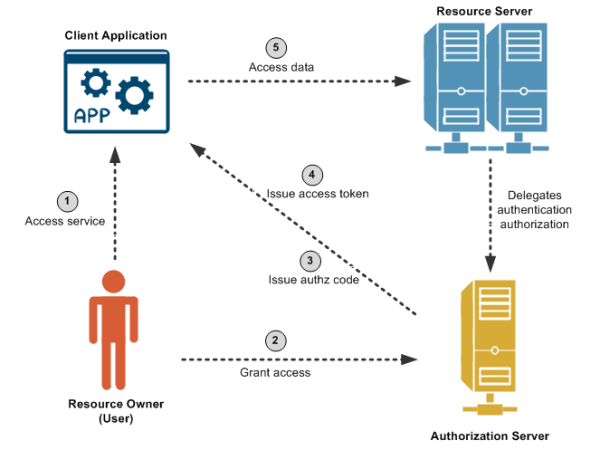
Out of band, API Gateway preregisters with Google and obtains a client ID and secret. API Gateway also registers a callback URL to receive the authorization code from Google when you, as resource owner, authorize access to your Google calendar. The application has also requested access to an API named /google/calendar, which has an OAuth scope of calendar.
The credentials received from Google are added to the Google OAuth provider profile using Policy Studio (for more information, see Configure OAuth client application credentials). The provider profile is also configured with the authorization end point and token endpoint of the Google authorization server. The callback URL is also created as an HTTP listener on API Gateway, with a filter for receiving the authorization code.
The steps in the diagram are described as follows:
- Using a browser or mobile phone, you access a service defined on API Gateway, which needs to access your Google calendar on your behalf. The client application initiates the authorization flow by redirecting your browser to the authorization endpoint defined in the Google OAuth provider profile.
- After following the redirect you log in to your Google account and authorize the application for the requested scope.
|
Note
|
You have not shared your Google user name and password with the API Gateway application. At this point, you, as the resource owner, are no longer involved in the process. |
- The authorization server then redirects your browser to the callback URL on API Gateway, along with an authorization code.
- The API Gateway client application gets the authorization code, and must exchange this short-lived code for an access token. The client application sends another request to the authorization server, this time to the token endpoint, saying it has a code that proves the user has authorized it to access their calendar, and now issue the access token to be sent on to the API (resource server). The authorization server verifies the authorization code and returns an access token.
- The client application sends the access token to the API (resource server), and receives the calendar information as requested.