This topic applies to doclets or Word- or PowerPoint-based supplemental doclets.
When you check out a doclet or a Word- or PowerPoint-based supplemental doclet, it is locked so that nobody else can modify it.
Before you begin this procedure, you should have already launched Microsoft Word or PowerPoint, connected to Oracle Enterprise Performance Reporting Cloud Service, and opened a report package, as described in Connecting to Enterprise Performance Reporting in Smart View.
 To check out a doclet or supplemental doclet:
In the Smart View Panel, select the doclet or supplemental doclet to check out.
Only Word- or PowerPoint-based supplemental doclets can be checked out.
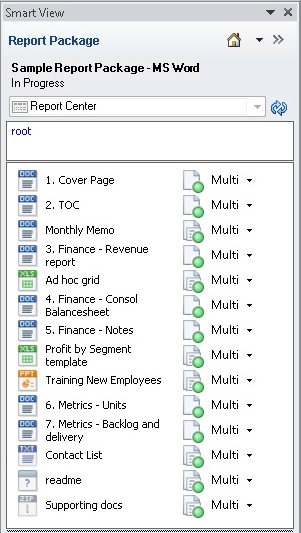
The Word-based report package shown in Figure 96, Report Package Containing Doclets and Supplemental Doclets contains a variety of artifacts, including doclets, Word- and PowerPoint-based supplemental doclets, an Excel supplemental doclet, supplemental doclets in of type TXT and ZIP, as well as a supplemental doclet of unknown type. Also, note the following icons in the Report Center:
 signifies a doclet
 signifies a supplemental doclet
Double-click the doclet or supplemental doclet name.
The Performance Reporting ribbon is displayed in Word or PowerPoint when:
You open a doclet
You open a Word- or PowerPoint-based supplemental doclet
Figure 97, Performance Reporting Ribbon for Doclet in Author Phase in Unchecked-Out State shows the Performance Reporting ribbon for the author phase, before the doclet is checked out.
Note:
The availability of buttons in the Performance Reporting ribbon depends on the permissions that are assigned to you; the phase that you are in—authoring, review, or sign off; and the operation you are performing.
Note:
If a doclet or supplemental doclet is checked out by another user, then the Check Out button is disabled.
The doclet or supplemental doclet is now locked for your use. You can work with it directly in Smart View while connected to Oracle Enterprise Performance Reporting Cloud Service.
In the doclet responsibilities list in the Smart View Panel, a lock icon and the user name are displayed for the doclet or supplemental doclet that is checked out.

In the Performance Reporting ribbon, the Check Out button is replaced with the Cancel Checkout button.
Next steps for working with the checked-out doclets or supplemental doclets in Oracle Enterprise Performance Reporting Cloud Service:
You can undo, or cancel, the checkout if you want to remove your lock on the doclet or supplemental doclet. Undoing the checkout allows other users to check out and update the doclet. See Undoing Checkouts.
If you must close Word or PowerPoint before you are finished with your authoring changes, you do not need to check in the doclet or supplemental doclet, but you must upload it to retain the changes in progress. See Uploading and Working with Page Attributes and Slide Masters.
You can download the Word or PowerPoint file and work with the doclet or supplemental doclet offline, as described in Working with Doclets and Supplemental Doclets Locally.