EZTask - Manage Reservations
EZTask Manage Reservations is a search tool used to retrieve guest reservations according to your filter criteria.
|
How do I search reservations by Travel Agent, I don't see that field? How do I find out how many reservations have already checked in today? |
|
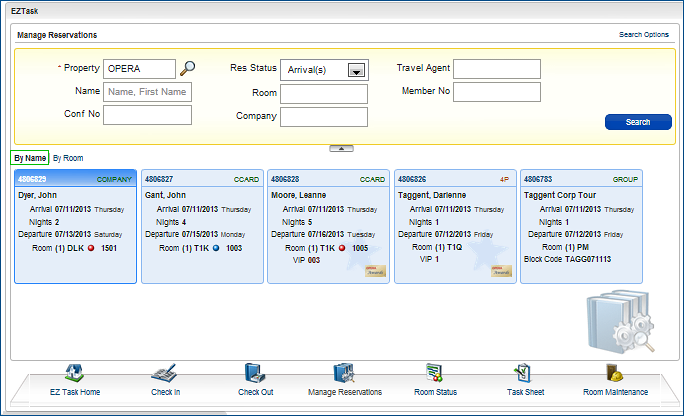
Search results can be displayed alphabetically by name or numerically by room number (both ascending order). Select a reservation from the results to open that reservation.
Select "By Name" (alphabetical) or "By Room" (numerical) in the image below to see the difference in result views. |
Criteria
Name, Room No, Company, and Travel Agent fields allow partial searches, for example, "Smi" for "Smith", or "300" to see all reservations that have third floor rooms (3000, 3001, 3002 and so on) assigned to them.
Conf No (Confirmation number) and Member No both need the full number for searching.
For the Confirmation number you can use the reservation's Confirmation Number, an External Confirmation Number, or the Cancellation Number.
Res Status (Reservation Status) offers choices from a list of values as follows:
Res Status... |
Returns Reservations that... |
Arrival(s) |
...are due in today, but have not yet Checked In. |
Arrived |
...have been Checked In today. |
Cancelled |
...have Cancelled and whose Arrival date or Stay Date(s) include today. |
Departed |
...have Checked Out today. |
Day Use |
...are using the room for the day today (not overnight) and have already Checked In. |
Departure(s) |
...are due out today, but have not yet Checked Out. |
In House |
...have already Checked In, have Stay Date(s), or are Due Out on today's date . |
No Show(s) |
...did not check in on their Arrival date (from previous days) but whose Stay Date(s) include today. |
Waitlist |
...are on a Waitlist and their Arrival, Day Use, or Stay Date(s) include today. |
Note: All Res Status filters use today's date as their reference point. If you leave the Res Status blank, the results will not be filtered by today's date.
Search Options
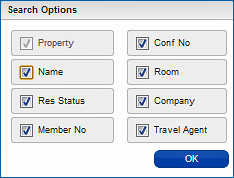
When selected, options from this menu display on the search screen as additional filters.
 Quick Links

 FAQs
FAQs