Oracle Visual Builderで開発されたプラグインの使用
Oracle Visual Builder (Visual Builder)を使用してカスタム・プラグインを作成し、それをOracle Fusionフィールド・サービスで使用する場合があります。 25Cから、プラグインを作成するアプローチを標準化して、プラグインがFusion標準に準拠していることを確認できます。
Visual Builderでプラグインの作成を開始するには、「アプリケーション」タイプの画面を選択し、「Gruntを使用したビルドの最適化およびコードの監査」ガイドの指示を使用してプラグインを構築します。 「監査」タブを使用して、プラグインがエラーなしで正しく作成されていることを確認できます。
プラグインを準備するために実行する必要がある大まかなステップは次のとおりです:
- Visual BuilderプラグインをOracle Fusionフィールド・サービス・プラグインAPIに接続します。
- プラグイン・アーカイブの要件を確認します。
- プラグインをエクスポートしてビルドします。
- プラグインのインポート。
Visual BuilderプラグインをOracle Fusionフィールド・サービス・プラグインAPIに接続
プラグインAPIを使用するには、プラグインにOracle Fusionフィールド・サービス・コネクタ・ファイルを含める必要があります:
- Visual Builderの「リソース」>「js」フォルダにofsc-connector.jsファイルを作成します。
- 次のサンプル・コードをofsc-connector.jsファイルにコピーします:
/**
 * @licence
 * Copyright (c) 2025, Oracle and/or its affiliates. All rights reserved.
 * Oracle Technology Network Developer License Terms (https://www.oracle.com/downloads/licenses/production-modify-license.html)
 */
"use strict";
define([
], () => {
    const OFSC_API_VERSION = 1;
    class OfscConnector extends EventTarget {
        constructor() {
            super();
            window.addEventListener("message", this.onPostMessage.bind(this), false);
            this._currentCommunicationCallback = null;
            this._currentCommunicationPromise = null;
        }
        /**
         * @param {Object} dataToSend
         * @returns {Promise.<*>}
         */
        sendMessage(dataToSend) {
            if (this._currentCommunicationPromise) {
                return Promise.reject(new Error('Communication channel is busy'));
            }
            this._currentCommunicationPromise = new Promise((resolve, reject) => {
                const originUrl = this.constructor._getOriginUrl();
                const origin = originUrl ? this.constructor._getOrigin(originUrl) : '*';
                this._currentCommunicationCallback = (receivedData) => {
                    this._currentCommunicationCallback = null;
                    this._currentCommunicationPromise = null;
                    if (receivedData instanceof Error) {
                        return reject(receivedData);
                    }
                    if (receivedData.method && receivedData.method === 'error') {
                        return reject(receivedData);
                    }
                    return resolve(receivedData);
                };
                dataToSend.apiVersion = OFSC_API_VERSION;
                parent.postMessage(dataToSend, origin);
                this.dispatchEvent(new CustomEvent('debugMessageSent', { detail: dataToSend }));
            });
            return this._currentCommunicationPromise;
        }
        onPostMessage(event) {
            // Ignore internal JET messages
            if (event.source === window) {
                return;
            }
            if (typeof event.data === 'undefined') {
                this.dispatchEvent(new CustomEvent('debugIncorrectMessageReceived', { detail: "No data" }));
                if (this._currentCommunicationCallback) {
                    this._currentCommunicationCallback(new Error('No data'));
                    return;
                }
                return false;
            }
            const data = this.constructor.parseJSON(event.data, null);
            if (data === null) {
                if (this._currentCommunicationCallback) {
                    this._currentCommunicationCallback(new Error('Incorrect JSON'));
                    return;
                }
                this.dispatchEvent(new CustomEvent('debugIncorrectMessageReceived', { detail: event.data }));
                return false;
            }
            this.dispatchEvent(new CustomEvent('debugMessageReceived', { detail: data }));
            if (this._currentCommunicationCallback) {
                this._currentCommunicationCallback(data);
            } else {
                this.dispatchEvent(new CustomEvent('messageFromOfs', { detail: data }));
            }
        }
        static generateCallId() {
            return window.btoa(String.fromCharCode.apply(null, window.crypto.getRandomValues(new Uint8Array(16))));
        }
        static _getOrigin(url) {
            if (typeof url === 'string' && url !== '') {
                if (url.indexOf("://") > -1) {
                    return (window.location.protocol || 'https:') + url.split('/')[2];
                } else {
                    return (window.location.protocol || 'https:') + url.split('/')[0];
                }
            }
            return '';
        }
        static _getOriginUrl() {
            if (document.referrer) {
                return document.referrer;
            }
            if  (document.location.ancestorOrigins && document.location.ancestorOrigins[0]) {
                return document.location.ancestorOrigins[0];
            }
            return null;
        }
        static parseJSON(text, defaultValue = null) {
            try {
                return JSON.parse(text);
            } catch (err) {
                return defaultValue;
            }
        }
    }
    return OfscConnector;
});
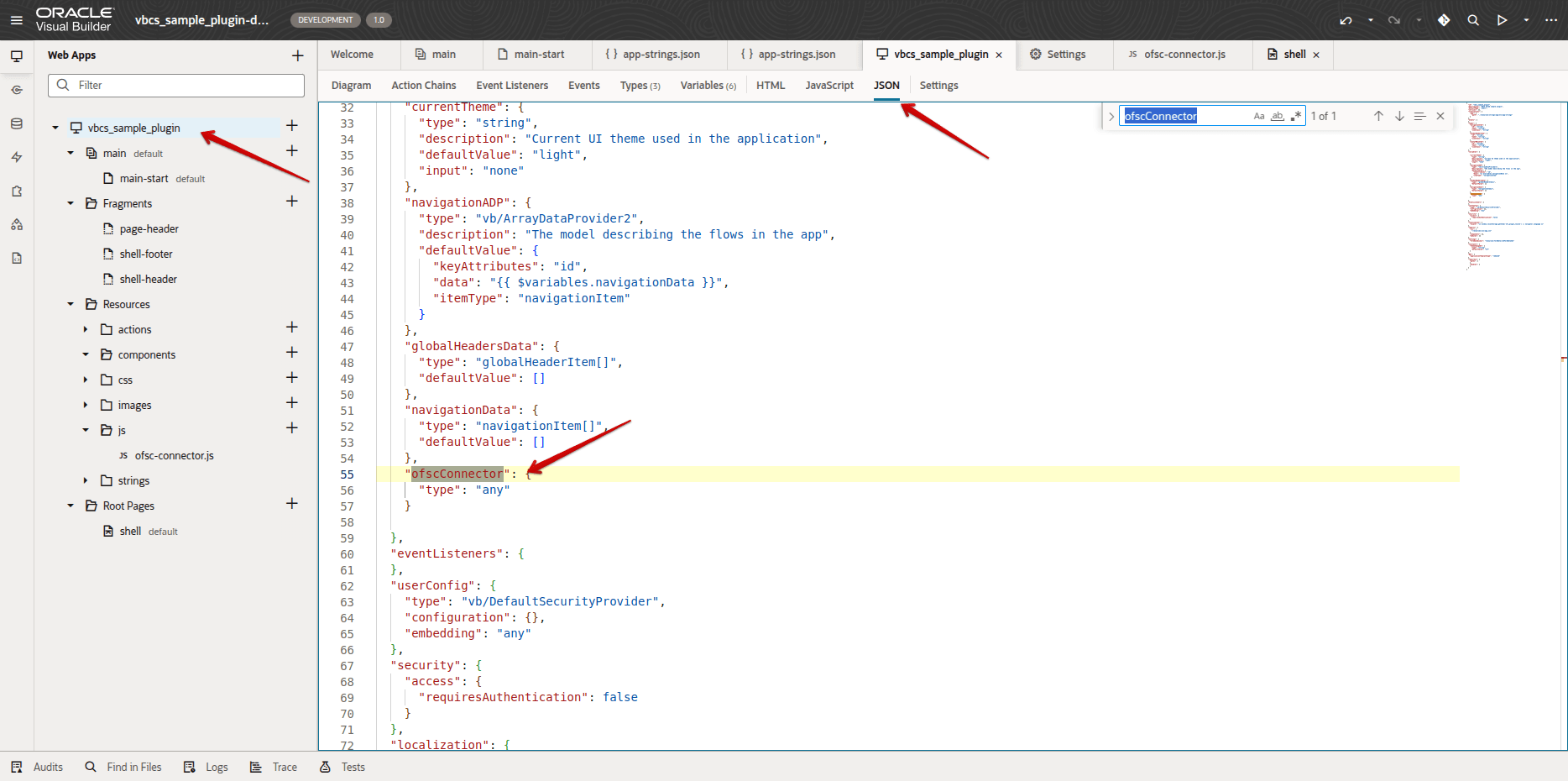
- 新しいファイルofsc-connector.jsをプラグインに含めます。 このスクリーンショットは、プラグインに含まれるofsc-connector.jsファイルを示しています:
.
- initOFSConnectorという名前の新しいアクション・チェーンを作成します。
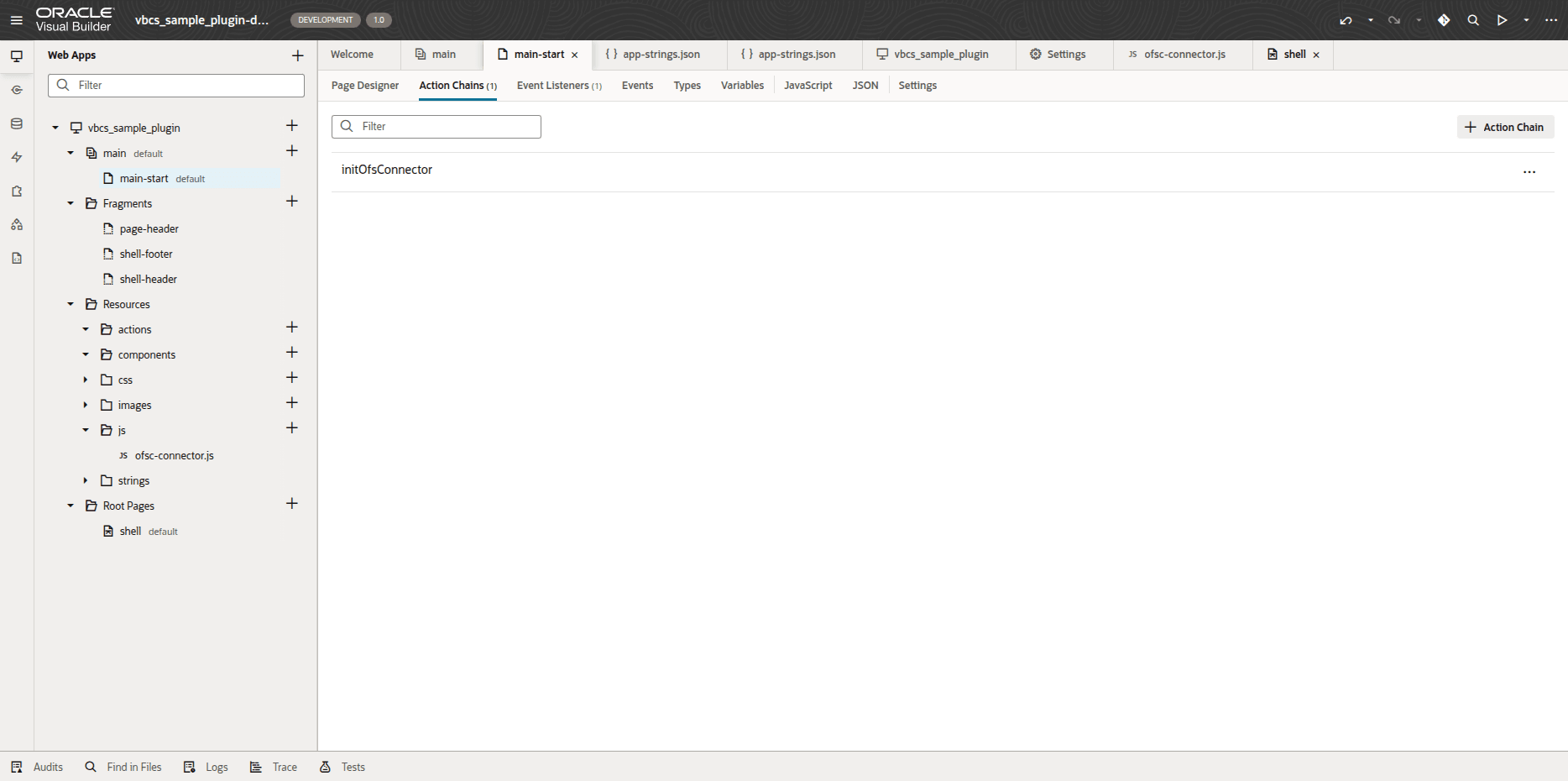
- 「UI」または「コード」タブを使用して、次のチェーンを追加します:
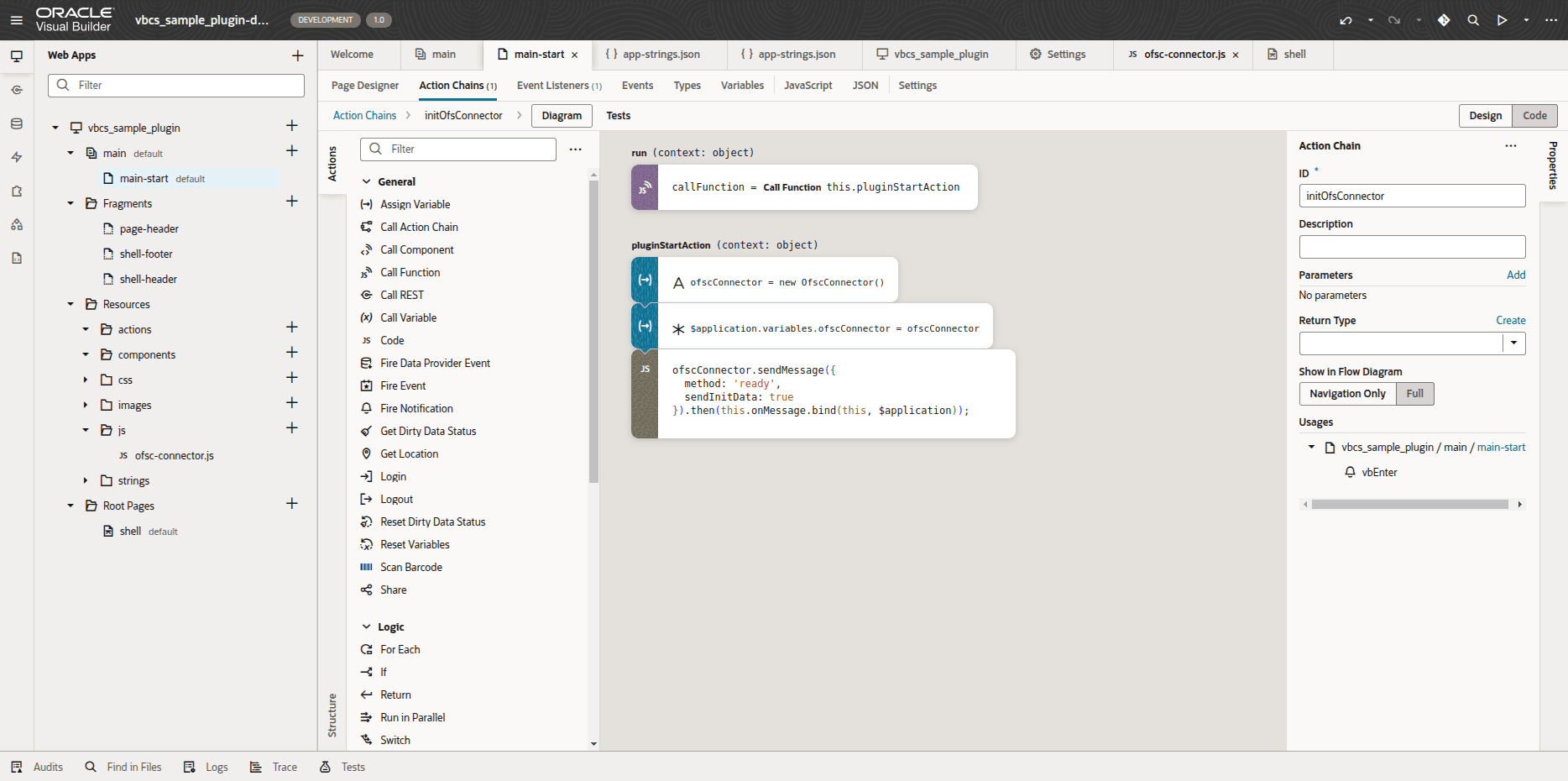
次のコードを追加します:
define([
  'vb/action/actionChain',
  'resources/js/ofsc-connector'
], (
  ActionChain,
  OfscConnector
) => {
  'use strict';
  class initOfsConnector extends ActionChain {
    /**
     * @param {Object} context
     */
    async run(context) {
      const { $page, $flow, $application, $constants, $variables } = context;
      const callFunction = await this.pluginStartAction(context);
    }
    /**
     * @private
     * @param {Object} context
     */
    async pluginStartAction(context) {
      const { $page, $flow, $application, $constants, $variables } = context;
      const ofscConnector = new OfscConnector();
      $application.variables.ofscConnector = ofscConnector;
      ofscConnector.sendMessage({
        method: 'ready',
        sendInitData: true
      }).then(this.onMessage.bind(this, $application));
    }
    /**
     * @private
     */
    onMessage($application, messageData) {
      if (!messageData) {
        return;
      }
      switch (messageData.method) {
        case 'init':
          this.initPlugin($application, messageData);
          break;
        case 'open':
          this.openPlugin($application, messageData);
          break;
        // default:
        //   console.log('method', messageData.method, 'data', messageData);
      }
    }
    /**
     * @private
     */
    initPlugin($application, jsonData) {
      this.sendInitEnd($application.variables.ofscConnector);
    }
    /**
     * @private
     */
    sendInitEnd(ofscConnector) {
      ofscConnector.sendMessage({ method: 'initEnd' });
    }
    /**
     * @private
     */
    openPlugin($application, jsonData) {
      this.setUserLocale(jsonData.user);
    }
    /**
     * @private
     */
    setUserLocale(user) {
      const currentLocale = window.localStorage.getItem('ofs_plugin_locale');
      const locale = user.locale || user.languageCode || window.navigator.language;
      if (currentLocale !== locale) {
        window.localStorage.setItem('ofs_plugin_locale', locale);
        window.location.href = this.getPluginUrl();
      }
    }
    /**
     * @private
     */
    getPluginUrl() {
      const url = window.location.href;
      if (url.endsWith('/')) {
        return url + 'index.html';
      }
      return url;
    }
  }
  return initOfsConnector;
});
プラグイン・アーカイブの要件の確認
この項では、ファイル形式やサポートされているファイル・タイプなど、プラグイン・アーカイブを作成する要件について説明します。
「アーカイブ・ファイル形式」
アーカイブは.zip拡張子を持ち、ZIPアーカイブである必要があります。 アーカイブのサイズは5MBを超えないようにしてください。
コンテンツのアーカイブ
- アーカイブには、ディレクトリおよび次のファイル・タイプのみが含まれている必要があります:
- .htmlファイル
- .cssファイル
- .js、.json、.mapファイル
- .appacheファイル
- .jpg、.jpeg、.png、.gif、.svg、.icoファイル
- ディレクトリ
- すべてのファイルの合計サイズは20 MBを超えないようにしてください。
- index.htmlファイルを配置する必要があります
- 最適化されたVisual Builderプラグインの/build/optimized/webApps/<plugin_name_folder>/index.html内
- ホストされるプラグインのアーカイブの / (ルート・フォルダ)に
- アーカイブには、空のディレクトリを含め、600個を超えるエントリを含めることはできません。
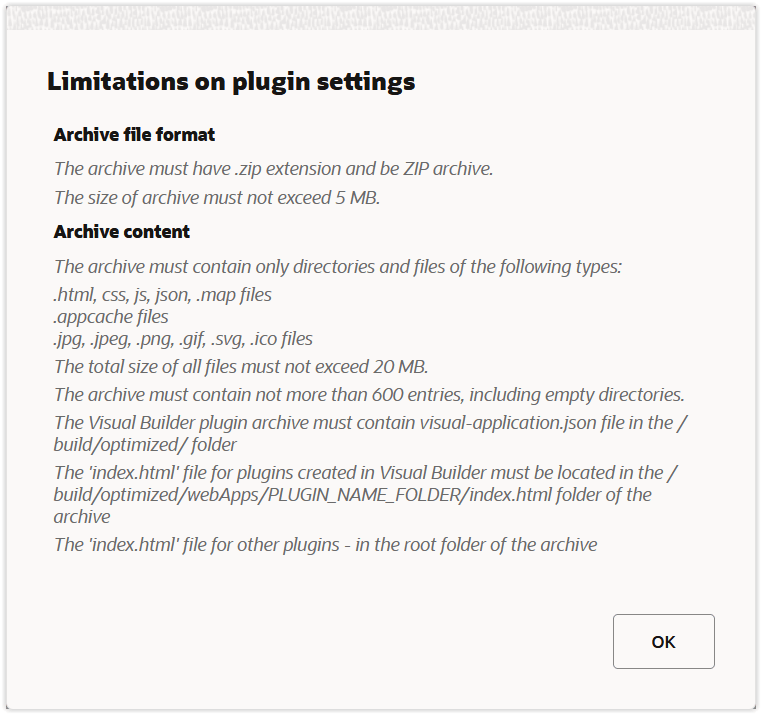
このスクリーンショットは、プラグイン・アーカイブの要件を示しています:
プラグインのエクスポートおよびビルド
プラグインを作成し、プラグイン・アーカイブの要件を確認したら、プラグインをエクスポートする必要があります。
メニューの右上にあるアクション・メニューの「エクスポート」をクリックします。 プラグイン・アーカイブを含む.zipファイルが作成されます。
次の手順を使用してプラグインを構築します:
- Node.jsをインストールします。
- プラグインでアーカイブをコンピュータ上の任意のローカル・フォルダに解凍します。
- 端末を開き、解凍したアーカイブを含むフォルダを選択します。
- 次の端末コマンドを使用して、プラグインを構築します。
npm i && grunt vb-clean && grunt vb-process-local --url:ce=http://exchange.oraclecorp.com/api/0.2.0 && grunt vb-package
Visual Builderを使用したプラグインの構築方法の詳細は、「Gruntを使用したビルドの最適化およびコードの監査」ガイドを参照してください。
- すべてのファイルとフォルダを新しいアーカイブにZipします。 アーカイブのルートにあるすべてのプラグイン・ファイルとフォルダがアーカイブに含まれていることを確認します。
Oracle Fusion Field Serviceへのプラグインのインポート
Visual Builderを使用して作成したプラグインをエクスポートおよびビルドした後、それをOracle Fusion Field Serviceにインポートする必要があります。
- Oracle Fusion Field Serviceにサインインします。
- 「構成」→「Forms &プラグイン」をクリックします。
- 「プラグインの追加」をクリックし、「プラグイン・アーカイブ」を選択します。
- プラグイン・アーカイブをアップロードします。
- 「追加」をクリックします。 Visual Builderプラグイン・アーカイブがホスト・プラグインとして追加されます。
既存のプラグインを拡張したいが、Visual Builderのソース・コードにアクセスできないとします。 次のステップを実行します。
- Oracle Fusionフィールド・サービスの「プラグインの編集」ページを開きます。
- 「バージョン履歴」セクションに移動し、アーカイブをダウンロードします。
- Visual Builderにインポートします。 プラグインは変更可能です。
複数の言語をサポートするOracle Visual Builderプラグインの作成
25Cの更新以降、複数の言語をサポートするプラグインをVisual Builderに作成することもできます。 多言語は、Visual Builderでネイティブにサポートされています。これにより、異なる言語を話すユーザーに対して単一のプラグインを構築および維持できます。 この方法の詳細については、「Oracle Visual Builderでの複数言語アプリケーションの作成: 言語スイッチャの作成」を参照してください。
「Oracle Visual Builder Studioを使用したアプリケーションのビルド」の項の説明に従って、プラグインにofsConnector.jsおよびofsInitConnector.jsファイルを追加します。
ofsInitConnectorファイルに次のコードを追加します:
setUserLocale(user) {
      const currentLocale = window.localStorage.getItem('ofs_plugin_locale');
      const locale = user.locale || user.languageCode || window.navigator.language;
      if (currentLocale !== locale) {
        window.localStorage.setItem('ofs_plugin_locale', locale);
        window.location.href = this.getPluginUrl();
      }
    }
このコードはプラグインに新しい言語を適用します。
プラグインAPI
新しいロケール・フィールドが初期化メッセージのプラグインAPIを介して送信され、フィールドはユーザー・コレクションに属します。 これを使用して、FFS UIで選択した言語をプラグインに適用できます。
init message
{
...,
"user": {
        "languageCode": "en",
        "locale": "en-US"
    }
}
ビジネス上の利点
- 正式なFusion標準に従って、Visual Builderで作成されたプラグインの実装を簡略化
- 従業員がさまざまな言語で話すことのできるプラグインの開発とメンテナンス作業を削減
有効化のステップ
この機能を有効化するうえで必要な操作はありません。
ヒントと考慮事項
最適化されていないプラグイン・アーカイブは、Oracle Fusionフィールド・サービスにアップロードできません。