Connecting a Local Access Terminal to Server’s Serial Port

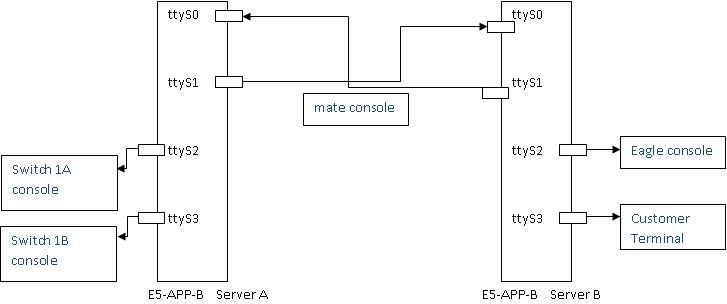
Port ttyS0 is the port used on both ELAP A and B servers to connect to the console.

  1. Connect the workstation you will use as the Local Access Terminal to Serial port ttyS0 on the server (see Figure 1).

    E5-APP-B on ELAP Console Connectivity

  2. Reconnect the original cables as shown in Figure 1.
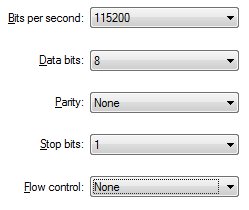
  3. If using a laptop, the refer to Figure 2 for the correct settings needed for the local console connection to the ttyS0 port:

    Laptop Connection Settings

  4. When the prompt appears on the Local Access Terminal, enter either of the following usernames and associated passwords:
    • To access the ELAP text interface, enter the ELAPconfig username and the password provided by your system administrator. For more information about the ELAP text interface, see Accessing the ELAP Text Interface.
    • To run the syscheck utility, enter syscheck as the username and syscheck as the password. For more information about running syscheck from this interface, see Running syscheck Using the syscheck Login

    Once a server has been installed with ELAP application and cabling has been completed, the subsequent upgrades can be done via serial connectivity from the mate ELAP server.