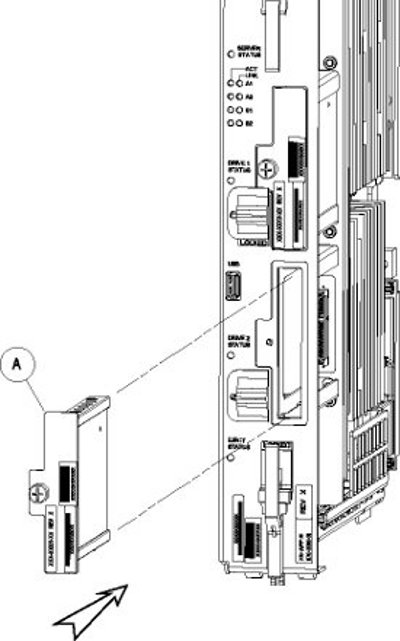
Procedure - Replace Drive Module Assembly

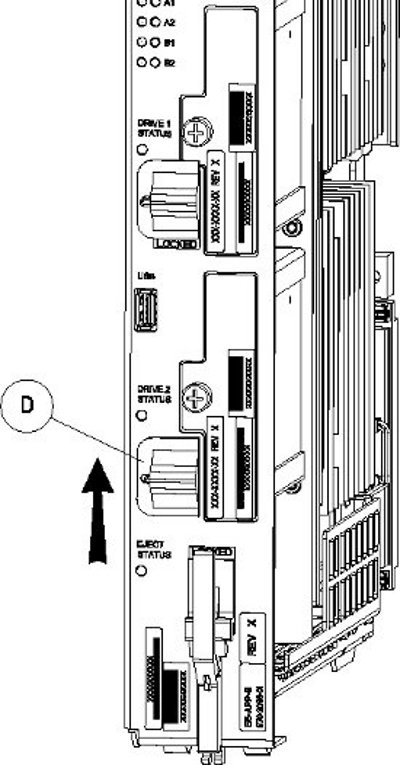
When drive module locking switch (D) is transitioned from unlocked to locked, the LED will flash red to indicate the drive is locked and in process of coming online (see Figure 2).

$ sudo /usr/TKLC/plat/sbin/cpDiskCfg <source disk> <destination disk>
$ sudo /usr/TKLC/plat/sbin/cpDiskCfg /dev/sdb /dev/sda
$ sudo /usr/TKLC/plat/sbin/mdRepairThis step takes 45 to 90 minutes and runs in the background without impacting functionality.
After the RAID is repaired successfully, output showing both drive modules is displayed:
Personalities : [raid1] md2 : active raid1 sda2[0] sdb2[1] 26198016 blocks super 1.1 [2/2] [UU] bitmap: 1/1 pages [4KB], 65536KB chunk md1 : active raid1 sda3[0] sdb3[1] 262080 blocks super 1.0 [2/2] [UU] md3 : active raid1 sdb1[1] sda1[0] 442224640 blocks super 1.1 [2/2] [UU] bitmap: 1/4 pages [4KB], 65536KB chunk unused devices: <none>